AI Course Creation Tools: Build and Launch Your Course in Weeks, Not Months

Picture the typical course creation journey for a solopreneur.
Month 1: Outlining the curriculum, second-guessing every module decision Month 2: Recording lesson 1, hating how you sound, re-recording five times Month 3: Still on lesson 3 because you’re stuck on making slides perfect Month 4: Realize you need worksheets, quizzes, and bonus materials Month 5: Starting to question if this course will ever launch Month 6: Burned out, considering giving up entirely
Six months of effort. Zero revenue. The course still isn’t done.
Here’s what’s shifted with AI course creation tools: solopreneurs are now going from idea to launched course in 2-4 weeks. Not because they’re cutting corners or lowering quality – because AI handles the mechanical work that used to eat months of time.
The curriculum structure that took weeks to develop? AI drafts it in an afternoon. The video editing that made you want to quit? AI makes it as simple as editing a document. The worksheets, quizzes, sales pages, and marketing materials? AI generates them while you focus on what only you can provide – your expertise and teaching approach.
This isn’t about replacing your knowledge. It’s about removing the bottlenecks that keep your expertise trapped in your head instead of packaged into a course that generates revenue.
In this guide, we’re breaking down the AI tools that actually accelerate course creation, the workflows that get you from zero to launched, and how to maintain quality while moving fast.
If you’ve been sitting on course knowledge for months or years because the creation process feels overwhelming, this is your roadmap to actually shipping.
If you’re tired of wondering where your next client will come from, this is for you.
The Predictable Client Flow breaks down the 3-step framework for creating steady, repeatable client growth without overcomplicating your marketing.
👇 Enter your email below to get it instantly.
You’ll get the full framework in your inbox – clear, focused, and easy to follow.
Why AI Course Creation Tools Matter for Solopreneurs
Course creation has always been a high-value move for solopreneurs. AI just made it actually achievable without burning out.
The Course Creation Bottleneck
Traditional course creation workflow looks like this:
Planning phase: 40-60 hours
- Curriculum outlining
- Learning objective development
- Module structuring
- Lesson planning
Content creation: 80-120 hours
- Script writing for 20-30 lessons
- Recording videos (multiple takes)
- Editing all footage
- Creating slides or visual aids
Support materials: 30-50 hours
- Worksheets and templates
- Quizzes and assessments
- Bonus resources
- Student guides
Marketing assets: 20-30 hours
- Sales page copywriting
- Email sequences
- Launch planning
- Promotional materials
Total: 170-260 hours before launch
For a solopreneur, that’s 4-6 months of nights and weekends. Most people give up halfway through.

Expertise vs. Instructional Design
Here’s what typically happens: you know your topic inside and out. You could teach it to someone face-to-face easily. But translating that expertise into a structured online course? That requires different skills – instructional design, curriculum development, content sequencing.
Most solopreneurs aren’t trained educators. They’re experts who want to teach. AI bridges that gap by handling the instructional design framework while you provide the expertise.
Time-to-Market Advantage
Every month your course knowledge sits in your head instead of in a launched product is a month of lost revenue.
Realistic scenario:
- Market opportunity window: 12-18 months before saturation
- Traditional course creation: 6 months
- AI-assisted creation: 3-4 weeks
- Revenue difference: 10+ months of sales captured vs. missed
The solopreneurs winning aren’t necessarily creating better courses. They’re getting to market while the opportunity still exists.
Quality Without Compromise
The fear with AI is that speed means lower quality. That’s not what happens when you use these tools correctly.
AI doesn’t lower quality – it removes the tedious work that was preventing you from focusing on quality:
- Editing out filler words from recordings
- Formatting slides consistently
- Generating clear quiz questions
- Writing professional worksheet instructions
- Creating polished sales materials
You spend less time on production mechanics and more time on teaching effectively. That’s better quality, not worse.
Revenue Acceleration
Courses are high-leverage assets. Create once, sell repeatedly with minimal additional time investment.
Math that matters:
- Course priced at $297
- Takes 3 weeks to create with AI tools
- Sells to 50 people in first 3 months
- Revenue: $14,850
- Ongoing monthly sales: 10-20 people ($2,970-5,940/month)
Without AI tools, that same course might take 6 months to create. You’ve lost $15,000-30,000 in revenue that could’ve been earned during those 6 months.

You don’t just need faster creation – you need consistent client flow.
Download The Predictable Client Flow – a free 3-step framework that helps solopreneurs turn efficiency into steady, reliable income without overcomplicating their marketing.
You can see the steps here → Get The Predictable Client Flow Framework
Best AI Tools for Course Curriculum and Structure
The foundation of any good course is solid structure. These tools help you build curriculum faster without sacrificing learning effectiveness.
ChatGPT/Claude for Course Outlining (Free – $20/month)
ChatGPT and Claude are where most solopreneurs should start. They’re exceptional at transforming scattered expertise into structured learning paths.
Prompt that works:
“I want to create a course teaching [target audience] how to [desired outcome]. They’re currently at [skill level] and need to reach [goal state]. Create a complete course outline with:
- 5-8 modules
- 3-5 lessons per module
- Clear learning objectives for each lesson
- Estimated lesson length
- Logical progression from beginner to outcome”
What you get: Complete course structure in 5 minutes that would take days of planning manually.
Advanced technique: After getting the outline, ask ChatGPT to identify gaps, suggest prerequisite knowledge for each module, and recommend which lessons need visual aids or interactive elements.
Coursebox AI ($29/month)
Coursebox AI is purpose-built for course creation. It generates curriculum structure, lesson content, quizzes, and even video scripts from your topic description.
Workflow:
- Input your course topic and target audience
- AI generates complete curriculum outline
- Expand each lesson into full content
- Export to your course platform
Best for: Solopreneurs who want end-to-end AI assistance and don’t mind paying for specialized tools.
Notion AI for Course Planning ($10/month)
If you’re already using Notion for organization, the AI features work brilliantly for course planning.
Use cases:
- Generate lesson outlines from bullet points
- Create module descriptions
- Summarize research into teachable content
- Organize course assets in databases
Advantage: Everything stays in your existing workspace. No switching between planning tools and creation tools.
AI Content Creation for Course Videos
Video creation is where most course creators get stuck. These tools remove the friction.
Descript for Video Courses ($12/month)
Descript fundamentally changed video course creation. You edit video by editing the transcript. Delete text = delete that video section.
Course creation workflow:
- Record lesson (don’t worry about mistakes)
- Descript transcribes automatically
- Delete “ums,” “ahs,” and mistakes from transcript
- Video edits automatically
- Studio Sound makes audio professional
- Export in multiple formats
Time savings: What used to take 2-3 hours of editing per 10-minute video now takes 15-20 minutes.
In my experience working with solopreneurs: Descript is the single tool that most often determines whether someone actually finishes their course or gives up. It removes the editing bottleneck that kills momentum.
Synthesia AI Avatars ($22/month)
Synthesia creates presenter-style videos using AI avatars. You never appear on camera.
When this makes sense:
- You’re camera-shy or uncomfortable on video
- You want consistent presenter appearance
- You need to update content frequently without re-recording
When to skip it:
- Building personal brand (people want to see YOU)
- Teaching relationship-based topics
- First course (authentic you builds more trust)
Reality check: AI avatars work better for corporate training than personal courses. Use them strategically, not by default.
CapCut for Course Editing (Free)
CapCut is completely free and includes AI features that used to require expensive software:
- Auto-captions with high accuracy
- Background removal
- AI-suggested transitions
- Trending effects and templates
Best for: Solopreneurs on tight budgets who need good-enough video editing without monthly subscriptions.
Loom with AI Summaries (Free tier, $8/month paid)
Loom is perfect for screen-recording lessons – tutorials, software walkthroughs, demonstrations.
AI features:
- Automatic transcription
- Chapter generation
- Summary of key points
- Viewer insights
Use case: Technical courses, software training, process demonstrations where you’re showing your screen.
AI Writing Tools for Course Content
Written lesson content, scripts, and materials need to be clear and comprehensive. AI accelerates without sacrificing quality.
ChatGPT for Lesson Scripts (Free – $20/month)
Transform bullet points into full lesson scripts using ChatGPT.
Effective prompt:
“Write a 10-minute lesson script on [topic] for [audience]. Include:
- Hook that grabs attention
- Clear explanation of [concept]
- 2-3 concrete examples
- Common mistakes to avoid
- Actionable takeaway Use conversational tone, short sentences, avoid jargon.”
Output: Professional script ready to record. Edit for your voice, but the structure and content are done.
Claude for Detailed Explanations (Free – $20/month)
Claude excels at nuanced, in-depth explanations when lessons require more depth than ChatGPT typically provides.
Use it for:
- Complex topic breakdowns
- Step-by-step process explanations
- Maintaining context across related lessons
- Creating comprehensive course documentation
Jasper for Course Marketing ($49/month)
Jasper specializes in marketing copy. Use it for everything surrounding the course – sales pages, email sequences, launch content.
Templates specifically for:
- Course descriptions
- Module benefit statements
- Testimonial request emails
- Launch sequences
- Social media promotion
Worth it if: You’re launching multiple courses or struggling with marketing copywriting. Not essential if ChatGPT works for you.
Creating Course Materials and Resources with AI
Students need more than videos – worksheets, slides, templates, and resources enhance learning.
Canva’s AI for Workbooks ($13/month for Pro)
Canva with AI features creates professional course materials faster than any design tool.
What you can generate:
- Worksheets and templates
- Checklists and trackers
- Slide presentations
- Student workbooks
- Certificate templates
- Bonus resource guides
Magic Write drafts the copy directly in your designs. Magic Design generates layout options. You customize and export.
ROI: If Canva saves you 5-10 hours of design work per course, it paid for itself.
Gamma AI Presentations ($10/month, free tier)
Gamma generates entire slide decks from course outlines. You input lesson topics, AI creates professional slides with:
- Title slides
- Content structured logically
- Visual elements
- Consistent design
- Export to PowerPoint or PDF
Time savings: 3-4 hours of slide creation becomes 30 minutes of reviewing and customizing.
ChatGPT for Worksheets and Exercises (Free – $20/month)
Create practical application materials with AI.
Prompts that work:
“Create a worksheet for students learning [topic]. Include:
- 5 reflection questions
- 3 practice exercises
- Real-world application scenarios
- Space for notes and planning”
“Generate 10 practice problems for [concept] at [skill level]. Include answer key with explanations.”
AI-Powered Quiz and Assessment Creation
Quizzes validate learning and keep students engaged. AI makes creation fast.
ChatGPT for Quiz Generation (Free – $20/month)
ChatGPT generates quizzes quickly based on your lesson content.
Prompt example:
“Based on this lesson content [paste content], create:
- 10 multiple choice questions (4 options each)
- 5 true/false questions
- 3 short answer questions Include answer key with brief explanations.”
Time investment: 5-10 minutes to generate and review vs. 1-2 hours manually creating quiz questions.
Quizgecko ($10/month, free tier)
Quizgecko automatically generates quizzes from uploaded course content – PDFs, videos, documents.
Upload lesson materials → AI creates quiz → You review and export
Simple. Faster than manual creation. Good enough quality for most course needs.
Google Forms with AI (Free)
Google Forms now includes AI-suggested questions based on your form purpose.
Advantages:
- Completely free
- Easy sharing with students
- Automatic grading for multiple choice
- Response collection and analysis
- Integration with Google Sheets
Limitation: AI features are basic compared to specialized tools, but sufficient for most course assessments.
AI Tools for Course Sales Pages and Marketing
Your course needs to be discovered and sold. These tools handle marketing content.
ChatGPT for Sales Copy (Free – $20/month)
Generate compelling course sales pages with strategic prompts.
Prompt framework:
“Write sales page copy for my course [course name] that:
- Opens with the main pain point: [specific problem]
- Explains transformation: from [current state] to [desired state]
- Lists benefits and outcomes
- Addresses objection: [common objection]
- Includes strong call-to-action Use persuasive but authentic tone for [target audience].”
What you get: Complete sales page draft in 10 minutes. Edit for your voice, add specifics, and you’re done.
Canva for Course Graphics ($13/month for Pro)
Create all visual marketing materials in Canva:
- Course promotional images
- Social media posts announcing launch
- Email header graphics
- Landing page visuals
- Instagram Stories about course
- Pinterest pins driving to sales page
AI assistance: Magic Design generates layout options. Magic Write creates supporting copy. Magic Resize adapts for all platforms.
Copy.ai Course Templates ($49/month)
Copy.ai has pre-built templates specifically for course marketing:
- Launch email sequences
- Social media promotional posts
- Ad copy variations
- Student testimonial requests
- Course update announcements
Value proposition: Faster than prompting ChatGPT from scratch. Worth it if you’re launching courses regularly.
AI for Student Support and Engagement
Knowing which AI course creation tools can handle student questions and support helps you scale without getting overwhelmed by repetitive inquiries.
ChatGPT Custom GPTs (Free – $20/month)
Build a custom GPT trained on your course content that acts as a 24/7 teaching assistant.
Setup process:
- Upload course materials to custom GPT
- Configure personality and tone
- Set boundaries (what it should/shouldn’t answer)
- Share link with students
What it handles:
- Common questions about lessons
- Clarifying confusing concepts
- Suggesting which lesson covers a topic
- Providing additional examples
What you still handle: Personal questions, technical issues, feedback on student work.
Intercom with AI ($39/month)
Intercom provides chatbot functionality for course platforms. AI handles initial student questions and routes complex issues to you.
Use case: If you’re getting 50+ student questions weekly and many are repetitive (login issues, finding materials, basic clarifications), AI support saves hours.
Skip if: You’re getting fewer than 20 questions weekly. Manual response is faster than setting up automation.

Creating a Complete AI Course Production Workflow
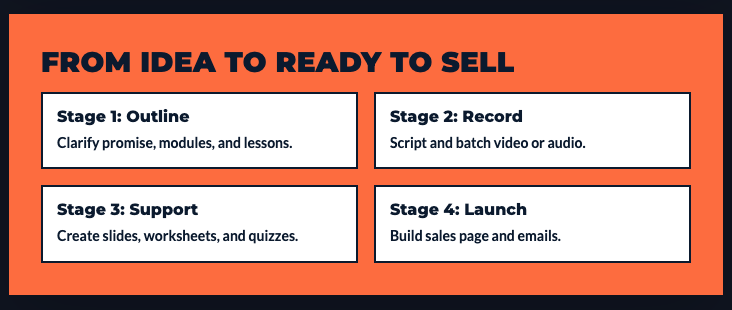
Here’s how to actually use these tools together to go from idea to launched course in 3-4 weeks.
Week 1: Research and Curriculum Design
Monday: Topic Validation (2-3 hours)
- Use ChatGPT to analyze market demand
- Research competitor courses
- Identify unique angle
- Define clear student transformation
Tuesday-Wednesday: Curriculum Structure (4-6 hours)
- Use ChatGPT/Claude to generate course outline
- Refine modules and lessons
- Set learning objectives
- Map student journey
- Create in Notion for organization
Thursday-Friday: Lesson Planning (6-8 hours)
- Use AI to draft lesson scripts
- Identify what needs visual aids
- Plan exercises and activities
- Organize in your workspace
Week 1 total: 12-17 hours
Week 2-3: Content Creation
Content Recording Strategy:
Batch all recording. Don’t edit as you go. Record everything first, then edit.
Video lessons:
- Record all lessons (1-2 days)
- Use Descript to edit transcripts and clean audio
- Export with auto-generated captions
- Total: 12-16 hours
Written materials:
- Use ChatGPT to generate worksheet drafts
- Create quizzes with Quizgecko or ChatGPT
- Design materials in Canva
- Total: 8-12 hours
Week 2-3 total: 20-28 hours
Week 4: Polish and Launch Prep
Monday-Tuesday: Marketing Materials (6-8 hours)
- Write sales page with ChatGPT
- Create graphics with Canva
- Set up course platform
- Build email sequence
Wednesday-Thursday: Quality Control (4-6 hours)
- Review all lessons for accuracy
- Test all materials and links
- Have someone review for clarity
- Make necessary adjustments
Friday: Launch Setup (3-4 hours)
- Upload all content to platform
- Configure student access
- Set up payment processing
- Schedule launch communications
Week 4 total: 13-18 hours
Total Course Creation Time: 45-63 hours over 4 weeks
Compare to traditional 170-260 hours over 6 months. You’re launching 5+ months earlier with comparable quality.
Common AI Course Creation Mistakes to Avoid
Based on patterns I’ve observed with course creators, here’s what typically goes wrong and how to avoid it.
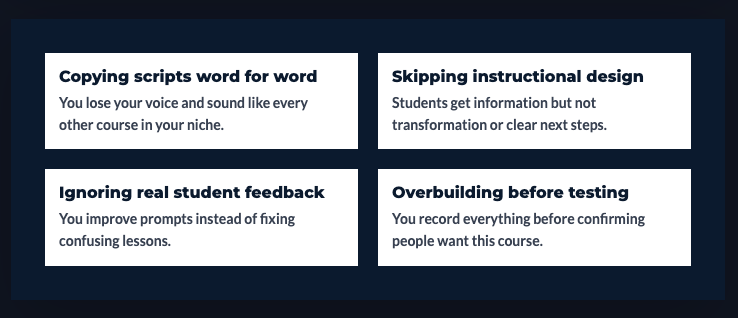
Over-Reliance on AI Content
The mistake: Using AI to generate everything and publishing without adding your personal expertise and examples.
Why it fails: Students can tell when content is generic AI output. They bought your course for YOUR knowledge and perspective.
The fix: Use AI to draft structure and initial content. Then add:
- Your specific examples and case studies
- Personal stories and experiences
- Industry-specific nuances AI doesn’t know
- Your teaching style and personality
AI generates the skeleton. You add the soul.
Skipping the Human Review
The mistake: Trusting AI output without verifying accuracy.
What happens: AI confidently states incorrect information. Students notice. Your credibility suffers.
The fix: Fact-check everything AI generates in your area of expertise. If something seems off, it probably is. Verify before publishing.
Generic Course Syndrome
The mistake: Using AI templates and prompts without customization.
The result: Course feels like every other AI-generated course. Nothing stands out. Students don’t engage deeply.
The fix: Customize everything. Your examples. Your framing. Your unique methodology. AI handles structure and grunt work – you provide differentiation.
Ignoring Instructional Design
The mistake: Focusing entirely on content creation without considering how people actually learn.
What happens: Course has good information but poor learning outcomes. Students don’t implement and don’t leave good reviews.
The fix: AI can help with structure, but study basic instructional design principles:
- Start with learning objectives
- Build from simple to complex
- Include practice opportunities
- Check understanding regularly
- Reinforce key concepts
Technology Over Teaching
The mistake: Getting caught up in trying every new AI tool instead of focusing on teaching effectively.
What happens: You’ve tested 20 tools but your course still isn’t finished.
The fix: Pick 3-5 core tools. Master them. Finish your course. Try new tools for your next course, not during creation of this one.
No Student Testing
The mistake: Creating entire course in isolation without student feedback.
What happens: You launch and discover sections are confusing, too advanced, or missing key information.
The fix: Have 2-3 people from your target audience review the course before launch. Beta test if possible. Get feedback. Improve.
Missing the Human Connection
The mistake: Creating efficient courses that lack warmth and personal engagement.
What happens: Students complete course but don’t feel connected to you. No repeat customers, referrals, or community.
The fix:
- Record welcome videos showing your face
- Share personal insights in lessons
- Respond to student questions personally
- Create community around the course
- Be present, not just efficient
If you’re tired of wondering where your next client will come from, this is for you.
The Predictable Client Flow breaks down the 3-step framework for creating steady, repeatable client growth without overcomplicating your marketing.
👇 Enter your email below to get it instantly.
You’ll get the full framework in your inbox – clear, focused, and easy to follow.
Your Action Plan: Launch Your Course in 30 Days
Let’s make this concrete with a focused 4-week plan.
Week 1: Foundation (12-15 hours)
- Choose your course topic and validate demand
- Use ChatGPT to create complete curriculum outline
- Write learning objectives for each module
- Plan lesson formats (video, text, interactive)
- Set up organization system (Notion, Google Drive, etc.)
Week 2: Core Content Creation (20-24 hours)
- Batch-record all video lessons using Descript
- Use ChatGPT to generate lesson scripts and materials
- Create all worksheets and templates in Canva
- Build quizzes with ChatGPT or Quizgecko
- Edit videos and refine written content
Week 3: Support Materials and Polish (12-16 hours)
- Create bonus resources and templates
- Design course slides if needed
- Generate email welcome sequence
- Set up student community or support system
- Quality control review of all content
Week 4: Launch Preparation (8-12 hours)
- Write sales page with ChatGPT
- Create marketing graphics in Canva
- Set up course on platform (Teachable, Gumroad, etc.)
- Build launch email sequence
- Prep social media promotion
- Launch!
Total: 52-67 hours over 4 weeks
That’s 10-17 hours weekly. Completely doable alongside your regular work.
The Course That Matters Most
What’s the one thing you know deeply that people would pay to learn?
Maybe it’s a skill you’ve developed over years. Maybe it’s a system you’ve created that gets consistent results. Maybe it’s knowledge that took you years to acquire that you could teach in weeks.
That’s your course.
Stop waiting for perfect. Stop thinking you need more expertise. If you’re 5-10 steps ahead of your target student, you’re qualified to teach.
Use AI tools to remove the bottlenecks. Focus your energy on teaching well, not on production mechanics.

Remember This
The solopreneurs building successful course businesses aren’t necessarily the best teachers or the most knowledgeable experts.
They’re the ones who shipped their course while others were still planning.
AI tools don’t make you a better teacher. They make it possible to actually finish and launch instead of getting stuck in endless creation mode.
Your knowledge has value. Package it. Price it. Sell it.
Don’t let the mechanics of course creation keep your expertise locked in your head.
Here’s My Question For You:
What’s the course you’ve been thinking about creating but haven’t started because it feels overwhelming?
Not three courses. Just one.
Use the tools and workflow in this guide to create that course in the next 30 days. Not perfect. Not exhaustive. Just good enough to help your target students get real results.
Launch it. Get students. Get feedback. Improve version 2.
That’s how courses actually get built. Not by planning perfectly – by shipping imperfectly and iterating.
Your future self – the one earning course revenue while working on other projects – is gonna thank you for starting today.
Now go build your course.