AI Social Media Tools for Solopreneurs: Your Complete Guide to Managing Social Without Losing Your Mind

Look, let’s talk about the elephant in the room.
You’re supposed to be posting on Instagram, LinkedIn, Twitter, Facebook, TikTok, Pinterest, and somehow still have time to actually run your business. It’s ridiculous. And if one more marketing expert tells you “just be consistent” without acknowledging you’re also the CEO, customer service rep, accountant, and product creator, you might lose it.
Here’s the reality: 73% of solopreneurs report social media as their most time-consuming marketing activity. And the algorithm gods demand you show up daily, or you basically disappear. It’s exhausting.
But here’s what’s shifted in the last year or two – AI social media tools for solopreneurs have evolved from “kinda helpful” to “actually game-changing.” We’re not talking about clunky automation that makes you sound like a robot. We’re talking about tools that help you maintain your voice, stay visible, and reclaim hours of your life every single week.
This guide walks you through exactly which tools are worth your money, how to use them without losing your authenticity, and how to build a workflow that keeps you visible without keeping you chained to your phone.
Let’s get into it.
If you’ve been trying to stay consistent while managing everything yourself, this will help.
I put together The AI Blueprint for Solopreneurs – a calm, structured guide that shows you how to use AI to simplify your systems and save time without losing your voice.
👇 Enter your email below to get your free copy.
It’ll be in your inbox within minutes – practical, focused, and built to help you work smarter.

Why Solopreneurs Need AI Social Media Tools More Than Ever
The stakes have changed. Five years ago, posting on social media a few times a week was enough. Now? The algorithms punish inconsistency like it’s a crime.
The Social Media Overwhelm Problem
Here’s what managing social media manually looks like for most solopreneurs: you spend 2-3 hours creating content, another hour designing graphics, 30 minutes scheduling posts, then throughout the day you’re jumping between platforms responding to comments, checking analytics, and feeling guilty because you know you should be doing more.
That’s 4+ hours daily. For a solopreneur, that’s basically your entire productive work window gone.
And the worst part? You can’t just pick one platform anymore. Your B2B clients are on LinkedIn. Your younger audience is on TikTok and Instagram. Your referral network is still active on Facebook. You gotta be everywhere, or you’re leaving money on the table.
The math doesn’t work. There aren’t enough hours in the day to manually manage multiple platforms well AND run your actual business. Something’s gotta give, and usually it’s either your social presence (which kills visibility) or your revenue-generating work (which kills your business).
Time vs. Visibility Trade-Off
This is the tension that keeps solopreneurs up at night. You know social media drives leads and builds authority. But spending 20 hours a week on it means you’re not doing client work, developing products, or actually making money.
Before AI tools, the options were limited: hire someone (expensive and risky), batch content once a month (exhausting and often feels forced), or just post sporadically and accept mediocre results.
AI tools changed this calculation completely. You can now maintain consistent presence across multiple platforms while spending 4-6 hours weekly instead of 20+. That’s not eliminating the work – it’s making it sustainable.
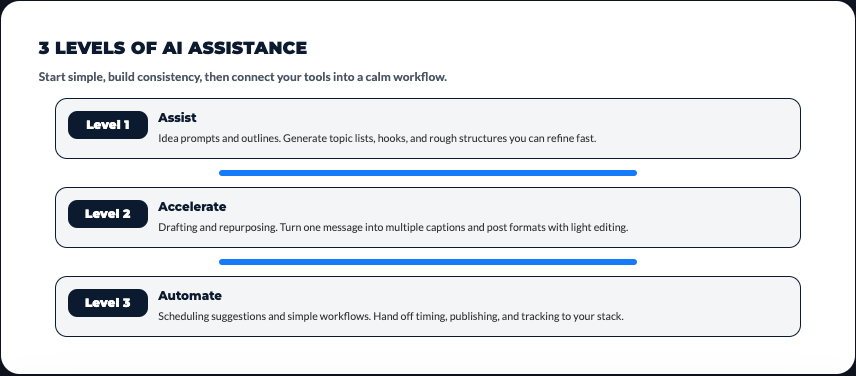
The typical workflow: AI helps generate content ideas, draft captions, create graphics, and optimize posting times. You review, add your voice, approve, and move on. The strategic thinking is still yours. The mechanical execution gets handled by tools that don’t get tired or distracted.
The Algorithm Advantage
Here’s something most solopreneurs don’t realize: social media algorithms actually love consistency and engagement more than they love “quality” content. A decent post that gets quick engagement beats a perfect post that sits there collecting dust.
AI tools help you work WITH algorithms instead of fighting them. They analyze when your audience is most active, what content types get the most engagement, and which hashtags actually drive reach. Then they optimize your posting schedule and content format accordingly.
For example, AI analytics might notice your audience engages most with carousel posts on Tuesday mornings around 9 AM. Without AI, you’d never spot that pattern in your data. With AI, it’s automatic – and suddenly your engagement rates jump 40% just from better timing and format choices.
Competing with Bigger Brands
You’re competing against companies with entire marketing teams, designers, copywriters, and community managers. They’re posting 3-4 times daily across every platform with custom graphics, videos, and perfectly timed engagement.
How are you supposed to compete with that as a one-person operation?
AI levels that playing field. The same tools that let you generate professional graphics in 10 minutes? Big brands are using similar tools. The AI that helps you analyze competitor content and identify gaps? They’re using it too.
The difference is you’re more agile. You can test, pivot, and adjust faster than a company that needs three approval layers for every post. AI gives you the production capability of a team while maintaining the flexibility of a solo operator.
ROI Considerations
Let’s run the actual numbers because this matters.
Option 1: Do Everything Manually
- Time investment: 15-20 hours weekly
- Opportunity cost: At $100/hour target rate, that’s $1,500-2,000 in potential revenue weekly, or $78,000-104,000 annually
- Burnout risk: High
Option 2: Hire Help
- Social media manager: $2,000-4,000/month ($24,000-48,000 annually)
- Quality control time: Still need 3-5 hours weekly to review and approve
- Risk: They might not capture your voice accurately
Option 3: AI Tools
- Tool costs: $50-150/month for a solid stack ($600-1,800 annually)
- Time investment: 4-6 hours weekly
- Opportunity cost: At $100/hour, that’s $400-600 weekly ($20,800-31,200 annually)
- Total annual cost: $21,400-33,000
The AI route saves you roughly $45,000-71,000 annually compared to doing it manually, and $0-15,000 compared to hiring help. Plus you maintain complete control over your voice and message.
For most solopreneurs, that math works.

I’ve documented the exact system I use to make AI feel structured and human…not chaotic.
You can explore it here → See What’s Inside The AI Blueprint for Solopreneurs
Best AI Tools for Social Media Content Creation
Alright, let’s get specific. These are the tools that actually deliver value, not just marketing promises.
AI Caption Generators
Copy.ai is probably the most versatile option for social captions. You give it a topic or angle, pick your platform, and it generates 5-10 caption variations. The output is usually 70% of the way there – you’ll need to edit for your voice, but it beats staring at a blank screen.
Cost is $49/month for unlimited generations. Worth it if you’re posting daily across multiple platforms. The templates for different content types (educational, promotional, engagement-focused) save time because you’re not starting from scratch.
Jasper has specific social media templates that include hooks, body copy, and CTAs already structured. It’s pricier at $49/month minimum, but the quality is noticeably better for longer captions and storytelling posts. LinkedIn posts and Instagram carousels come out particularly strong.
ChatGPT is the budget option. Free tier works fine for occasional use, $20/month for Plus gives you priority access. You’ll need to write better prompts compared to tools built specifically for social, but it’s flexible and handles pretty much any platform or content type.
Real talk: None of these will perfectly match your voice out of the box. The workflow that works is: AI generates options → you pick the best one → you rewrite it in your actual voice. Still saves 60-70% of the time compared to writing from scratch.
Visual Content Creation
Canva’s AI features are honestly the best bang for your buck. Magic Write generates copy, Magic Design creates layouts, Background Remover handles product shots, and the template library is massive. Canva Pro is $13/month and pays for itself in the first week.
The AI recommendations for colors, fonts, and layouts based on your brand are surprisingly good. You upload your logo and brand colors once, then every design automatically matches your aesthetic. Saves the mental energy of making design decisions constantly.
DALL-E and Midjourney are for custom imagery that doesn’t exist in stock libraries. Need an illustration for a specific concept? A unique header image? Branded graphics with a specific vibe? These tools generate original images in under a minute.
Midjourney ($10/month basic) tends to create more artistic, stylized images. DALL-E (pay-as-you-go credits) is better for realistic imagery and following specific instructions. Having both gives you options, but start with one and expand if needed.
Warning: AI-generated images have a recognizable aesthetic. Mix them with real photos, screenshots, and human-created content to avoid that sterile “everything looks AI” vibe that audiences are starting to notice.
Video Content AI
Opus Clip is purpose-built for turning long videos into short-form social content. You upload a 30-minute video, it identifies the 10 most engaging clips, adds captions, and exports them ready to post. It’s specifically designed for creating TikToks, Reels, and YouTube Shorts from longer content.
Cost is $29/month for the starter plan. If you’re doing video content anyway (podcasts, webinars, YouTube), this tool pays for itself by multiplying your content output without additional recording time.
Descript takes a different approach – you edit video by editing text. The transcript is the editing interface. Delete a sentence in the transcript, that section disappears from the video. Studio Sound cleans up audio quality. Overdub lets you fix mistakes by typing instead of re-recording.
At $12/month for creators, it’s positioned as an editing tool, but the AI features make it fast enough that even non-video people can produce decent content. I’ve seen solopreneurs with zero video experience create professional-looking content using Descript.
Pictory converts blog posts and scripts directly into videos with stock footage, captions, and music. Quality varies – sometimes the footage matches perfectly, sometimes it’s way off and needs manual adjustment. Still faster than editing from scratch.
Best use case: repurposing written content into video format for platforms that prioritize video. Not ideal for original video content where you want specific footage.
AI Hashtag Generators
Real talk: most hashtag generators are mediocre. They pull trending hashtags that may or may not be relevant to your actual content or audience.
The better approach is using AI analytics tools like Metricool or Later that analyze which hashtags actually drove reach and engagement for YOUR content historically. Then they recommend similar hashtags with good reach potential that fit your niche.
This is way more valuable than generic trending hashtag lists. You want hashtags your specific audience uses, not hashtags with 10 million posts where you’ll get buried.
Content Variation Tools
This is where understanding how to leverage AI social media tools for solopreneurs really pays off. You write one core message, and AI adapts it for different platforms automatically.
Repurpose.io ($12.50/month) takes one piece of content and automatically reformats it for multiple platforms. A YouTube video becomes an Instagram Reel, a podcast episode becomes audiograms, a blog post becomes carousel slides. The formatting adapts to each platform’s specs without manual resizing.
Publer does similar work but focuses more on text adaptation – taking one caption and adjusting tone, length, and format for LinkedIn vs. Instagram vs. Twitter. Saves you from rewriting the same message five different ways.
The time savings compound fast. One piece of original content becomes 8-12 social posts across platforms. That’s the difference between posting once a day and 3-4 times daily without creating more original content.
AI Meme and Trending Content Generators
Look, jumping on trends feels forced for a lot of solopreneurs. But the algorithm rewards timeliness, so there’s real value in participating in trending conversations when relevant.
Tools like Predis.ai and Simplified include meme generators and trend monitors that alert you to viral formats in your niche. You can then adapt those formats to your message without spending hours scrolling social media looking for trends.
The key is using trends strategically, not desperately. If a trend doesn’t fit your brand or message, skip it. But when there’s a natural fit, AI tools help you execute quickly before the trend dies.

Scheduling and Automation Platforms with AI Capabilities
Scheduling tools have been around forever, but the AI features added in the last 18 months changed the game. These aren’t just calendars anymore – they’re optimization engines.
Buffer AI Assistant
Buffer added AI features that go beyond basic scheduling. The AI Assistant analyzes your past performance and suggests optimal posting times specific to your audience. Not generic “best times to post” advice – actual data from your account showing when YOUR followers are most active and engaged.
It also rephrases content for better engagement. You write a caption, and Buffer suggests variations that might perform better based on successful patterns in your niche. Sometimes the suggestions are obvious, sometimes they catch angles you missed.
Cost is $6/month for essentials, $12/month for the team plan with full AI features. The analytics alone justify the cost – you’re making data-driven decisions instead of guessing.
Hootsuite with OwlyWriter
Hootsuite’s always been solid for managing multiple accounts in one dashboard. OwlyWriter is their AI caption generator built directly into the platform. The integration is smooth – you’re scheduling and generating content in the same workflow instead of jumping between tools.
The AI can also suggest post ideas based on trending topics in your industry. You pick one, it generates the caption, you schedule it. The entire process takes 2-3 minutes per post.
Pricing starts at $99/month, which is steep for solopreneurs just starting with AI tools. Better option for established businesses already managing 5+ social accounts daily.
Later’s AI Caption Writer
Later is particularly strong for Instagram-focused solopreneurs. The AI caption writer understands Instagram’s specific engagement patterns – it knows that first line matters more than the rest, that questions drive comments, that value-driven content gets saved.
The visual planning interface lets you see how your feed will look before posting. Combined with AI-generated captions, you can plan aesthetically cohesive content that also performs well algorithmically.
Starts at $18/month for the starter plan with AI features. Good middle ground between basic scheduling and enterprise-level platforms.
Metricool’s AI Features
Metricool combines analytics with AI-powered content suggestions. It analyzes your best-performing content and recommends similar topics, formats, and posting times. The competitor analysis feature shows what’s working for others in your space.
What sets it apart is the cross-platform analytics. You see which platforms drive the most traffic, leads, and conversions – not just engagement. This helps you prioritize where to focus your energy.
At $18/month, it’s positioned as an analytics tool with AI features rather than a scheduling tool with analytics. Pick based on what you need more.
SocialBee’s AI Posting Categories
SocialBee’s approach is interesting – you create content categories (educational, promotional, engagement, etc.) and the AI automatically recycles and optimizes evergreen content. Old posts that performed well get reshared automatically when data suggests they’ll perform well again.
The AI also varies the caption slightly each time content recycles, so it doesn’t look like you’re just reposting the same thing. Smart for solopreneurs with limited time to create new content constantly.
Pricing starts at $29/month. Worth it if you have a library of evergreen content that stays relevant.
Publer’s AI Assist
Publer’s strength is multi-platform adaptation. Write one post, and the AI adjusts it for each platform automatically. LinkedIn gets a professional tone with 200+ characters. Twitter gets punchy with 280 characters max. Instagram gets casual with strategic line breaks.
The bulk scheduling feature lets you load 100+ posts at once using a CSV. Combined with AI optimization, you can plan months of content in a few hours.
Starts at $12/month for the professional plan. Best value for solopreneurs managing 3+ platforms consistently.
AI-Powered Analytics and Performance Tracking
Analytics used to mean staring at dashboards full of numbers that didn’t tell you what to actually DO differently. AI analytics tools now tell you what’s working, what’s not, and specifically what to change.
Understanding What Metrics Actually Matter
Vanity metrics – likes, followers, impressions – feel good but don’t pay bills. What actually matters: website clicks, lead generation, conversions, customer acquisition cost from social channels.
AI analytics tools help you connect social activity to business outcomes. They track which posts drove website traffic, which traffic sources converted to customers, and what that customer is worth. That’s the data that informs real business decisions.
Tools like Sprout Social (starts at $249/month – expensive but powerful) and Agorapulse (starts at $49/month) include AI-powered reporting that highlights these business metrics instead of just engagement stats.
Predictive Analytics Tools
This is where AI gets genuinely useful. Tools like Predis.ai and Cortex analyze your content before you post it and predict likely performance. Low predicted engagement? Maybe rework the caption or try a different format.
It’s not perfect – no AI can guarantee virality – but it catches obvious mistakes. Like posting a text-heavy image when your audience engages more with faces. Or using a caption style that historically underperforms for your account.
Think of it as a quality check before publishing. Catches issues that would’ve hurt performance.
Audience Insights Platforms
Understanding your audience beyond basic demographics is huge. AI tools analyze behaviors, interests, and engagement patterns to build actual profiles of your followers.
Audiense and Affinity use AI to segment your audience into groups with shared characteristics. You might discover 40% of your audience is interested in X topic, which you weren’t creating content about. Or that a specific demographic engages way more than others, suggesting where to focus acquisition efforts.
This intelligence informs content strategy. You’re creating what your audience actually wants instead of guessing.
Competitor Analysis AI
Tools like Phlanx, Social Blade, and Rival IQ track competitor performance and identify winning content strategies. The AI analyzes which content types, topics, and formats drive the most engagement for competitors in your space.
You’re not copying – you’re identifying gaps and opportunities. Maybe all your competitors post inspirational quotes but nobody posts tactical how-to content. That’s an opening.
Or maybe everyone’s using carousel posts and seeing high engagement. That’s a format worth testing for your content too.
Sentiment Analysis
AI sentiment analysis tools scan comments, DMs, and brand mentions to gauge how people actually feel about your content and brand. It goes beyond counting comments to understanding the emotion behind them.
Positive sentiment trending down? Something’s off with your messaging. Negative sentiment spike? You need to investigate what triggered it before it escalates.
Tools like Brandwatch and Mention include AI sentiment tracking. They’re enterprise-priced ($100+/month), so they’re overkill for early-stage solopreneurs. But as you scale, understanding audience sentiment becomes critical.
ROI Tracking and Attribution
This is the hardest metric to track manually and where AI provides massive value. Which social posts actually led to customers? What’s the customer acquisition cost from social compared to other channels?
AI attribution tools connect social media activity to CRM data and revenue. They track the customer journey from first social media interaction through multiple touchpoints to final purchase.
Google Analytics 4 includes AI-powered attribution modeling for free. Paid tools like HubSpot and Salesforce offer more sophisticated tracking but start at $50+/month.
For most solopreneurs, starting with GA4’s free AI features makes sense. Upgrade to paid tools once social media is consistently driving $5k+/month in attributable revenue.
Engagement and Community Management with AI
Content creation gets the most attention, but engagement is where relationships and sales actually happen. AI tools help you scale engagement without losing the personal touch.
AI-Powered Chatbots
Chatbots used to feel robotic and annoying. Modern AI chatbots using natural language processing can actually hold decent conversations.
ManyChat (free up to 1,000 contacts, then $15/month) works across Instagram, Facebook, and WhatsApp. You set up conversation flows for common questions – pricing, availability, booking processes – and the AI handles initial responses. When it hits something complex, it routes to you.
The win: You’re not answering “What are your hours?” for the 50th time this month. The chatbot handles that. You focus on high-value conversations with qualified leads.
MobileMonkey offers similar functionality with better Instagram DM automation. Instagram’s API limits automation, but within those limits, MobileMonkey maximizes what’s possible.
Key: Make it obvious it’s a bot upfront. People don’t mind bots for simple questions. They hate bots that pretend to be human.
Comment Management Tools
When you’re getting 50+ comments daily across multiple posts and platforms, managing responses manually is overwhelming. You miss important comments, response times lag, and engagement opportunities slip through.
AI comment management tools like Agorapulse and Sprout Social prioritize comments needing your attention. The AI flags questions, complaints, and high-value engagement opportunities first. Generic “great post!” comments get deprioritized.
You can still respond to everything eventually, but you handle the important stuff immediately instead of chronologically. Better user experience, more efficient use of your time.
Automated Engagement Strategies
This is ethically tricky territory. Some AI tools will auto-like and auto-comment on posts in your niche to increase visibility. It works technically – you get more exposure. But it often feels inauthentic and can violate platform terms of service.
Better approach: Use AI to identify engagement opportunities, not execute them automatically. Tools like Circleboom and Crowdfire analyze your niche and suggest accounts to follow, posts to engage with, and conversations to join. You review and engage manually.
You’re getting AI’s analytical power without the inauthenticity of automated engagement.
Crisis Management AI
Negative reviews, angry customers, PR issues – they happen. AI tools can alert you to problems before they spiral.
Brandwatch and Hootsuite Insights monitor brand mentions across social media and flag unusual negative sentiment spikes. You get alerts when something’s brewing so you can respond quickly.
Fast response often prevents escalation. A customer complaint addressed in 30 minutes usually stays contained. That same complaint ignored for 3 hours might blow up publicly.
Most solopreneurs don’t need enterprise crisis monitoring. But setting up Google Alerts for your brand name and common misspellings gives you basic AI-powered monitoring for free.
Influencer Identification
Finding partnership opportunities manually means hours of scrolling and researching. AI tools scan your niche and identify accounts with good engagement, aligned audiences, and partnership potential.
Heepsy ($49/month) and Upfluence (custom pricing) analyze audience overlap, engagement rates, and content alignment. They suggest influencers or collaborators who make sense for your brand.
Not just big accounts – the AI identifies micro-influencers in your niche with highly engaged, relevant audiences. Often better ROI than partnering with larger accounts.
Personalized Response Generation
When you’re getting 100+ DMs and comments weekly, responding individually is time-consuming. But generic copy-paste responses feel impersonal.
AI tools like Lately can generate personalized responses based on the context of each message. You review and send (or edit first). It sounds specific to that conversation without you writing from scratch every time.
The balance: Use AI to draft, but review before sending. Never auto-send AI responses without review. That’s where things feel robotic and hurt relationships.
Content Repurposing and Multi-Platform Distribution
Here’s the truth that changed how I think about social media: you don’t need more content. You need to use what you already have better.
Cross-Platform Content Adaptation
Every platform has different specs, different audiences, different expectations. LinkedIn wants professional long-form. Instagram wants visual storytelling with line breaks. Twitter wants punchy takes. TikTok wants authentic, fast-paced video.
Creating original content for each platform separately? That’s 15-20 hours weekly. Unsustainable for a solopreneur.
AI adaptation tools automatically resize, reformat, and adjust tone for each platform. Publer and SocialBee excel at this. You write one core message, and the AI adjusts it contextually for each destination.
LinkedIn version gets a professional opening, data points, and thought leadership framing. Instagram version gets emojis, line breaks, and a conversational hook. Twitter version gets condensed to 280 characters with strategic hashtags.
Same idea, different execution. That’s smart repurposing.
Long-Form to Short-Form Conversion
If you’re creating long-form content anyway – podcasts, YouTube videos, blog posts, webinars – you’re sitting on dozens of social posts you haven’t extracted yet.
Opus Clip is purpose-built for this. Upload a 30-minute video, and it identifies the 10 most engaging 30-60 second clips. It analyzes hooks, pacing, and content value to find moments that work as standalone pieces. Adds captions automatically. Exports in vertical format for Reels, TikToks, and Stories.
Cost is $29/month, but if you’re already creating video content, the ROI is immediate. One video becomes 10+ social posts without additional recording time.
Descript works similarly but gives you more control over clip selection. The AI transcribes everything, then you highlight sections you want as clips. It handles the cutting, captioning, and formatting. More manual than Opus but more precise control over output.
Repurpose.io and Similar Platforms
Repurpose.io ($12.50/month) connects to your content sources – YouTube, podcast RSS feeds, blogs – and automatically creates social content as you publish.
New YouTube video goes live? Repurpose.io automatically creates an Instagram Reel, LinkedIn video post, Twitter video, and Pinterest pin. All formatted correctly for each platform. You can customize templates so everything stays on-brand.
The workflow becomes: create one piece of content, publish it, and Repurpose.io handles distribution across 6-8 platforms automatically. You review and approve, but the mechanical work is done.
Lately ($49/month) takes a similar approach but focuses more on text extraction. It pulls quotes, insights, and key points from long content and generates dozens of text-based social posts. One blog post becomes 20+ tweets, 10 LinkedIn posts, and 5 Facebook updates.
Quality varies – maybe 40% of generated posts are usable without editing. But even that saves hours compared to manual extraction.
AI Transcription for Social Captions
Video and audio content without captions loses 85% of potential engagement. Most people scroll social media with sound off. No captions = no views.
Manual transcription is tedious. Paying for transcription services adds up fast at $1-2 per minute of content.
AI transcription is essentially free now. Descript, CapCut, and Riverside.fm all include automatic transcription with high accuracy (95%+ for clear audio). You can generate captions, pull quotes for graphics, or convert entire videos to blog posts.
The workflow: record video → AI transcribes → use transcript for captions, pull quotes, and text-based repurposing. One asset becomes multiple content formats.
Story and Reel Generators
Vertical video content performs well, but reformatting horizontal video manually is annoying. You’re cropping, repositioning, adding text overlays, adjusting for each platform’s specs.
CapCut (free with pro features at $10/month) and InShot include AI auto-crop features. Upload horizontal video, select vertical format, and the AI keeps the important elements in frame as the video plays. It tracks faces, text, and movement to ensure nothing important gets cut off.
Not perfect – sometimes you gotta manually adjust – but it handles 80% of the work automatically. A 10-minute horizontal video becomes 8-10 vertical clips in about 15 minutes total.
Newsletter to Social Content
If you’re already writing newsletters, you’re creating valuable content that most of your social audience never sees.
Tools like Typefully (free for basic, $12.50/month for premium) and Buffer can automatically pull content from your newsletter and format it for social media. Key insights become Twitter threads. Main points become LinkedIn posts. Quotes become Instagram graphics.
You’re maximizing the reach of content you already created. No additional writing required.
AI Tools for Social Media Graphics and Design
Design used to be the barrier that stopped most solopreneurs from creating professional-looking content. You’d spend 45 minutes in Canva moving elements around, second-guessing every decision, and still ending up with something that looked… fine.
AI design tools changed that math completely.
Canva’s Magic Write and Design
Canva Pro ($13/month) is probably the single best investment for solopreneurs doing their own social graphics. The AI features added over the last year make it ridiculously powerful.
Magic Design generates entire layouts based on your uploaded assets. Drop in a photo and some text, hit Magic Design, and it creates 10+ professional layouts you can customize. No more starting from a blank canvas wondering where to put things.
Magic Write generates social copy directly in your designs. You’re creating an Instagram post? Magic Write suggests captions that match your visual. It pulls from your brand voice settings so the tone stays consistent.
Background Remover is clutch for product photos and professional headshots. One click removes backgrounds cleanly. No more dealing with complicated selection tools or paying for removal services.
The brand kit features are underrated. Set your colors, fonts, and logo once. Every design you create automatically matches your brand aesthetic. You’re not making design decisions constantly – the AI handles consistency while you focus on message.
Adobe Express AI Features
Adobe Express (free for basic, $10/month for premium) brings Adobe’s professional design tools to solopreneurs in an accessible package. The AI features feel more sophisticated than Canva but with a steeper learning curve.
Quick Actions include AI-powered background removal, image resizing, format conversion, and video trimming. The quality is noticeably better than most competitors – Adobe’s been doing this for decades.
Generate from Template creates custom designs based on text descriptions. Type “Instagram post for productivity tips with minimalist aesthetic” and it generates multiple design options. You pick one and customize.
If you’re already comfortable with design tools and want more control, Adobe Express is solid. If you’re a complete beginner, Canva’s probably more intuitive.
Designs.ai
Designs.ai ($29/month) is an all-in-one platform that creates logos, videos, graphics, and copy. The AI generates complete branded content suites – social posts, stories, ads – all matching your visual identity.
The quality is hit or miss. Sometimes it nails exactly what you wanted. Sometimes the output looks generic or off-brand. You’ll need to regenerate and tweak frequently.
Best use case: solopreneurs who need a complete visual brand quickly and don’t have design skills. It won’t replace a professional designer, but it gets you 70% of the way there for a fraction of the cost.
Simplified AI
Simplified ($12/month for small team plan) combines graphic design and copywriting in one platform. You can create the visual and generate the caption without switching tools.
The template library is massive – 50,000+ options for every platform and content type. The AI-powered copy templates understand different content formats (educational, promotional, engagement) and adjust tone accordingly.
The collaboration features are nice if you ever work with contractors or team members. Everyone can access brand assets and templates from one place.
PhotoRoom and Background Removal
PhotoRoom ($9/month for pro) is specifically built for product photography and professional headshots. The AI doesn’t just remove backgrounds – it enhances lighting, removes shadows, and adjusts colors to make products look more appealing.
The Magic Retouch feature removes unwanted objects from photos. Got a photo with someone’s hand in the corner? Remove it with one click. Background has a distracting element? Gone.
For solopreneurs selling physical products or building personal brands on social media, PhotoRoom pays for itself fast. Professional-looking product shots without hiring a photographer.
Brand Kit Automation
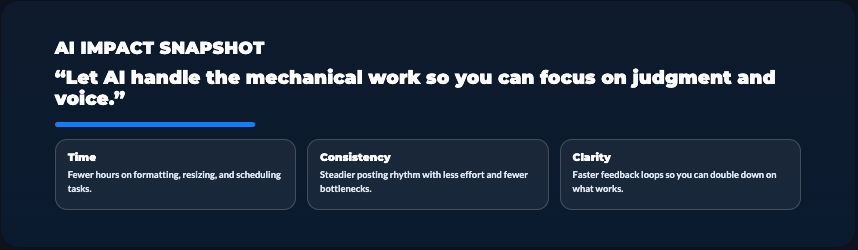
Most design tools now include AI-powered brand kits that maintain visual consistency across all content. You set your colors, fonts, logo placement, and design style once. Then every design automatically follows those rules.
Canva, Adobe Express, and Relay.app all include this feature. The AI suggests color palettes based on your logo, recommends fonts that match your brand personality, and flags designs that don’t match your established aesthetic.
This matters more than most solopreneurs realize. Consistent branding builds recognition and trust. When people see your content, they should know it’s yours immediately based on visual consistency.
Platform-Specific AI Tools and Strategies
Each social platform has different algorithms, different user expectations, and different content formats that perform well. Generic approaches don’t cut it anymore.
LinkedIn AI Tools
LinkedIn’s Collaborative Articles feature uses AI to generate article starters on various topics. You can contribute expert insights, which positions you as a thought leader and increases profile visibility. The algorithm promotes contributors in feeds.
Shield Analytics ($30/month) is an AI-powered LinkedIn analytics tool that tracks post performance, identifies optimal posting times for your specific audience, and suggests content topics based on what’s performing well in your niche.
Taplio ($55/month) combines AI content generation with LinkedIn-specific scheduling and analytics. It suggests viral post formats, generates carousel content, and identifies engagement opportunities (posts to comment on, people to connect with).
For B2B solopreneurs, LinkedIn is often the highest-ROI platform. Investing in platform-specific tools makes sense if LinkedIn drives significant leads and revenue.
Instagram AI Solutions
Later ($18/month starter) is built specifically for Instagram. The AI caption writer understands Instagram’s engagement patterns – that first line determines whether people tap “more,” that questions drive comments, that value-driven content gets saved and shared.
The visual planning interface shows how your feed looks before posting. You can plan aesthetically cohesive content that also performs algorithmically.
Flick ($14/month) specializes in Instagram hashtag research and AI caption generation. It analyzes which hashtags actually drive reach for your specific account and niche, not just generic popular hashtags.
Predis.ai ($29/month) creates complete Instagram posts – visual + caption + hashtags – based on text descriptions. Type your topic, and it generates ready-to-post content. Quality is decent for everyday posts, though important content still warrants more customization.
TikTok Content AI
TikTok’s algorithm is famously unpredictable, but AI tools help you identify and execute on trends faster.
Peech ($30/month) monitors TikTok trends in your niche and alerts you to viral formats, sounds, and hashtags. You can jump on trends while they’re still growing instead of discovering them after they’ve peaked.
CapCut (free, pro at $10/month) is TikTok’s official editing app with powerful AI features. Auto-captions, text-to-speech, trending effects, and AI-suggested cuts based on your footage. Most successful TikTok creators use CapCut because it’s optimized for the platform.
Opus Clip identifies the most “TikTok-friendly” moments in longer videos. It analyzes hooks, pacing, and retention points to find clips that match TikTok’s fast-paced format.
Twitter/X AI Assistants
Typefully ($12.50/month) is purpose-built for Twitter. It helps you write, schedule, and analyze tweets and threads. The AI suggests improvements before you post – better hooks, clearer phrasing, optimal thread structure.
Tweet Hunter ($49/month) combines AI tweet generation with audience building features. It analyzes top-performing tweets in your niche, suggests similar content, and automates engagement strategies (without spammy auto-commenting).
ChatGPT with the right prompts honestly works great for Twitter. Ask it to generate 10 tweet variations on a topic, pick the best ones, customize them, and schedule. Total time: 10 minutes for a week’s worth of content.
Facebook and Community AI
Meta Business Suite includes free AI features for business pages – suggested posting times, content recommendations, and automated comment moderation.
GrowSurf and SparkToro use AI to identify where your target audience hangs out in Facebook groups and communities. You’re not posting blindly – you’re joining conversations where your potential customers already are.
For solopreneurs running Facebook groups, ManyChat ($15/month) handles automated welcome messages, FAQs, and member engagement prompts. The AI keeps communities active without requiring constant manual facilitation.
Pinterest AI Optimization
Tailwind ($15/month) is the most sophisticated Pinterest scheduling and optimization tool. The AI suggests optimal pin descriptions, identifies trending topics in your niche, and recommends board strategies.
Canva’s Pinterest templates combined with Magic Write generate complete pins – design + SEO-optimized descriptions + hashtags. Pinterest is search-based, so SEO matters more than other platforms. The AI optimization actually impacts discoverability.
Pinterest isn’t dead for solopreneurs – it’s underutilized. If you’re in niches like home decor, food, fashion, DIY, or lifestyle, Pinterest drives significant website traffic. AI tools make it manageable to maintain a presence without manual pin creation and scheduling.
Building Your AI Social Media Workflow
Tools are useless without a workflow that actually fits into your life. Here’s how to build a sustainable system.
Creating a Content Calendar
AI tools can plan weeks or months of content in advance based on themes, trending topics, and your content pillars.
Notion (free for personal use) combined with ChatGPT works surprisingly well. Use ChatGPT to generate a month’s worth of content ideas, paste them into Notion, and organize by week and platform. Add AI-generated captions later as you execute.
CoSchedule ($29/month) includes AI-powered content calendar features. It suggests posting frequency based on your goals, identifies content gaps, and recommends topics that align with your audience interests and business objectives.
The workflow most solopreneurs land on: dedicate 2-3 hours once weekly (or once monthly) to content planning. Use AI to generate ideas and draft captions. Schedule everything in one batch. Then spend 10-15 minutes daily responding to engagement.
Batching planning separately from execution is key. Context-switching between creative work and engagement work kills productivity.
Establishing Your Brand Voice in AI Tools
Most AI tools let you set brand voice guidelines. Take time to configure these properly upfront – it saves hours of editing later.
In ChatGPT, Jasper, or Copy.ai, provide examples of your writing style. Give it 3-5 captions you’ve written that perfectly capture your voice. Tell it to analyze tone, vocabulary, sentence structure, and personality. Then instruct it to match that style in future content.
Update your brand voice settings as your style evolves. What worked six months ago might not match how you communicate now.
Quality Control Processes
Never post AI-generated content without review. That’s where things go wrong – sounding robotic, missing context, or saying something off-brand.
The review checklist:
- Does this sound like me or like a generic AI?
- Would I say this exact phrase in real life?
- Is there a more interesting or clearer way to say this?
- Does this add value or is it just filling space?
- Would I want to read this?
If you can’t honestly answer yes to all five, keep editing. AI gives you the draft. You add the soul.
Time-Blocking Strategies
Most successful solopreneurs batch AI-assisted social media work into focused blocks rather than spreading it throughout the week.
Common approaches:
- Monthly batching: One 4-hour session monthly to plan and create all content
- Weekly batching: 2 hours weekly to create that week’s content
- Daily engagement: 15-20 minutes daily responding to comments and messages
Pick what fits your energy and schedule. Consistency matters more than the specific approach.
Combining AI Tools Effectively
You don’t need 15 tools. You need 3-5 that work together seamlessly.
A solid starter stack:
- Content creation: ChatGPT or Jasper ($0-49/month)
- Design: Canva Pro ($13/month)
- Scheduling: Buffer or Later ($6-18/month)
- Analytics: Metricool ($18/month)
Total: $37-98/month depending on choices. That’s your base. Add platform-specific or specialized tools only after you’ve maxed out value from the basics.
Measuring and Optimizing
Use AI analytics to continuously improve. What you should be tracking:
- Which content types drive most engagement?
- Which platforms deliver best ROI (leads, traffic, sales)?
- What posting times and frequencies work best?
- Which topics resonate most with your audience?
Review metrics monthly. Adjust strategy based on data, not assumptions. AI analytics tools surface these insights automatically – you just need to act on them.
Avoiding Common Pitfalls with AI Social Media Tools
AI makes social media manageable for solopreneurs, but there are real traps that hurt people who don’t see them coming.
The Authenticity Trap
The biggest risk with AI social media tools is losing your voice. When everything’s AI-generated, your content starts sounding like everyone else’s AI-generated content. Generic. Safe. Forgettable.
Your audience followed you for YOU. Your perspective, your personality, your way of explaining things. AI can help you articulate faster, but it can’t replace what makes you unique.
The balance: Use AI for structure, formatting, and first drafts. Add your personality, specific examples, and unique insights during editing. If someone who knows you reads your content and thinks “that doesn’t sound like them,” you’ve crossed the line.
Over-Automation Risks
It’s tempting to automate everything. Schedule weeks of content, auto-respond to comments, let chatbots handle DMs. Suddenly you’re “present” on social media without actually being present.
The problem: social media is SOCIAL. It’s about relationships and conversations. Over-automation makes you seem distant and impersonal, even if your content is good.
The rule: Automate content creation and scheduling. Don’t automate engagement and relationship-building. Respond to comments personally. Have real conversations in DMs. Show up live occasionally. Let people know there’s a human behind the brand.
Platform Policy Compliance
Each platform has rules about automation and AI-generated content. Violate them and you risk account restrictions or bans.
Instagram limits automation heavily. Many auto-engagement tools violate terms of service. Stick to approved scheduling tools like Later, Buffer, and Hootsuite.
LinkedIn has gotten stricter about automation too. Tools that auto-like, auto-comment, or auto-connect frequently get flagged. Use AI for content creation and analytics, not engagement automation.
Twitter/X under Elon has become more permissive, but still prohibits some forms of automation. Read current policies before using aggressive automation tools.
General rule: If a tool promises to automatically engage with hundreds of accounts daily, it’s probably skirting platform policies. Use with caution.
Content Quality Concerns
AI can generate unlimited content. That doesn’t mean it should.
Quality beats quantity every time. Five genuinely valuable posts weekly beat 20 mediocre AI-generated posts. Your audience would rather hear from you less frequently with real insight than constantly with surface-level content.
Before posting AI-generated content, ask: Does this add value? Does it teach something, inspire something, or help someone solve a problem? Or is it just noise filling space?
If it’s the latter, don’t post it. Silence is better than mediocrity.
Privacy and Data Security
Most AI tools process your content on their servers. That means everything you input potentially gets stored and analyzed.
Don’t put confidential information, client details, or sensitive business data into AI tools unless you’ve verified their privacy policies and data handling practices.
Read the terms of service. Look for statements about:
- Whether they use your inputs to train AI models
- How long they store your data
- Who has access to your information
- Whether they sell data to third parties
Protect yourself and your clients. Once data leaves your control, you can’t get it back.
Dependency Issues
AI tools are powerful, but they’re tools. They can disappear (companies shut down), change pricing dramatically (happens often), or introduce features that make them less useful.
Don’t build your entire business on tools you don’t control. Maintain core skills even while using AI assistance.
Can you write decent captions without AI if you had to? Can you create passable graphics? Can you analyze basic metrics?
You don’t need to be an expert, but you should be capable. AI should enhance your skills, not replace them entirely. That keeps you adaptable when tools change.

If you’ve been trying to stay consistent while managing everything yourself, this will help.
I put together The AI Blueprint for Solopreneurs – a calm, structured guide that shows you how to use AI to simplify your systems and save time without losing your voice.
👇 Enter your email below to get your free copy.
It’ll be in your inbox within minutes – practical, focused, and built to help you work smarter.
Your Next Move: Building a Sustainable AI Social Media System
Here’s what I need you to understand: social media doesn’t have to consume your life to be effective.
For years, solopreneurs got told to “just show up consistently” without anyone acknowledging you’re also running the entire rest of your business. That advice was incomplete at best, destructive at worst.
AI social media tools changed the equation. You can maintain visibility across multiple platforms, create professional content, engage with your audience, and track meaningful results – all while spending 4-6 hours weekly instead of 20+.
But let me be clear: AI is a tool, not a replacement for you. The solopreneurs winning with social media are using AI to handle mechanical work – drafting captions, creating graphics, scheduling posts, analyzing data. They’re NOT using AI to replace their voice, their insights, or their genuine engagement with their community.
Your audience wants to connect with YOU. AI just makes it sustainable for you to show up without burning out.
Here’s your action plan:
Start with one platform and one tool. Maybe that’s Instagram with Later’s AI caption writer. Maybe it’s LinkedIn with ChatGPT for post drafting. Pick whichever combination solves your biggest pain point right now.
Use it consistently for 30 days. Track your time investment and results. Notice what feels authentic and what feels forced.
After 30 days, evaluate honestly:
- Did it save you meaningful time?
- Did your content quality maintain or improve?
- Do you still sound like you?
- Are results (engagement, reach, leads) maintaining or improving?
If yes to most of those, keep the tool and maybe add one more for your next pain point. If no, try a different tool or approach.
Build your stack slowly. Master one tool before adding another. That’s how you create a sustainable system instead of overwhelming yourself with too many new platforms simultaneously.
And remember this: the solopreneurs thriving aren’t working the longest hours. They’re working smart – using AI to multiply their output while protecting their energy, their voice, and their sanity.
So here’s my question for you: What’s the one social media task that drains your energy most right now?
That’s where you start. Not with a complete overhaul. Not with 10 new tools. Just one task, one tool, one month.
Test it. Measure it. Adjust based on real results, not hype.
Your future self – the one who’s maintaining consistent social presence without feeling chained to their phone – is gonna thank you for starting today.
Now go build something.