AI Research Tools: Find Better Information in a Fraction of the Time

Here’s a common scenario that plays out with solopreneurs constantly.
They need to research something for their business. Maybe it’s understanding a new market, analyzing competitors, validating a product idea, or just learning about a topic they need to understand quickly.
So they start Googling. An hour later, they’ve got 47 browser tabs open. They’ve read conflicting information. They’re not sure which sources are trustworthy. They still don’t have clear answers, just more questions.
Three hours in, they’re exhausted and maybe 30% closer to the insights they actually need. The research bottleneck just killed an entire afternoon.
That’s where AI research tools changed the game for solopreneurs. What used to take hours of manual searching, reading, and synthesizing now takes minutes. You get better sources, clearer answers, and actual insights instead of just piles of data.
We’re not talking about replacing your thinking or judgment. We’re talking about getting to good information faster so you can make decisions and move forward instead of drowning in research paralysis.
In this guide, we’re breaking down why research matters, which AI research tools actually deliver value, and how to build workflows that give you insights instead of just information overload.
Before you dive into the tools, get the simple flow that helps you turn research into consistent client growth.
The Predictable Client Flow breaks down the 3-step framework for creating steady, repeatable client growth without overcomplicating your marketing.
👇 Enter your email below to get it instantly.
You’ll get the full framework in your inbox – clear, focused, and easy to follow.
Why AI Research Tools Are Essential for Solopreneurs
Research used to mean spending hours or days gathering information before you could make decisions. That timeline doesn’t work when you’re running everything yourself.

The Information Overload Problem
More data doesn’t equal better decisions. In fact, what typically happens is the opposite. Solopreneurs start researching, find too much information, get overwhelmed by conflicting sources, and either make decisions based on incomplete understanding or get stuck in analysis paralysis.
AI tools solve this by doing the heavy lifting of finding, filtering, and synthesizing information. You get relevant insights instead of 10,000 search results to sort through manually.
Time Scarcity Reality
When you’re handling sales, delivery, marketing, operations, and everything else, spending 4-6 hours on research for one decision isn’t realistic.
AI research tools compress that timeline dramatically. What used to take an afternoon takes 20-30 minutes. You still get quality information, but you get it fast enough that research doesn’t become a bottleneck stopping progress.
If this is showing you what’s possible, this flow helps you turn clearer decisions into steady client demand.
You can see the steps here → Get The Predictable Client Flow Framework
Quality Over Quantity Shift
Manual research means wading through low-quality content, outdated information, and sources with questionable credibility. You’re sorting through noise to find signal.
AI tools can evaluate source quality, prioritize authoritative information, and filter out unreliable content automatically. You’re working with better sources from the start instead of discovering halfway through that your research was based on questionable information.
Decision-Making Speed
Business moves fast. Opportunities don’t wait for perfect research. You need to make good decisions quickly based on best available information.
AI research tools let you gather sufficient information to make confident decisions without spending days achieving perfect certainty (which doesn’t exist anyway). You move faster without being reckless.
Competitive Intelligence Advantage
Your competitors might be making decisions based on gut feeling and limited information. If you’re using AI to quickly access better data, spot patterns they miss, and understand markets more deeply, that’s a real edge.
The advantage isn’t just speed. It’s making better decisions consistently because you’re working with better information.
Best AI Research Tools for General Information
Let’s start with the tools that handle broad research across any topic. These are your starting point for most research needs.
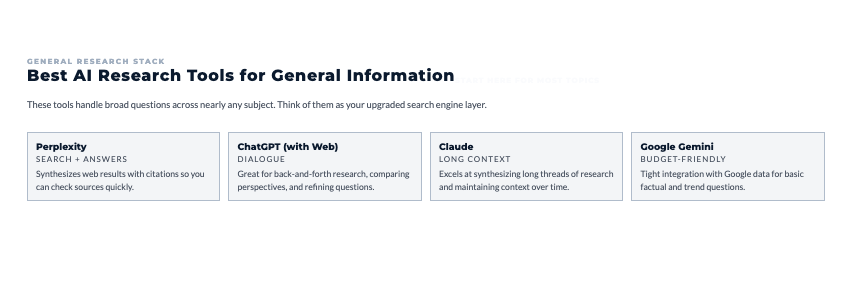
Perplexity AI (Free, $20/month Pro)
Perplexity is basically Google meets ChatGPT with citations. It searches the web, synthesizes information, and shows you exactly where each piece of information came from.
What makes it valuable:
- Cites sources directly in responses
- Follows up with related questions
- Shows you the actual sources used
- Handles complex questions well
- Real-time web search integration
Best for: Quick research where you need trustworthy answers with verifiable sources.
ChatGPT with Web Search (Free, $20/month Plus)
ChatGPT Plus added web search capability. Now it can search current information and cite sources instead of being limited to training data.
How to use it effectively:
- Ask specific research questions
- Request sources for claims
- Have it compare multiple perspectives
- Follow up with clarifying questions
- Ask it to synthesize findings
Best for: Conversational research where you’re exploring a topic through back-and-forth dialogue.
Claude with Document Analysis (Free, $20/month Pro)
Claude excels at analyzing documents and synthesizing information from multiple sources you provide.
What it handles well:
- Reading and summarizing long documents
- Comparing multiple sources
- Extracting key insights from research papers
- Organizing information into clear structures
- Maintaining context across long conversations
Best for: Deep analysis of specific documents or synthesizing information you’ve already gathered.
Google Gemini (Free)
Gemini integrates directly with Google’s search data and other Google services.
Advantages:
- Free access to capable AI
- Integration with Google Workspace
- Access to Google’s search index
- Decent at factual questions
- Can handle research queries
Best for: Budget-conscious solopreneurs who need basic research capabilities at no cost.
Academic and Scientific Research AI Tools
When you need credible, peer-reviewed information, these tools search scientific literature instead of general web content.
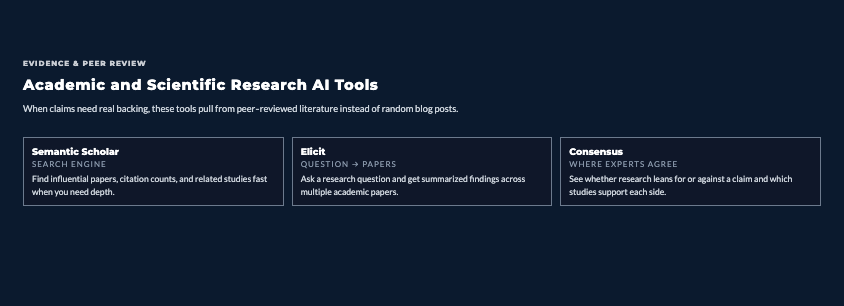
Semantic Scholar (Free)
Semantic Scholar is an AI-powered academic search engine. It understands research papers and helps you find relevant studies quickly.
Key features:
- Searches millions of academic papers
- Shows citation counts and influence metrics
- Identifies key findings and methodologies
- Suggests related papers
- Free to use
Best for: Solopreneurs who need scientific backing for claims or understanding of research-based topics.
Elicit (Free, $10/month Plus)
Elicit specifically finds and summarizes academic papers to answer research questions.
How it works:
- You ask a research question
- It finds relevant papers
- Summarizes findings across papers
- Extracts key data and conclusions
- Shows where information comes from
Best for: Getting quick answers to questions that require academic research without reading dozens of papers.
Consensus (Free, $9/month Premium)
Consensus searches scientific research and shows you where experts agree or disagree on topics.
What makes it unique:
- Focuses on scientific consensus
- Shows support/opposition for claims
- Cites specific studies
- Handles health, science, and social science topics
- Free tier is generous
Best for: Validating claims and understanding scientific consensus on topics.
AI Tools for Document Analysis and Summarization
Sometimes research means analyzing specific documents rather than broad searching. These tools handle that.
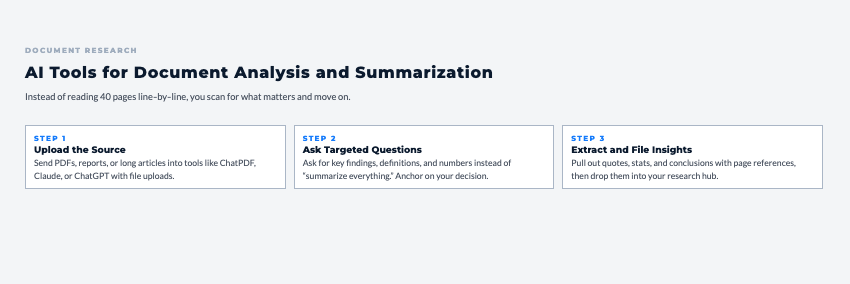
ChatPDF (Free, $5/month Plus)
ChatPDF lets you upload PDFs and ask questions about their content. The AI reads the document and answers based on what’s in it.
Common uses:
- Analyzing research papers
- Extracting insights from reports
- Understanding legal documents
- Reviewing contracts
- Summarizing long documents
Pricing: Free for limited use, $5/month for regular use.
Best for: Quick analysis of PDF documents without reading every page manually.
Humata (Free, $15/month Pro)
Humata reads and summarizes complex documents, answers questions about content, and helps you understand dense material quickly.
What it handles:
- Technical documentation
- Academic papers
- Business reports
- Legal documents
- Long-form content
Best for: Regular document analysis needs where you’re working with complex material frequently.
Market and Business Research AI Tools
Understanding markets, trends, and business opportunities requires specific research tools beyond general AI.
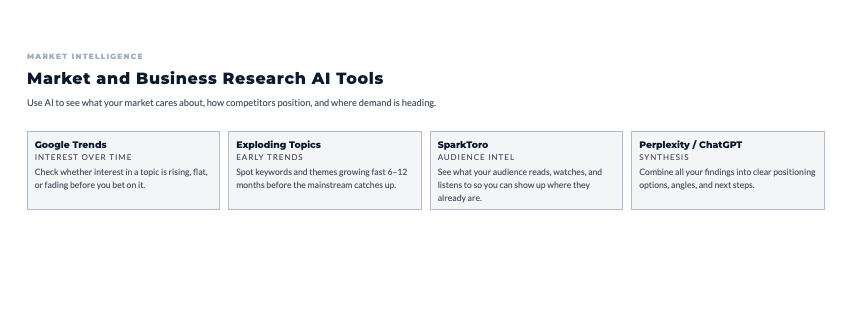
Google Trends with AI Interpretation (Free)
Google Trends shows search volume over time. The limitation: it gives you data but not interpretation. Using AI tools to analyze Trends data gives you insights.
Workflow:
- Research topic in Google Trends
- Export data or screenshot graphs
- Paste into ChatGPT or Claude
- Ask: “What does this trend data tell me about market opportunity? What patterns do you see? What should I investigate further?”
You get strategic analysis instead of just raw numbers.
SparkToro (Free tier, $50/month paid)
SparkToro shows you what your target audience searches for, which sites they visit, who they follow, and what they talk about.
Strategic value:
- Understand audience interests beyond your assumptions
- Find where your audience already hangs out online
- Discover influencers and publications they trust
- Validate or challenge your market understanding
Best for: Understanding target audiences before investing in content or marketing strategies.
AnswerThePublic (Free tier, $99/month Pro)
AnswerThePublic visualizes questions people ask about topics. It’s Google autocomplete data presented usefully.
How to use it:
- Research your topic
- See what questions people actually ask
- Identify knowledge gaps and concerns
- Find content opportunities
- Understand search intent
Best for: Content planning and understanding what your market wants to know.
Exploding Topics ($39/month, free tier)
Exploding Topics uses AI to identify topics experiencing rapid growth before they hit mainstream awareness.
Why it matters:
- Spot trends 6-12 months early
- Get ahead of market shifts
- Find opportunities before saturation
- Validate if topics are growing or declining
Best for: Solopreneurs who want to catch trends before everyone else jumps on them.
Data Analysis and Visualization AI
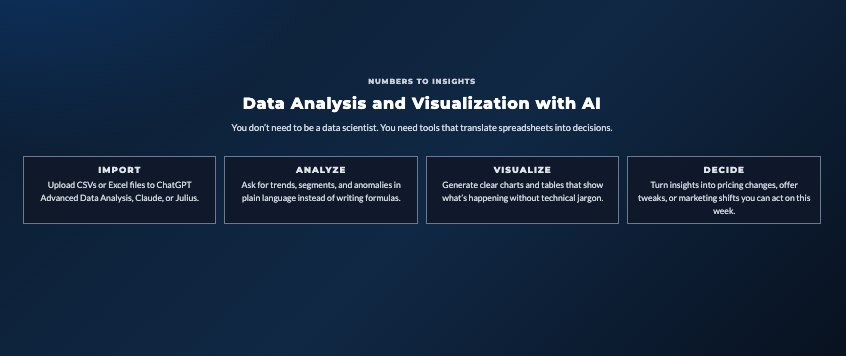
Sometimes research involves analyzing data you’ve collected. These tools help you make sense of numbers.
ChatGPT Advanced Data Analysis (Requires Plus)
ChatGPT Plus can analyze uploaded spreadsheets, generate insights, and create visualizations.
What it handles:
- CSV and Excel file analysis
- Data cleaning and organization
- Pattern identification
- Basic visualizations
- Statistical analysis
Common uses: Analyzing sales data, customer feedback, survey results, website analytics exports.
Claude with Data Analysis (Free/Pro)
Claude can process and analyze data from spreadsheets you upload or paste into conversations.
Strengths:
- Handling messy data
- Explaining findings clearly
- Generating actionable insights
- Comparing datasets
- Synthesizing multiple data sources
Best for: When you need help understanding what your data actually means for your business.
Julius AI ($20/month)
Julius is specifically built as a data analyst chatbot. Upload data, ask questions, get insights and visualizations.
Features:
- Natural language data queries
- Automatic visualization creation
- Statistical analysis
- Trend identification
- Export results
Best for: Solopreneurs who regularly work with data and need analysis tools without learning complex software.
Research Organization and Knowledge Management
Finding information is one thing. Organizing it so you can actually use it later is another. Understanding which AI research tools integrate knowledge management helps you build systems where insights don’t get lost in scattered notes and browser bookmarks.

Notion AI ($10/month add-on)
Notion with AI features helps organize research with smart note-taking, summarization, and connections.
Research workflow:
- Capture information in Notion
- Use AI to summarize long notes
- Generate action items from research
- Create databases of organized insights
- Connect related research automatically
Best for: Solopreneurs who want one place for all their research and project information.
Obsidian with AI Plugins (Free base, plugins vary)
Obsidian is networked note-taking. With AI plugins, it becomes a powerful research tool that connects ideas automatically.
Why it’s powerful:
- Links between notes create knowledge graphs
- AI plugins add summarization and analysis
- Local storage keeps your research private
- Extremely flexible and customizable
Best for: People who want to build interconnected knowledge bases where research connects to other insights over time.
AI Research for Content Creation
Research often serves content creation. These workflows turn research into published material efficiently.
Research-to-Content Workflow
Typical process:
- Use AI tools to research topic thoroughly
- Gather key insights and sources
- Ask AI to create content outline from research
- Write draft incorporating researched information
- Use AI to check facts and improve clarity
- Verify sources and add citations
- Publish with confidence you’re accurate
Tools combination: Perplexity for research + ChatGPT for outlining + Claude for draft refinement.
Fact-Checking and Verification
AI tools can help verify information, but you shouldn’t blindly trust them.
Smart verification approach:
- Use multiple AI tools to cross-check claims
- Verify sources directly (don’t just trust AI citations)
- Check publication dates to ensure currency
- Look for consensus across multiple sources
- Be skeptical of information without clear sources
Reality check: AI can help with fact-checking but shouldn’t be your only verification method.
Source Citation Management
Managing sources doesn’t require expensive citation software when AI can help.
Practical workflow:
- Save source URLs as you research
- Paste key information with sources into AI tool
- Ask AI to format citations in your preferred style
- Keep running document of sources used
- Verify citations are accurate before publishing
Building Efficient AI Research Workflows
Random research doesn’t help. Systematic approaches do. Here’s how to build workflows that actually work.
Research Question Formulation
Bad research starts with vague questions. AI can help clarify what you’re actually trying to learn.
Example evolution:
- Vague: “Research my market”
- Better: “Who are my competitors and what do they charge?”
- Best: “Identify 5-10 competitors offering [specific service] to [specific audience], analyze their pricing models, and note their positioning differences”
Specific questions get useful answers. Use AI to help refine fuzzy questions into clear research objectives.
Source Discovery Phase
Don’t just use one tool. Use multiple to get comprehensive coverage.
Standard research stack:
- Start with Perplexity for initial overview and sources
- Use Google Trends to understand interest over time
- Check Consensus or Semantic Scholar for scientific backing
- Use ChatGPT to synthesize findings from multiple sources
- Verify key claims through direct source checking
Different tools excel at different things. Use the right tool for each phase.
Information Extraction
You don’t need to read everything completely. Extract what matters and move on.
Efficient extraction:
- Use AI to summarize long articles or papers
- Pull key statistics and claims
- Note sources for important information
- Skip tangential information ruthlessly
- Focus on insights relevant to your specific question
The goal is insights, not comprehensive knowledge. Extract enough to make decisions, not everything available.
Synthesis and Analysis
Once you’ve gathered information, you need to make sense of it. This is where AI tools really shine.
Synthesis workflow:
- Dump all your research into AI tool (ChatGPT or Claude)
- Ask: “What are the key insights from this research? What patterns do you see? What’s surprising or unexpected?”
- Request organization: “Organize these findings into main themes”
- Identify gaps: “What questions remain unanswered?”
- Get recommendations: “Based on this research, what should I do?”
You’re using AI as a thinking partner to make sense of raw information.
Common AI Research Mistakes to Avoid
These mistakes happen constantly. Avoid them and your research quality improves dramatically.
Trusting AI Completely
AI tools sometimes make up information (called “hallucinations”). They present false information confidently.
Protection strategy:
- Always verify important claims
- Check sources directly when they matter
- Use multiple tools to cross-reference
- Be skeptical of claims without sources
- Recognize when AI says “I don’t know” versus when it guesses
Skipping Source Verification
AI might cite sources. That doesn’t mean the sources say what AI claims they say.
What typically happens: Someone uses AI research, cites the sources AI provided, and later discovers the source doesn’t actually support the claim. That damages credibility.
Better approach: For anything important, click through and verify sources directly.
Research Without Action
The goal isn’t perfect knowledge. It’s sufficient understanding to make decisions.
Common trap: Solopreneurs keep researching because they enjoy learning or fear making wrong decisions. Meanwhile, competitors with worse information are moving faster and winning.
Better mindset: Research until you can make a reasonably confident decision, then decide and move forward. You can always research more later if needed.
Using Only One Source or Tool
Single sources have biases and blind spots. One tool might miss information another finds.
Minimum viable research: Check at least 2-3 different AI tools or sources before treating information as validated. If they all agree, you’re probably on solid ground.
Ignoring Publication Dates
AI might pull information from outdated sources. What was true in 2019 might not be true now.
Always check: When was this information published? Is it still current? Have things changed since then?
Over-Complicating Research
Perfect research isn’t the goal. Good enough to make smart decisions is the goal.
Reality check: You don’t need to become an expert. You need to understand enough to make your specific decision. That’s often way less research than you think.
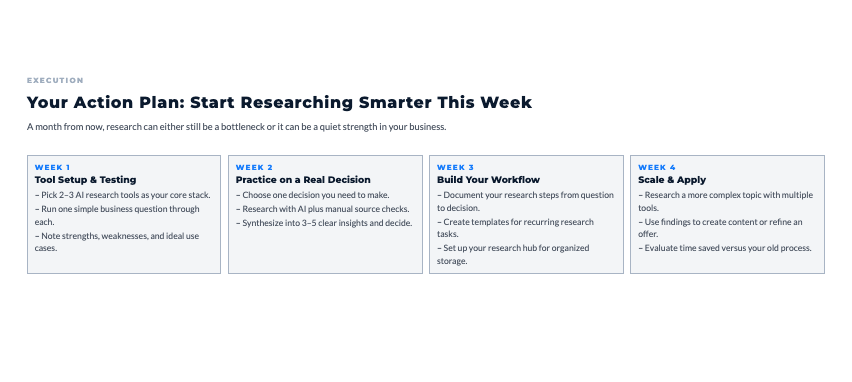
Your Action Plan: Start Researching Smarter This Week
Let’s make this practical.
Week 1: Tool Setup and Testing
- Pick 2-3 AI research tools based on your needs
- Free starter stack: Perplexity + ChatGPT + Google Gemini
- Create accounts and test with simple research question
- Learn basic features and capabilities
- Document which tool works best for what
- Total time: 1-2 hours
Week 2: Research Practice
- Pick one business decision you need to make
- Use AI tools to research thoroughly
- Practice verification and source checking
- Synthesize findings into clear insights
- Make the decision based on research
- Total time: 3-4 hours
Week 3: Workflow Development
- Document your research process
- Create templates for common research needs
- Set up organization system for research findings
- Identify which tools you use most
- Refine your personal research workflow
- Total time: 2-3 hours
Week 4: Advanced Application
- Research a more complex topic or decision
- Use multiple tools in combination
- Practice synthesis and analysis
- Create content from research
- Evaluate time savings versus old methods
- Total time: 4-5 hours
Total investment: 10-14 hours to build research capabilities that serve you indefinitely
The Research That Matters Most
What’s the one business question you need to research right now to make progress?
Maybe it’s:
- Understanding if there’s demand for your product idea
- Analyzing how competitors position themselves
- Learning about a new market you’re considering
- Validating assumptions about your audience
- Understanding regulations that affect your business
Pick that one question. Use AI research tools to answer it thoroughly this week. Then make your decision and move forward.
Don’t let research become procrastination. Use it as a tool to make better decisions faster, not as an excuse to delay action.
Remember This
Research quality matters more than research quantity. You don’t need to know everything. You need to know enough to make smart decisions confidently.
AI research tools don’t replace your judgment. They give you better information faster so your judgment operates on solid ground instead of assumptions and guesses.
The solopreneurs who win aren’t the ones with perfect information. They’re the ones who gather good information quickly, make decisions, and move forward while others are still researching.
As you start making faster decisions, use this simple flow to turn that momentum into consistent client conversations.
The Predictable Client Flow breaks down the 3-step framework for creating steady, repeatable client growth without overcomplicating your marketing.
👇 Enter your email below to get it instantly.
You’ll get the full framework in your inbox – clear, focused, and easy to follow.
Use AI to compress research timelines from days to hours. Use the time you save to execute instead of gathering more information you don’t actually need.
Here’s My Question For You:
What’s the first thing you’re gonna research this week using AI tools?
Not ten things. Just one business question that’s holding you back.
Pick your tools. Formulate a clear question. Research systematically. Synthesize what you learned. Make your decision.
That’s how you go from “I need to research this someday” to “I researched it and here’s what I’m doing based on what I learned.”
Your future self (the one making confident decisions based on solid research instead of guessing) is gonna thank you for starting today.
Now go get the insights you need to move forward.