AI Workflow Automation for Solopreneurs: Reclaim 10+ Hours Weekly Without Hiring Help

Here’s a scenario that plays out in countless solo businesses every single day.
It’s 4:30 PM. You’ve been working since 8 AM. What have you actually accomplished? You answered 47 emails. Created three invoices. Chased down two late payments. Updated your CRM. Scheduled social media posts. Organized files. Followed up with leads.
All necessary tasks. All important. But none of them were the high-value work that actually grows your business. You spent 8 hours on administrative work that could’ve taken 30 minutes with proper automation.
Tomorrow, you’ll do it all again. The hamster wheel never stops.
Now picture a different reality: You wake up to find that overnight, your AI workflow automation for solopreneurs system handled client onboarding for two new customers, sent payment reminders, organized your inbox by priority, created draft social posts, logged expenses, and prepared your weekly revenue report.
The mechanical work happened automatically. You spend your 8 hours on strategy, client delivery, and business development – the work only you can do.
That’s not fantasy. That’s what smart workflow automation makes possible.
In this guide, we’re breaking down exactly which workflows to automate first, the AI tools that actually deliver ROI, and how to build automation systems without technical skills or overwhelming yourself.
If you’re drowning in operational tasks and can’t find time for the work that actually moves your business forward, this is your roadmap to getting those hours back.
Before you streamline your workflows, get clear on which part of your business needs structure first.
I created The Clarity Compass to help you identify the gap between where you are and the structure your business needs next.
👇 Enter your email below to get it sent to you.
You’ll receive it in your inbox shortly – a simple, grounded guide to help you move forward with confidence.
Understanding AI Workflow Automation for Solo Businesses
Before diving into specific automations, let’s establish what we’re actually talking about and why it matters so much for solopreneurs.
What Workflow Automation Actually Means
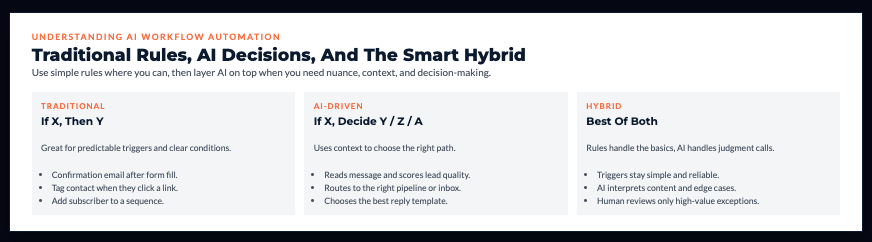
Traditional automation: “When X happens, do Y” Example: When someone fills out a contact form, send a confirmation email.
AI-powered automation: “When X happens, analyze context and decide between Y, Z, or A” Example: When someone fills out a contact form, AI reads their message, determines if they’re a qualified lead or spam, routes qualified leads to your CRM with priority scoring, and sends an appropriate response based on their inquiry type.
The difference is intelligence. Traditional automation follows rigid rules. AI automation adapts based on context.
The Solopreneur Automation Advantage
When you’re a team of one, every hour counts. Unlike companies where “someone should handle that” is an option, everything falls on you.
Reality check:
- You’re the CEO, accountant, marketer, customer service, and operations
- Every administrative minute is a minute not spent on revenue-generating work
- You can’t hire your way out of problems immediately
- Inconsistent systems mean things fall through cracks
Automation gives you leverage without payroll. It’s like having a team of tireless assistants who never complain, never take vacation, and cost a fraction of hiring humans.
AI Versus Traditional Automation
Traditional automation strengths:
- Reliable and predictable
- Simple to set up
- Perfect for straightforward workflows
Traditional automation weaknesses:
- Can’t handle exceptions or nuance
- Requires exact conditions
- Breaks when situations change slightly
AI automation strengths:
- Handles nuance and context
- Makes decisions based on multiple factors
- Adapts to variations automatically
- Improves over time
AI automation weaknesses:
- Requires initial training/configuration
- Sometimes unpredictable
- More expensive than simple automation
The smart approach: Use traditional automation for simple, predictable tasks. Use AI automation when you need decision-making or contextual understanding.
ROI Reality Check
Let’s run actual numbers on automation value.
Time saved from basic automations:
- Email filtering and prioritization: 5 hours/week
- Invoice creation and sending: 2 hours/week
- Social media scheduling: 3 hours/week
- Client onboarding tasks: 2 hours/week
- Data entry and organization: 3 hours/week Total: 15 hours weekly
Value calculation: At $100/hour (target billable rate), that’s $1,500 weekly or $6,000 monthly in reclaimed time.
Automation costs:
- Zapier Pro: $20/month
- AI tools: $30/month
- Total: $50/month
ROI: Spending $50/month to reclaim $6,000/month in time value is a 120x return.
Even if automation only saves you 5 hours weekly, that’s still a 40x ROI.
The 80/20 of Automation
Not all automations deliver equal value. Focus on the 20% that save 80% of your time.
High-impact automations (do these first):
- Email management and filtering
- Invoice and payment workflows
- Client onboarding sequences
- Social media publishing
- Lead capture and routing
Lower-impact automations (nice but not essential):
- File organization
- Report formatting
- Routine data entry
- Backup processes
Start with high-impact workflows. Add others only after you’ve mastered the basics.
If this section is showing you gaps in your business structure, the Clarity Compass will help you see exactly where to focus next.
You can grab it here → Get The Clarity Compass
Best AI Workflow Automation Tools for Solopreneurs
Let’s get specific about which tools actually work and when to use them.
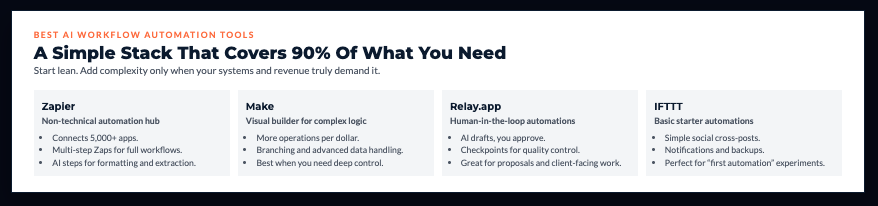
Zapier with AI Features ($20-50/month)
Zapier remains the most accessible automation platform for non-technical users. The AI features make it smarter.
What it does:
- Connects 5,000+ apps
- Creates multi-step workflows (“Zaps”)
- AI formatter for text manipulation
- AI-powered data extraction
- Simple visual interface
Best for: Solopreneurs who want powerful automation without coding.
Example workflow: New lead form submission → AI extracts key info → Creates CRM contact → Sends personalized welcome email → Adds to nurture sequence → Notifies you via Slack
Make ($9-29/month)
Make offers more complex workflows than Zapier with visual scenario building.
Advantages over Zapier:
- More operations per dollar
- Better for complex branching logic
- More powerful data manipulation
- Visual workflow builder
Best for: Solopreneurs comfortable with slightly higher complexity who want maximum power for their money.
Relay.app ($Free tier, paid from $8/month)
Relay.app focuses on human-in-the-loop automation – workflows that include both AI and human decision points.
Unique features:
- AI steps that require human approval
- Collaborative automation
- AI that reviews work before continuing
- Simple interface like Zapier
Best for: Solopreneurs who want automation but need quality control checkpoints.
Example: AI drafts client proposal → You review and approve → Automation sends to client → Tracks opens and follows up automatically
IFTTT ($2.50-5/month)
IFTTT is the simplest automation tool. Limited but effective for basic workflows.
Use cases:
- Social media cross-posting
- File backups
- Simple notifications
- Basic app connections
Best for: Complete beginners or extremely simple automation needs.
Automating Email and Communication Workflows
Email eats hours daily. These automations reclaim that time.
AI Email Sorting and Filtering
Stop manually sorting email. Let AI do it.
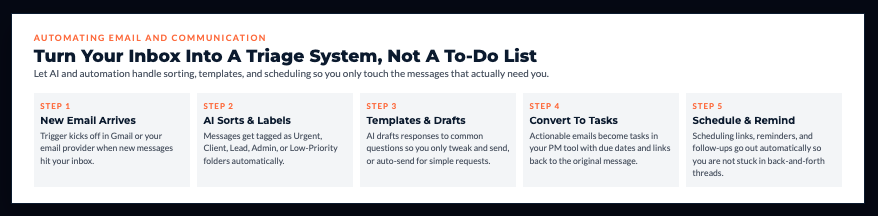
Setup with Gmail + Zapier:
- New email arrives
- AI analyzes content
- Automatically labels: Urgent, Client, Lead, Admin, Low Priority
- Moves to appropriate folders
- Notifies you only of urgent items
Time saved: 30-45 minutes daily scanning and organizing email.
Response Templates with AI
AI generates contextual responses to common emails.
Workflow:
- Common inquiry received
- AI identifies topic
- Generates appropriate response
- You review and send (or set to auto-send for basic queries)
Tools: ChatGPT API + Zapier, or Gmail Smart Compose
In my experience working with solopreneurs: This single automation saves 1-2 hours daily for those dealing with repetitive client questions.
Meeting Scheduling Workflows
Eliminate back-and-forth email ping-pong about availability.
Automated flow:
- Someone requests meeting
- Calendly/SavvyCal link sent automatically
- They book at available time
- Calendar updated automatically
- Confirmation sent to both parties
- Reminder sent day before
- Zoom link generated and shared
Time saved: 10-15 minutes per meeting scheduled. If you schedule 10 meetings weekly, that’s 2+ hours.
Email-to-Task Conversion
Turn emails into actionable tasks automatically.
Workflow:
- Email flagged or forwarded to specific address
- AI extracts action items
- Creates tasks in project management tool
- Sets due dates based on email content
- Links back to original email
Tools: Zapier + Todoist/ClickUp/Asana
Client Onboarding Workflow Automation
First impressions matter. Automation ensures consistent, professional onboarding every time.
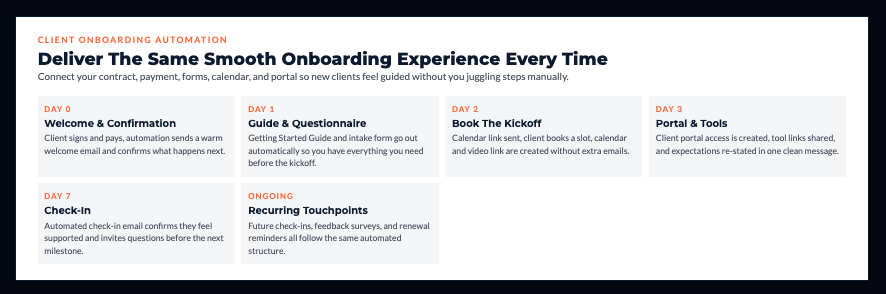
Welcome Sequence Automation
Trigger: New client signs contract or makes payment
Automated sequence:
- Welcome email sent immediately
- Getting Started Guide delivered
- Client questionnaire sent (day 1)
- Calendar link for kickoff call (day 2)
- Access to client portal created
- Introduction to tools/platforms (day 3)
- Check-in email (day 7)
Setup: ConvertKit/ActiveCampaign + Zapier + Your project management tool
Impact: Every client gets perfect onboarding without you remembering every step.
Document Collection Workflows
Problem: Chasing clients for required documents wastes everyone’s time.
Automated solution:
- Client signs up
- Automation sends document request with checklist
- Reminders sent automatically if documents not received
- Documents uploaded to organized client folder automatically
- You’re notified when everything is complete
Tools: JotForm/Typeform + Zapier + Google Drive/Dropbox
Contract and Proposal Generation
AI-powered workflow:
- Lead becomes qualified
- AI generates custom proposal using templates and client info from CRM
- Proposal sent for your review
- After approval, sent to client automatically
- E-signature requests triggered
- Signed contract filed automatically
- Invoice generated and sent
Tools: PandaDoc/Proposify + Zapier + DocuSign
Financial and Administrative Workflow Automation
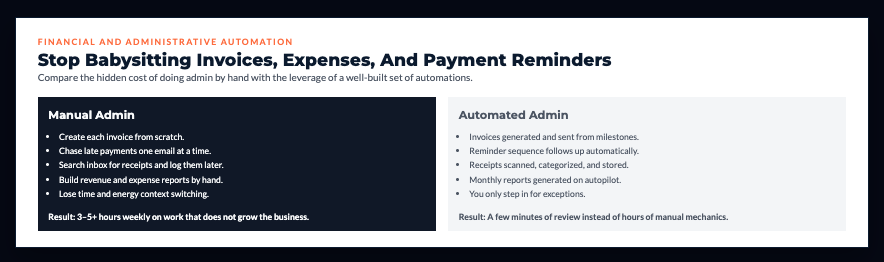
Money management is critical but time-consuming. Automate the mechanics.
Invoice Generation and Sending
Automated invoicing workflow:
- Project milestone completed (you mark in PM tool)
- Invoice automatically generated with correct amounts
- Sent to client automatically
- Receipt confirmation tracked
- Follow-up sequence initiated if unpaid after X days
Tools: QuickBooks/FreshBooks + Zapier
Time saved: 2-3 hours weekly creating and sending invoices manually.
Expense Tracking Automation
Problem: Manually logging expenses is tedious and often forgotten.
Automated solution:
- Receipt photo uploaded or emailed
- AI extracts: amount, vendor, date, category
- Expense logged automatically in accounting software
- Receipt filed in appropriate folder
- Monthly expense report generated automatically
Tools: Expensify/Dext + Zapier + QuickBooks
Payment Follow-Up Sequences
Automated reminder workflow:
- Invoice sent
- If unpaid 3 days before due date → Friendly reminder
- If unpaid on due date → Payment request
- If unpaid 3 days after → Firmer reminder
- If unpaid 7 days after → Final notice
- Each email tracked and logged in CRM
Impact: Getting paid faster without awkward manual follow-ups.
Content Creation and Publishing Workflows
Content drives growth but eats time. Automation makes it sustainable.
Multi-Platform Publishing
Core workflow:
- Create one piece of content (blog post, video, podcast)
- AI extracts key points and quotes
- Generates platform-specific posts:
- Twitter thread
- LinkedIn post
- Instagram caption
- Newsletter excerpt
- Images resized automatically for each platform
- Content scheduled across all channels
- Performance tracked automatically
Tools: Repurpose.io + Buffer + Zapier + Canva
Time saved: 3-4 hours weekly managing multi-platform posting manually.
SEO Optimization Automation
Workflow:
- Blog post drafted
- AI generates: meta description, title tag, alt text for images
- SEO score calculated
- Keyword density checked
- Internal linking suggestions provided
- Optimized version saved
Tools: SurferSEO + Zapier + WordPress
Content Backup Automation
Protect your content automatically:
- Content published on platform
- Automatically backed up to:
- Google Drive
- Notion database
- Local archive
- Organized by date and category
- Searchable archive maintained
Why it matters: Platforms change, break, or shut down. Your content stays safe.
Social Media Management Workflow Automation
When it comes to understanding AI workflow automation for solopreneurs, social media automation delivers some of the highest ROI – maintaining consistent presence across platforms without manual daily posting.
Engagement Monitoring and Response
Automated engagement workflow:
- AI monitors comments and mentions across platforms
- Sorts by: Questions, Praise, Complaints, Spam
- Flags items needing personal response
- Auto-responds to simple questions with approved answers
- Creates tasks for complex inquiries
- Tracks response times
Tools: ManyChat + Zapier + Your CRM
Impact: Stay responsive without checking social media every 30 minutes.
Content Curation Workflows
Automated curation:
- AI monitors industry sources (RSS feeds, news sites, influencers)
- Identifies relevant, high-quality content
- Suggests posts with your commentary
- Schedules throughout week automatically
- Varies sources for diversity
Tools: Feedly + Zapier + Buffer
Value: Maintain active social presence even when you’re not creating original content.
Performance Tracking Workflows
Automated analytics:
- Weekly performance report generated automatically
- Top-performing content identified
- Growth metrics compiled
- Engagement rates calculated
- Recommendations for content adjustments provided
- Sent to your inbox every Monday
Tools: Databox + Google Sheets + Zapier
Customer Service and Support Automation
Scale support without hiring a support team.
AI Chatbot Workflows
24/7 automated support:
- Customer asks question on website
- AI chatbot attempts to answer from knowledge base
- 70-80% of questions resolved automatically
- Complex questions routed to you with context
- All conversations logged in CRM
- Common questions identified for FAQ updates
Tools: Intercom + ManyChat + Zapier
ROI: Handling 70% of support questions automatically is massive time savings.
Ticket Routing Automation
Intelligent support routing:
- Support request received
- AI analyzes: urgency, topic, customer value
- Routes to appropriate workflow:
- Technical issues → Creates task with details
- Billing questions → Connects to accounting system
- Feature requests → Logs in product roadmap
- Complaints → Flags for immediate attention
- Automated acknowledgment sent
- Follow-up scheduled if not resolved in X hours
Tools: Help Scout + Zapier + Your task management system
Lead Generation and Sales Workflow Automation
More leads, better qualification, less manual work.
Lead Capture Automation
Multi-source lead collection:
- Lead submits form on website → Added to CRM
- Comment on social media → Captured and added
- Email inquiry received → Parsed and added
- Referral mentioned → Logged with source
- All leads automatically:
- Assigned score based on criteria
- Tagged by source
- Entered into appropriate nurture sequence
- Assigned tasks for follow-up
Tools: Zapier + HubSpot/Pipedrive
Lead Scoring with AI
Automated qualification:
- AI analyzes lead data:
- Company size
- Industry fit
- Budget indicators
- Behavior (email opens, site visits)
- Engagement level
- Assigns score: Hot, Warm, Cold
- Routes hot leads to sales workflow immediately
- Enters warm leads to nurture sequence
- Archives cold leads with re-engagement date
Impact: Focus time on leads most likely to convert.
Proposal Generation Workflows
Automated proposal creation:
- Lead marked as “Ready for Proposal”
- AI generates proposal using:
- Client information from CRM
- Service templates
- Pricing based on scope
- Case studies relevant to their industry
- Proposal sent for your review
- After approval, sent to client automatically
- Follow-up scheduled
Time saved: 1-2 hours per proposal. If you send 10 monthly, that’s 10-20 hours.
Building Your Custom Automation Stack
Don’t automate everything at once. Build systematically.
Audit Your Current Workflows
Week 1 Exercise: Track everything you do for one week. Log:
- Task description
- Time spent
- Frequency (daily, weekly, monthly)
- Complexity (simple, moderate, complex)
Identify automation candidates:
- Repetitive (done frequently)
- Rule-based (follows clear logic)
- Time-consuming (takes significant time)
- Low-value (doesn’t require your unique skills)
Prioritization Framework
Score each workflow on:
- Time saved (1-5 scale)
- Frequency (1-5 scale)
- Setup complexity (1-5, lower is easier)
Formula: (Time Saved × Frequency) ÷ Setup Complexity = Priority Score
Automate highest-scoring workflows first.
Start Small and Scale
Month 1: Automate 1-2 highest-priority workflows Month 2: Once stable, add 1-2 more Month 3: Add 1-2 more Month 4: Review all automations, optimize, then add more if needed
What I’ve seen happen: Solopreneurs who try to automate everything at once get overwhelmed, break things, and abandon automation entirely. Slow and steady wins.
Documentation Systems
Document every automation:
- What it does
- Which tools it uses
- Trigger conditions
- Actions taken
- How to troubleshoot
- Last updated date
Why: Three months from now, you’ll forget exactly how your automations work. Documentation prevents breaking things accidentally.
Tool: Notion database with automation documentation
Maintenance Schedules
Monthly automation review:
- Check that all workflows still function
- Review any errors or failed automations
- Update workflows if business processes changed
- Remove automations no longer needed
- Identify new automation opportunities
Automations require maintenance. Budget 1-2 hours monthly.
Your Game Plan: Automate Your First Workflow This Week
Let’s make this concrete and immediately actionable.
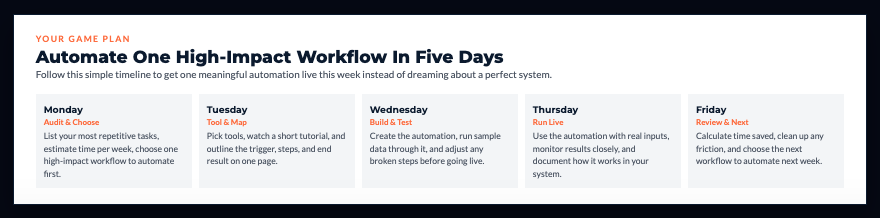
Monday: Audit and Prioritize (1 hour)
- List your 10 most time-consuming repetitive tasks
- Calculate time spent weekly on each
- Pick ONE to automate first
- Choose: High time savings + Simple to set up
Tuesday: Research and Setup (2-3 hours)
- Research which tools can automate your chosen workflow
- Sign up for needed platforms (many have free tiers)
- Watch tutorial videos
- Map out workflow steps
Wednesday: Build Automation (2-3 hours)
- Create the automation in your chosen tool
- Test with sample data
- Verify each step works correctly
- Fix any issues
Thursday: Live Testing (1 hour)
- Run automation with real data
- Monitor closely for errors
- Adjust as needed
- Document how it works
Friday: Review and Plan Next (1 hour)
- Calculate actual time saved
- Document the workflow
- Identify second automation to build next week
- Celebrate getting time back!
Total investment: 7-9 hours Result: One workflow automated, saving 2-5+ hours weekly ongoing
The Automation That Matters Most Right Now
What’s the one repetitive task that drains your energy most?
Not the task that takes longest. The one that makes you think “I can’t believe I’m doing this manually again.”
Maybe it’s:
- Creating and sending invoices
- Following up on unpaid bills
- Scheduling social media posts
- Onboarding new clients
- Responding to common questions
- Organizing your inbox
Pick that one. Automate it this week.
Don’t build a perfect automation system. Build one automation that works.
Then build another. And another.
Remember This
The solopreneurs scaling their businesses without burning out aren’t necessarily working smarter in every way.
They’ve just automated the repetitive work that was consuming 10-20 hours weekly, freeing them to focus on high-value activities.
AI tools don’t make you a better business owner. They remove the operational burden that was preventing you from focusing on strategy and growth.
Automation isn’t about being lazy. It’s about being strategic with your limited time and energy.
Stop doing manually what technology can do automatically. Use your human judgment and creativity for work that actually requires it.
Before you decide what to automate next, get clear on which part of your business truly needs structure.
I created The Clarity Compass to help you identify the gap between where you are and the structure your business needs next.
👇 Enter your email below to get it sent to you.
You’ll receive it in your inbox shortly – a simple, grounded guide to help you move forward with confidence.
Here’s My Question For You:
What’s the ONE workflow you’re going to automate this week that will give you back 2+ hours weekly?
Not five workflows. Just one.
Use the tools and framework in this guide to build that automation in the next 5-7 days. Get it working. Experience the relief of that task happening automatically.
Then tackle automation #2.
Build your system incrementally. Each automation compounds with the previous ones until you’ve reclaimed entire days of time.
Your future self – the one working ON the business instead of IN the business – is gonna thank you for starting today.
Now go automate something.