AI Headshot Generator: Professional Photos in Minutes Without the Photoshoot

Here’s a scenario that happens all the time with solopreneurs.
You need a professional headshot for your website. You know the current photo you’re using is five years old and doesn’t look like you anymore. You’re wearing a completely different hairstyle, you’ve aged (obviously), and honestly, it just feels outdated.
So you start researching photographers. Quotes come back at $300-500 for a session. Plus you gotta schedule it, take time off, figure out what to wear, and deal with the awkwardness of posing for a camera. The whole thing feels like a bigger production than it needs to be.
Meanwhile, you need photos for LinkedIn, your website, social media, speaking engagements, and guest posts. One photoshoot gives you maybe 5-10 usable shots. What happens when you need different styles for different contexts six months from now? Another $300-500?
That’s where an AI headshot generator completely changes the equation. Upload 10-15 casual photos, and the AI generates dozens of professional headshots in different styles, backgrounds, and outfits. Total cost: $25-50. Total time: upload photos, wait 30 minutes, download results.
This isn’t about being cheap. It’s about removing the barriers that keep solopreneurs from having the professional photos they need to compete effectively.
Let’s break down why AI headshot generators matter, which tools actually deliver professional results, and how to use them without the photos looking obviously fake.
Before you explore the tools, get the simple flow that turns stronger visibility into steady client demand.
The Predictable Client Flow breaks down the 3-step framework for creating steady, repeatable client growth without overcomplicating your marketing.
👇 Enter your email below to get it instantly.
You’ll get the full framework in your inbox – clear, focused, and easy to follow.
Why AI Headshot Generators Are Perfect for Solopreneurs
Traditional professional photography creates barriers that solopreneurs struggle with constantly. AI removes most of those barriers completely.

The Professional Photography Barrier
What typically happens when someone needs professional headshots:
Cost barrier: $300-500 for a basic session. $800-1,500 for a full branding photoshoot. For a bootstrapped solopreneur, that’s significant money that could go toward business development.
Time barrier: Schedule the photographer (2-3 weeks out usually). Take 2-3 hours for the actual session. Wait another week for edited photos. Total: 3-4 weeks from decision to having usable photos.
Psychological barrier: A lot of people hate being photographed. The awkwardness of posing, the self-consciousness about appearance, the pressure to “perform” for the camera. It’s genuinely stressful for many solopreneurs.
AI removes all three barriers. Cost drops to $25-50. Time drops to same-day turnaround. No camera anxiety because you’re just uploading existing photos.
Multiple Platform Needs
Here’s the reality of modern solopreneurs: you need photos everywhere.
- LinkedIn profile
- Website about page
- Email signature
- Twitter/X profile
- Instagram profile
- Speaking engagement bios
- Guest post author photos
- Podcast thumbnails
- Course creator profiles
That’s nine different places minimum. Traditional photography gives you 5-10 photos per session. AI generates 50-100+ variations from one upload.
Plus different platforms need different styles. LinkedIn wants professional and corporate. Instagram can be more casual. Speaking engagements need confident and approachable. One photoshoot can’t cover all those variations. AI can.
Update Frequency Challenge
Photos get outdated fast. Haircut changes, you age, fashion evolves, your brand matures. Ideally, you’d update professional photos annually. Realistically, most solopreneurs use the same photos for 3-5 years because scheduling and paying for new photoshoots feels like too much hassle.
With AI headshot generators, updating photos costs $25-50 and takes 30 minutes. You can refresh your image quarterly if you want. No photographer scheduling required.
Budget-Friendly Solution
Let’s run the actual comparison:
Traditional photography:
- Basic headshot session: $300-500
- Full branding shoot: $800-1,500
- Makeup artist (if needed): $75-150
- Wardrobe planning time: 2-3 hours
- Travel to location: 30-60 minutes each way
- Session time: 1-3 hours
- Usable photos: 5-15
AI headshot generation:
- One-time fee: $25-50 (some tools subscription)
- Your time: 30 minutes to upload photos
- Processing time: 20-60 minutes
- Usable photos: 50-200+
- Ability to regenerate: Unlimited with subscription
The math isn’t even close. You’re getting 10x the photos for 5-10% of the cost.
If this is sparking momentum, this flow shows you how to turn better visibility into consistent client conversations.
You can see the steps here → Get The Predictable Client Flow Framework
Best AI Headshot Generator Tools
Let’s cut through the noise. These are the AI headshot generators that actually produce professional-quality results.
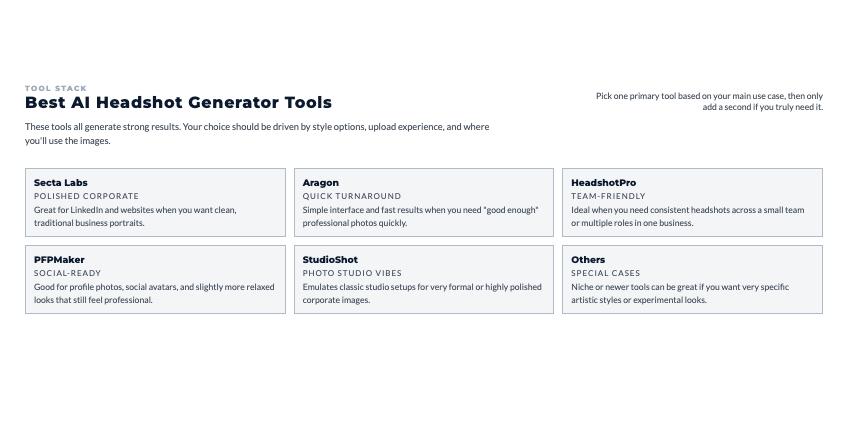
Headshot Pro ($29-39 one-time)
Headshot Pro is built specifically for professional business headshots. It’s not trying to do everything. Just corporate-quality headshots.
How it works: Upload 10-20 photos of yourself in different settings and angles. The AI trains on your face, then generates 100+ professional headshots in various styles, backgrounds, and poses.
What you get:
- 120+ headshot variations
- Multiple background options (office, outdoor, studio, blurred)
- Different outfit styles
- Various expressions (serious, friendly, approachable)
- High resolution suitable for print
Best for: Solopreneurs who need traditional corporate headshots for LinkedIn, websites, and professional materials.
Profile Picture AI ($29 one-time)
Profile Picture AI generates high-quality headshots with style customization. You pick the vibe (professional, casual, creative) and it generates accordingly.
Key feature: Better style control than most competitors. You’re not just getting generic corporate headshots. You can specify “approachable entrepreneur” or “creative professional” and get results that match.
Best for: Personal brands that need professional photos but don’t want the super-formal corporate look.
Aragon AI ($29 for 40 photos)
Aragon turns casual photos into professional headshots. The magic is in how well it handles lower-quality source photos.
What makes it different: You can use regular selfies and casual photos. Other tools need better source material. Aragon’s AI is better at working with what you’ve already got on your phone.
Best for: People who don’t have many good photos of themselves and don’t want to take new ones specifically for AI generation.
Secta AI ($49 one-time)
Secta focuses specifically on corporate and business headshots. Very traditional, very professional. Think Fortune 500 company photo directory.
When it makes sense: You’re in a conservative industry (finance, law, consulting) where casual or creative photos would hurt credibility. You need photos that scream “serious professional.”
When to skip it: You’re in a creative field or building a personal brand where approachable matters more than corporate polish.
PhotoAI ($29/month subscription)
PhotoAI is a subscription model that includes headshot generation plus other AI photo tools. If you only need headshots once, the subscription doesn’t make sense. If you’re generating photos regularly or want other AI photo features, it’s worth considering.
Subscription makes sense if:
- You update photos quarterly
- You want to generate photos for team members
- You use the other AI photo features (product photos, AI avatars)
How AI Headshot Generation Actually Works
Understanding the process helps you get better results and manage expectations about what’s possible.

Photo Upload Requirements
Most AI headshot generators need 10-20 source photos of you. Here’s why:
The AI needs to learn your face from multiple angles, expressions, and lighting conditions. One perfect selfie isn’t enough. It needs variety to accurately recreate your appearance in new contexts.
What works best:
- Mix of straight-on and slightly angled shots
- Different expressions (neutral, smiling, serious)
- Various lighting conditions
- Different settings (indoors, outdoors)
- Mix of close-up and medium distance
- Variety of what you’re wearing
What doesn’t work:
- All photos from the same day in same location
- Heavy filters or editing on source photos
- Sunglasses or hats covering your face
- Group photos where you’re not clearly visible
- Extremely blurry or low-resolution images
AI Training Process
After you upload photos, the AI spends 20-60 minutes training a model specifically on your face. It’s learning:
- Your facial structure and proportions
- Skin tone and texture
- Hair color and style
- Distinctive features (glasses, facial hair, etc.)
- Natural expressions
This is why processing isn’t instant. The AI is literally building a custom model just for you.
Style Transfer Technology
Once trained on your face, the AI applies professional photography elements. Understanding how AI headshot generator technology handles this transfer determines the quality you’ll see in your final results.
It’s combining your facial features with:
- Professional lighting setups
- Studio-quality backgrounds
- Professional posing
- Camera angles used in traditional photography
- Post-processing typical of professional headshots
The result: photos that look like they came from a professional photographer’s studio, but generated entirely by AI.
Quality and Resolution
Most tools output high-resolution images suitable for both web and print use. Typical specs:
- Resolution: 2048×2048 pixels or higher
- File format: JPG or PNG
- File size: 2-5 MB per photo
This means you can use them for websites, social media, business cards, brochures, conference materials, or anything else you need.
Preparing Photos for Best AI Headshot Results
The quality of your AI headshots depends heavily on the source photos you provide. Here’s how to set yourself up for success.
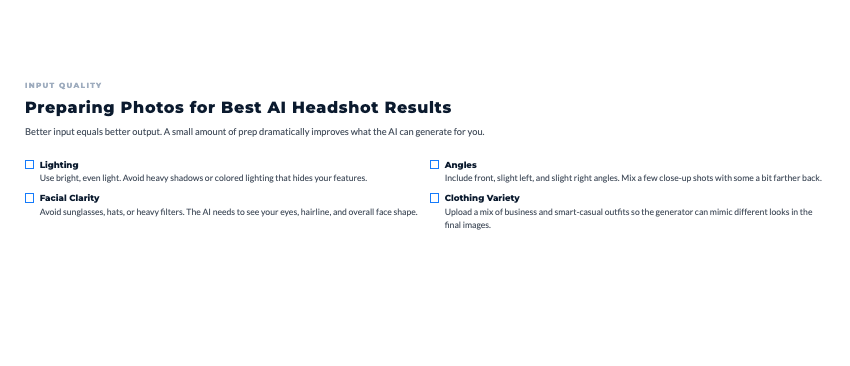
Source Photo Quality
You don’t need professional photos as source material, but you do need decent quality.
Good enough:
- Recent smartphone photos
- Well-lit selfies
- Casual photos friends took of you
- Video call screenshots (if resolution is decent)
Not good enough:
- Grainy, pixelated images
- Photos from 10+ feet away where your face is tiny
- Heavily filtered photos from Instagram
- Photos with significant motion blur
Easy test: Can you clearly see your facial features? If yes, it’ll probably work. If you gotta squint to make out details, the AI will struggle too.
Lighting Considerations
Natural light is your friend. Photos taken near windows or outdoors in indirect sunlight work great.
What to avoid:
- Direct overhead lighting (creates harsh shadows)
- Extreme backlighting (makes your face dark)
- Very yellow/orange indoor lighting
- Complete darkness with only phone flash
Quick wins:
- Take photos near a window during daytime
- Outdoor photos on cloudy days (diffused light)
- Well-lit indoor spaces with multiple light sources
You don’t need professional lighting. Just avoid extreme lighting situations that make you look weird.
Expression Variety
Include different expressions in your source photos:
- Neutral/serious (professional contexts)
- Natural smile (approachable professional)
- Genuine laugh (casual contexts)
- Thoughtful/confident (speaking/teaching contexts)
The AI will generate variations, but having diverse source expressions helps it create more natural-looking results.
Photo Quantity Needs
Most tools want 10-20 photos minimum. More is usually better up to about 25-30 photos. Beyond that, you hit diminishing returns.
Sweet spot: 15-20 varied photos taken over multiple days in different settings.
Corporate and Professional Business Headshots
Different business contexts need different photo styles. AI tools let you generate appropriate options for each situation.
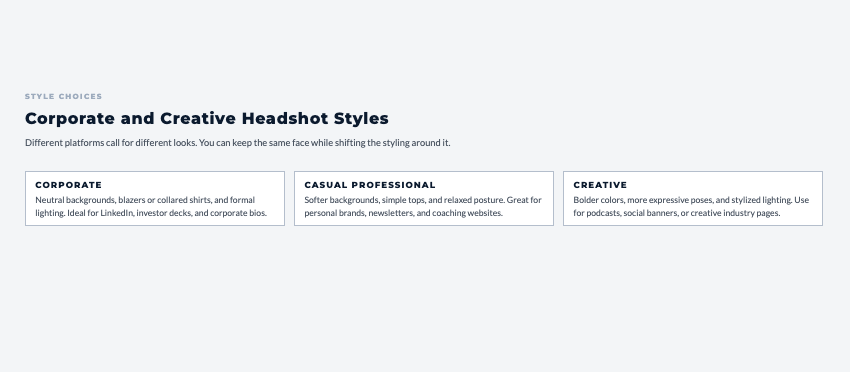
LinkedIn-Ready Headshots
LinkedIn has specific photo norms. Professional but approachable. Solid background or slightly blurred. Dressed like you’re going to an important meeting.
AI generators know these norms and can produce LinkedIn-appropriate photos automatically. Just specify “LinkedIn professional” and you’ll get options that fit platform expectations.
Corporate Website Photos
Business websites need cohesive professional photos. AI helps by generating photos with similar backgrounds, lighting, and styling even though they’re created at different times.
What typically happens: A solopreneur adds team members or contractors over time. Traditional photography means everyone’s photos look different because they were taken by different photographers at different times. With AI, you can generate matching photos that look like they came from the same corporate photoshoot.
Industry-Appropriate Styling
Different industries have different photo expectations:
Conservative (finance, law, consulting): Dark suit, neutral background, serious expression, very traditional.
Creative (design, marketing, arts): More casual attire, interesting backgrounds, approachable expressions, showing personality.
Tech (software, startups): Business casual, modern backgrounds, confident but not stiff, balancing professional with innovative.
AI tools let you generate variations for each context. You’re not locked into one style from one photoshoot.
Casual and Creative Headshot Styles
Not every context needs corporate formality. Personal brands often benefit from more approachable photos.
Approachable Entrepreneur Photos
Building a personal brand requires balancing professionalism with personality. People need to see you as competent but also relatable.
AI generators can create “professional but friendly” headshots. Think: nice outfit but not a suit, natural smile, background that suggests “real person” not “corporate drone.”
Creative Industry Headshots
Designers, writers, artists, and other creative professionals can use less traditional headshots. AI tools generate options with:
- More interesting backgrounds
- Casual but stylish attire
- Expressive poses
- Artistic lighting
The goal: communicating competence while showing you’re not a traditional corporate type.
Social Media Profile Pictures
Different platforms have different photo cultures:
LinkedIn: Professional headshot, traditional framing, business attire.
Twitter/X: Can be more casual, personality showing through, doesn’t need formal background.
Instagram: Very casual acceptable, showing personality and lifestyle.
AI generators let you create platform-appropriate variations from the same source photos. You’re not using your LinkedIn headshot on Instagram and vice versa.
Customizing and Editing AI-Generated Headshots
AI outputs are starting points. You’ll want to customize for your specific needs.

Background Customization
Most AI generators offer multiple background options:
- Professional office setting
- Outdoor blurred background
- Neutral gray or white studio
- Soft bokeh effect
- Specific colors matching your brand
You can regenerate the same photo with different backgrounds to see what works best for different contexts.
Expression Selection
AI generates multiple expressions from your source photos. You’ll have options ranging from serious and professional to friendly and approachable.
Strategy: Download multiple expressions. Use serious ones for formal contexts (corporate website, LinkedIn). Use friendly ones for personal brand content (social media, blog, email signature).
Consistency Across Images
When building a photo library, you want photos that work together even if they’re used in different places.
What to look for:
- Similar lighting quality
- Comparable background formality
- Consistent level of polish
- Matching color tones
Most AI tools generate consistent results by default, but check before you download dozens of photos.
Using AI Headshots Across Platforms
Once you’ve got your AI-generated photos, here’s how to deploy them effectively.

LinkedIn Profile Optimization
LinkedIn profile photos have specific best practices:
- Sized at 400×400 pixels minimum
- Face takes up 60% of the frame
- Professional attire
- Solid or subtly blurred background
- Natural smile or confident serious expression
AI-generated headshots work great for LinkedIn because they’re designed for exactly this use case.
Website About Pages
Your website about page needs a photo that builds trust while showing personality. What works:
- High-quality professional photo
- Appropriate to your industry but showing personality
- Good resolution for larger display
- Background that doesn’t distract from your face
AI generators can create several options. Test them on your actual website to see what feels right.
Email Signature Photos
Email signature photos are small (usually 100×100 to 150×150 pixels) so they need to be clearly visible at tiny sizes.
What works:
- Close-up framing
- High contrast between you and background
- Clear facial features
- Professional but approachable expression
Social Media Profiles
Each platform has different size specs:
- Twitter: 400×400 pixels (circular crop)
- Instagram: 320×320 pixels (circular crop)
- Facebook: 180×180 pixels (circular crop)
- LinkedIn: 400×400 pixels (square)
AI headshots work for all of these. Just crop appropriately for each platform’s display format.
AI Headshot Quality and Authenticity
The biggest concern people have about AI headshots is whether they’ll look fake or whether they’ll actually look like the person.
Realistic Versus AI-Looking
Modern AI headshot generators have gotten good enough that most photos look indistinguishable from professional photography. But not all tools are equal.
Signs of good quality:
- Natural skin texture (not overly smoothed)
- Realistic hair detail
- Appropriate shadowing and highlights
- Eyes look natural and focused
- Teeth look realistic if smiling
Red flags:
- Skin looks plastic or overly perfect
- Hair has weird artifacts or unnatural patterns
- Eyes look slightly off or unfocused
- Lighting seems impossible or inconsistent
- Background has obvious AI glitches
Consistency with Real Appearance
The AI should make you look polished, not different. You’re aiming for “best version of yourself” not “different person entirely.”
Good results:
- People who know you would recognize you immediately
- You look like yourself on a good day
- Features are accurate but professionally lit
- Age-appropriate (not artificially younger or older)
Bad results:
- Friends wouldn’t recognize you from the photo
- Significant features changed (eye color, face shape, etc.)
- Looks nothing like your source photos
- Seems like a completely different person
If the AI output doesn’t look like you, don’t use it. The whole point is having better photos of yourself, not photos of someone else.
Ethical Considerations and Disclosure
Using AI headshots raises questions about transparency and appropriateness in different contexts.
Transparency About AI Use
Here’s the honest question: do you need to disclose that your headshot is AI-generated?
General answer: For most business contexts, no disclosure required. Professional headshots get edited and retouched anyway. AI is just another form of photo enhancement.
When disclosure might matter:
- Journalism and press contexts
- Dating and personal relationships
- Situations where photo authenticity is specifically relevant
- If directly asked
What makes sense for most solopreneurs: Use AI headshots without specifically announcing they’re AI-generated, but be honest if asked directly.
Professional Context Appropriateness
AI headshots work great for:
- Business websites and LinkedIn
- Social media profiles
- Email signatures
- Speaking bios and press kits
- Marketing materials and ads
- Course creator profiles
They’re probably not appropriate for:
- Dating profiles (huge authenticity expectations)
- Government IDs or legal documents
- Contexts requiring photo verification
- Situations where you’ve been specifically asked for recent photos
Use common sense. If the context depends on photo authenticity, use real photos.
Building Trust
The goal with AI headshots is looking more professional, not being deceptive. You’re removing the barrier of expensive photography, not trying to look like someone else.
The test: Would people meeting you in person think your photo was accurate? If yes, you’re using AI headshots appropriately. If they’d be surprised by the difference, you’ve gone too far.
Cost Comparison: AI vs Traditional Photography
Let’s run the full economic analysis to see where AI makes sense versus when traditional photography is worth the investment.
Traditional Headshot Costs
Basic professional headshot session:
- Photographer fee: $300-500
- Time commitment: 2-3 hours (session + travel)
- Makeup artist (optional): $75-150
- Photos received: 5-15 edited images
- Usage rights: Usually unlimited for business use
Full branding photoshoot:
- Photographer fee: $800-1,500
- Time commitment: 4-6 hours
- Professional styling: $150-300
- Location fees (if applicable): $50-200
- Photos received: 30-60 edited images
- More variety in poses, locations, contexts
AI Headshot Pricing Models
One-time purchase tools:
- Headshot Pro: $29-39
- Profile Picture AI: $29
- Aragon AI: $29
- Processing time: 30-60 minutes
- Photos received: 50-200+ variations
- No additional costs
Subscription models:
- PhotoAI: $29/month
- Unlimited generations
- Makes sense if you need fresh photos quarterly
Long-Term Value
If you update photos annually:
Traditional photography (5 years):
- Year 1: $400
- Year 2: $400
- Year 3: $400
- Year 4: $400
- Year 5: $400
- Total: $2,000
AI generation (5 years):
- Year 1: $29
- Year 2: $29
- Year 3: $29
- Year 4: $29
- Year 5: $29
- Total: $145
You’re saving $1,855 over five years while having way more photo variety and style options.
Your Action Plan: Get Professional Photos This Week
Alright, you’ve got the complete picture now. You understand why AI headshot generators make sense, which tools deliver quality results, and how to use them appropriately.

This Week: Generate Your Professional Headshots
Day 1: Gather Source Photos (30 minutes)
- Go through your phone
- Find 15-20 decent photos of yourself
- Variety of angles, expressions, lighting
- Recent photos (last 6-12 months)
Day 2: Choose Tool and Upload (30 minutes)
- Pick one AI headshot generator (Headshot Pro for traditional professional, Profile Picture AI for more style options)
- Create account and pay (about $29)
- Upload your photos
- Select style preferences
Day 3: Review and Select (45 minutes)
- AI processing completes (usually 30-60 minutes after upload)
- Review all generated options
- Select 5-10 favorites for different contexts
- Download high-resolution versions
Day 4: Deploy Across Platforms (60 minutes)
- Update LinkedIn profile photo
- Replace website about page photo
- Update email signature
- Refresh social media profiles
- Save remaining photos for future use
Total investment: Less than 3 hours and $29-39 for a complete professional photo library
The Photos That Matter Most
What’s the one place where your current photo is hurting your professional image?
Not everywhere. Just one place.
Maybe it’s:
- LinkedIn profile with a 5-year-old photo
- Website about page with a casual selfie
- Email signature with no photo at all
- Speaking bio using an outdated image
Pick that one place. Use an AI headshot generator this week to create better options. Update that one place with a professional photo.
Then notice how much more confident you feel about your professional presentation. Notice how people respond differently when they see a polished, current photo instead of whatever you had before.
That’s the shift. Professional photos stop being a barrier and start being something you update as easily as changing your bio.
Remember This
AI headshot generators don’t make you fake. They remove the barriers (cost, time, anxiety) that kept you from having the professional photos you needed.
You’re still you. The photos still look like you. You just look like the polished, professional version of yourself instead of the “best random photo I could find on my phone” version.
The solopreneurs competing most effectively aren’t the ones spending $500 on photoshoots every year. They’re the ones using AI to have professional photos for every context without the cost and time barriers.
As you refresh your professional presence, use this 3-step flow to turn that visibility into steady, predictable client growth.
The Predictable Client Flow breaks down the 3-step framework for creating steady, repeatable client growth without overcomplicating your marketing.
👇 Enter your email below to get it instantly.
You’ll get the full framework in your inbox – clear, focused, and easy to follow.
Here’s My Question For You:
What’s the first photo you’re gonna update with an AI-generated headshot?
Not all your photos. Just one.
Pick your tool. Upload your photos. Wait for the AI to generate results. Select your favorite. Update that one profile, website, or platform.
Then see how much easier the whole process was compared to scheduling a photographer, taking time off, dealing with photoshoot anxiety, and paying hundreds of dollars.
That’s why this matters. Professional photos stop being this big production and become something you can update whenever you need to.
Your future self, the one with current, professional photos everywhere they matter, is gonna thank you for starting today.
Now go get your headshots.