AI LinkedIn Post Generator: Create Engaging Content Without the Writing Struggle

Here’s what typically happens with solopreneurs and LinkedIn.
They know they should be posting on LinkedIn. They understand that consistent content builds credibility, attracts clients, and creates opportunities. They’ve seen competitors get leads from LinkedIn posts.
But when they sit down to actually write something, the blank page stares back at them. What should they say? How should they say it? Will people even care? After 30 minutes of staring and overthinking, they close LinkedIn without posting anything.
This happens repeatedly until they just stop trying. Meanwhile, their competitors who post consistently are getting all the visibility, connections, and opportunities.
That’s where an AI LinkedIn post generator changes everything. What used to take 30-45 minutes of staring at a blank screen now takes 5-10 minutes. You tell the AI what you want to communicate, it generates a solid draft, you customize it with your voice and examples, and you post.
This isn’t about being lazy or inauthentic. It’s about removing the friction that stops most solopreneurs from showing up consistently on the platform that matters most for B2B business.
Let’s break down why LinkedIn content matters, which AI tools actually help, and how to use them without sounding like a robot.
Before you start generating posts, get clear on the message and positioning that actually move your business forward.
I created The Clarity Compass to help you identify the gap between where you are and the structure your business needs next.
👇 Enter your email below to get it sent to you.
You’ll receive it in your inbox shortly – a simple, grounded guide to help you move forward with confidence.
Why AI LinkedIn Post Generators Matter for Solopreneurs
LinkedIn isn’t optional anymore for most solopreneurs. It’s where decision-makers hang out, where opportunities surface, and where professional credibility gets built or lost.
The LinkedIn Visibility Equation
Here’s the brutal reality: LinkedIn’s algorithm rewards consistency. Post regularly, and your reach expands. Post sporadically, and you become invisible.
What this looks like in practice:
- Post 2-3 times weekly: Your network sees your content, algorithm pushes it to second-degree connections, opportunities surface
- Post once monthly: Only your closest connections see it, no algorithmic boost, minimal impact
- Post never: You’re basically not on the platform regardless of having a profile
The difference between posting consistently and not posting is the difference between LinkedIn working for your business versus being a waste of time.
Professional Credibility Building
When someone checks out your LinkedIn profile (potential clients, partners, referral sources, media), they’re looking at your recent activity. What they see tells a story:
Active content creator: This person knows their stuff, stays current, contributes to their industry. Credible.
Inactive profile: Either they’re not really in business, they’re not engaged in their field, or they don’t have much to say. Less credible.
Fair or not, consistent posting signals professional relevance. Silence signals the opposite.
Client Attraction Mechanics
Here’s how LinkedIn content turns into business for solopreneurs:
Step 1: You post valuable content consistently Step 2: People in your network engage (likes, comments, shares) Step 3: Their connections see the engagement and check out your profile Step 4: Some of those people realize you solve a problem they have Step 5: They reach out or start following you Step 6: Eventually, they become clients
This happens passively while you’re doing other work. But it only happens if you’re posting consistently. AI tools make consistent posting actually sustainable.
Time Scarcity Solution
Most solopreneurs can’t dedicate an hour daily to LinkedIn content creation. They’ve got client work, business development, admin tasks, and actually delivering services.
Traditional LinkedIn posting time:
- Brainstorming topic: 15 minutes
- Writing draft: 20-30 minutes
- Editing and refining: 10-15 minutes
- Formatting for LinkedIn: 5 minutes
Total: 50-65 minutes per post. Do that 2-3 times weekly and you’re looking at 2-3 hours of content creation time weekly.
With AI tools:
- Prompt AI with topic and key points: 2 minutes
- Review and customize draft: 5-8 minutes
- Final polish and formatting: 2-3 minutes
Total: 10-15 minutes per post. That’s 75-80% time savings.
If this is opening up breathing room, the Clarity Compass helps you decide what to say so your content actually lands.
You can grab it here → Get The Clarity Compass
Best AI LinkedIn Post Generator Tools
Let’s cut through the noise. These are the AI tools that actually help create quality LinkedIn content.
ChatGPT for LinkedIn Content (Free, $20/month for Plus)
ChatGPT is the most versatile option. It handles pretty much any LinkedIn content type reasonably well.
How to use it effectively: “Write a LinkedIn post for [your audience] about [your topic]. Include a hook that stops the scroll, a brief story or example, actionable insight, and a question to drive comments. Casual professional tone, 150-200 words.”
The more specific your prompt, the better the output. Include details about your audience, desired tone, and post structure.
When to upgrade to Plus: If you’re creating content daily and hitting rate limits on the free version.
Claude for LinkedIn Writing (Free, $20/month for Pro)
Claude excels at longer, more nuanced posts that need to maintain consistent tone and depth. When you want thought leadership content that goes deeper than surface-level tips, Claude tends to perform better.
Best use cases:
- Longer-form thought leadership posts (250-400 words)
- Posts requiring nuance and careful positioning
- Content that needs to reference specific context
- Situations where tone consistency really matters
Jasper LinkedIn Templates ($49/month)
Jasper has pre-built templates specifically for LinkedIn posts. Different frameworks for different post types (story posts, listicles, thought leadership, engagement posts).
Worth it if: You’re posting daily and the $49/month saves you 3+ hours monthly compared to using free tools. The templates are faster than writing prompts from scratch.
Skip it if: You’re posting 2-3 times weekly and ChatGPT meets your needs.
Taplio AI Writing ($39/month)
Taplio is built specifically for LinkedIn. It includes AI writing plus scheduling, analytics, and viral post inspiration.
Key feature: It analyzes viral posts in your niche and shows you what’s working. You can generate similar posts adapted to your message.
Makes sense for: Solopreneurs serious about LinkedIn as a primary business channel. The analytics and scheduling justify the cost beyond just the AI writing.
Copy.ai LinkedIn Tools ($49/month)
Copy.ai has LinkedIn-specific templates for various post types. Quick generation with minimal prompting.
Best for: Speed over customization. If you need to pump out decent LinkedIn posts fast, Copy.ai delivers. If you want highly nuanced content, ChatGPT or Claude give you more control.

Understanding LinkedIn Content That Performs
Not all content performs equally on LinkedIn. The algorithm and audience have preferences you gotta work with.
The LinkedIn Algorithm Reality
LinkedIn prioritizes content that keeps people on the platform. Here’s what that means practically:
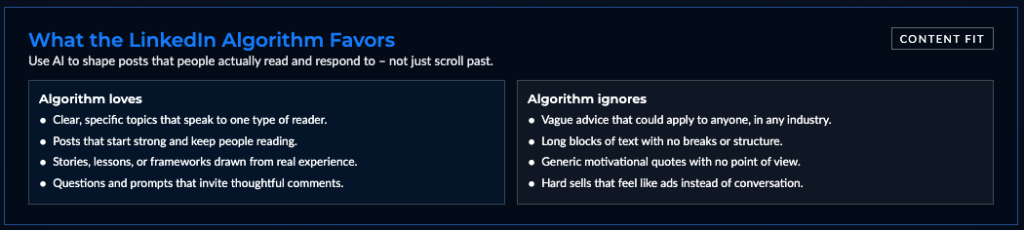
Algorithm loves:
- Posts that generate comments (highest weight)
- Content people spend time reading (dwell time)
- Posts that get saved or shared
- Native content (text posts, documents, native video)
Algorithm doesn’t boost:
- Posts with external links (takes people off LinkedIn)
- Content with obvious engagement bait (“type yes in comments”)
- Overly promotional posts
- Recycled content from other platforms
Hook Effectiveness
The first 1-2 lines determine whether people keep reading or scroll past. Understanding which AI LinkedIn post generator features help create scroll-stopping hooks will dramatically improve your engagement rates.
Hooks that work:
- Bold contrarian statements: “Most business advice is wrong about productivity”
- Personal vulnerability: “I lost my biggest client yesterday”
- Surprising statistics: “73% of solopreneurs make this fatal mistake”
- Direct questions: “Ever wonder why your LinkedIn posts go nowhere?”
- Pattern interrupts: “Stop doing [common thing everyone does]”
Hooks that don’t work:
- Generic observations: “Networking is important in business”
- Obvious statements: “Social media matters for entrepreneurs”
- Corporate jargon: “Leveraging synergies for optimal outcomes”
Value-First Content
The posts that perform best on LinkedIn deliver value upfront without asking for anything in return. Teaching, sharing insights, offering frameworks, providing perspective.
What works:
- Here’s what I learned from [experience]
- Three mistakes I see people make with [topic]
- The framework I use for [specific challenge]
- Unpopular opinion about [industry trend]
What doesn’t work:
- Look at my new blog post (link in comments)
- Excited to announce our new service
- Check out my podcast episode
- Register for my webinar
Save promotional content for every 5-7 value posts. Lead with teaching, not selling.
Generating Different Types of LinkedIn Posts with AI
Different situations call for different post types. AI can handle all of them if you prompt effectively.
Thought Leadership Posts
These establish you as someone with informed perspectives on your industry.
AI prompt that works: “Write a thought leadership LinkedIn post about [topic] for [audience]. Present a contrarian or nuanced take on [specific angle]. Include supporting reasoning and a call for discussion. Professional but approachable tone. 250 words.”
Structure AI typically generates:
- Hook presenting the contrarian take
- Context about common belief
- Your different perspective with reasoning
- Example or evidence supporting your view
- Question inviting others’ perspectives
Personal Story Content
Stories connect emotionally in ways that straight advice doesn’t. AI can structure the narrative even though you provide the actual story.
Effective prompt: “Structure a LinkedIn post around this story: [your story]. Extract the business lesson and end with actionable insight for [audience]. Conversational tone. 200 words.”
What you provide: The actual story details, specific examples, real outcomes.
What AI provides: Narrative structure, smooth transitions, clear lesson extraction, engaging format.
Educational and How-To Posts
Teaching content performs consistently well. People save and share posts that teach them something useful.
Prompt example: “Create a LinkedIn post teaching [audience] how to [achieve outcome]. Break it into 3-5 simple steps. Start with why this matters, explain each step clearly, end with encouragement. 250 words.”
These posts get saved frequently, which signals quality to the algorithm and extends your reach.
Question and Discussion Posts
Engagement-driven posts that prompt conversation. These generate comments, which LinkedIn’s algorithm loves.
How to prompt AI: “Write a LinkedIn post posing a thoughtful question to [audience] about [topic]. Provide brief context, ask the question, and invite specific perspectives. 100-150 words.”
Keep these shorter. The goal is conversation, not comprehensive coverage of the topic.

Crafting Hooks and Opening Lines with AI
Your first line determines everything. AI can generate hook options, but you need to recognize what makes a hook effective.
Pattern Interrupt Techniques
Hooks that make people stop mid-scroll because they’re unexpected or contrarian.
AI-generated examples:
- “I wasted $10,000 learning this lesson”
- “Everyone’s wrong about [common topic]”
- “The advice you’re following is killing your business”
- “I’m about to say something unpopular”
These work because they promise something worth the 30 seconds it takes to read your post.
Curiosity Gap Creation
Opening lines that make people need to know what comes next.
Examples:
- “Three years ago, I made a decision that changed everything”
- “Nobody talks about the dark side of [industry thing]”
- “Here’s what happens when you [unexpected action]”
- “The thing holding you back isn’t what you think”
You’re creating a question in the reader’s mind that only finishing your post will answer.
Pain Point Recognition
Starting with problems your audience feels deeply.
AI can generate these with proper prompting:
- “Tired of [specific frustration]?”
- “Ever feel like [common struggle]?”
- “The worst part about [challenge] is [specific pain point]”
These work because they signal “this post is about your actual problem, not generic advice.”
Structuring LinkedIn Posts for Maximum Engagement
Good hooks get attention. Good structure keeps it and drives engagement.
The Problem-Solution Framework
Classic structure that works consistently:
Line 1-2: Establish the problem your audience faces Line 3-6: Explain why this problem matters or persists Line 7-10: Present your solution or framework Line 11-12: Call to action (question, invitation to comment)
AI tools generate this structure naturally when you prompt them to “solve [specific problem] for [audience].”
Story-Lesson-Application Structure
Narrative posts that teach through experience:
Opening: Hook with story setup Middle: Tell the story with specific details Insight: Extract the business lesson learned Application: How others can apply this lesson Engagement: Question or call to action
Listicle Formatting
Easy to scan, easy to save, algorithm-friendly:
Pattern: Hook introducing the topic + number of points Point 1 with brief explanation Point 2 with brief explanation Point 3 with brief explanation Conclusion + engagement question
AI generates these effortlessly. Just prompt: “Create a LinkedIn post listing 5 [tips/mistakes/lessons] about [topic] for [audience].”
Adding Your Personal Voice to AI-Generated Posts
This is where most people mess up with AI content. They post the AI output without customization and it sounds generic.
Brand Voice Integration
Train AI to match your communication style by providing examples.
Effective approach: “Here are three of my best-performing LinkedIn posts: [paste examples]. Write a new post about [topic] matching this tone and style.”
The AI learns your cadence, vocabulary, how you structure ideas, what makes your voice distinct.
Authenticity Markers
Things AI can’t replicate that you need to add:
Your specific examples: “When I worked with a client in the manufacturing space” vs. AI’s generic “when working with clients”
Your unexpected observations: Insights from your unique experience that AI wouldn’t generate
Your personality quirks: How you specifically explain things, phrases you use, your sense of humor
Your opinions: What you actually believe, not just what sounds smart
Story and Example Insertion
AI generates structure and framework. You insert the real stories and examples that make posts memorable.
AI gives you: “Here’s what many solopreneurs get wrong about [topic]…”
You add: “Here’s what many solopreneurs get wrong about [topic]. Last month, I watched a talented designer lose a $50K client because she…”
Specific > Generic. Every time.
Optimizing LinkedIn Posts for the Algorithm
Beyond content quality, certain tactics work better with LinkedIn’s algorithm.
Dwell Time Optimization
LinkedIn measures how long people spend reading your post. Longer dwell time signals quality content.
How to increase dwell time:
- Write 150-300 words (sweet spot for reading time)
- Use line breaks for readability (nobody reads walls of text)
- Include compelling middle sections that reward reading past the hook
- End with thought-provoking questions or insights
Comment-Driving Strategy
Comments are the highest-weighted engagement signal. Posts with lots of comments get massively more reach.
Structure posts to generate comments:
- End with specific questions (not generic “what do you think?”)
- Take positions people will want to respond to
- Share experiences people relate to and want to share their own
- Create “fill in the blank” posts (“My biggest challenge with [topic] is ___”)
Hashtag Usage with AI
Hashtags matter, but less than you think. LinkedIn suggests 3-5 relevant hashtags maximum.
Prompt AI for hashtag selection: “Suggest 3-5 relevant LinkedIn hashtags for this post about [topic] targeting [audience]. Prioritize hashtags with good reach but not oversaturated.”
Mix popular tags (50K+ followers) with niche tags (5K-20K followers) for best balance of reach and relevance.
Posting Time Optimization
Best times to post on LinkedIn for most audiences:
- Tuesday-Thursday: 8-10 AM, 12-1 PM
- Weekdays generally beat weekends
- Avoid early Monday (people are catching up) and late Friday (people check out mentally)
Test different times and track what works for your specific audience.
Creating LinkedIn Content Series with AI
One-off posts are good. Series create momentum and give people reasons to follow you.
Weekly Content Themes
Establishing predictable patterns:
- Monday motivation posts
- Wednesday tactical tips
- Friday wins and lessons
AI prompt: “Generate 4 Monday motivation posts for [audience] about [general theme]. Each should be 150 words, inspiring but actionable, ending with a question.”
Create a month of themed content in one session.
Multi-Part Post Series
Breaking complex topics into sequences:
Post 1: “I’m going to share my framework for [outcome] over the next few posts. Here’s why this matters…”
Post 2: “Part 2: The first step in my [framework] is…”
Post 3: “Part 3: Once you’ve [first step], here’s what comes next…”
People follow along, engage across multiple posts, and you establish yourself as the expert on this topic.
Repurposing Content for LinkedIn with AI
You’ve already created content. AI helps you extract maximum value by adapting it for LinkedIn.
Blog to LinkedIn Conversion
Take a 1,500-word blog post and create 5-7 LinkedIn posts from it.
AI prompt: “This is my blog post: [paste post]. Extract 5 LinkedIn posts from this content. Each should stand alone, focus on one key insight, and be 150-200 words.”
One piece of content becomes a week of LinkedIn posts.
Podcast Episode Posts
Audio content translates well to written posts.
Workflow:
- Use AI to transcribe episode (Descript, Otter.ai)
- Prompt ChatGPT: “Extract the 3 most insightful points from this transcript and create LinkedIn posts for each”
- Customize with your voice
- Post across three days
Client Work Insights
Every project teaches lessons. AI helps structure those lessons into shareable posts.
Prompt: “I just completed a project where [describe situation and outcome]. Create a LinkedIn post sharing the key lesson without revealing client details. Focus on what others can learn.”
You’re building expertise publicly while maintaining client confidentiality.
Measuring and Improving LinkedIn Post Performance
Create content, measure results, improve based on data. AI tools help with the analysis too.
Engagement Metric Analysis
What matters most:
- Comments (highest algorithmic weight)
- Shares (signals valuable content)
- Saves (people want to reference later)
- Profile views (content driving discovery)
What matters less:
- Likes (nice but don’t drive reach much)
- Impressions alone (reach without engagement is empty)
Track which post types generate most comments and shares. Double down on those formats.
Connection Request Patterns
Notice when connection requests spike. What content drove that?
Imagine this common pattern: You post about a specific challenge in your industry. Connection requests come from people dealing with that challenge. That post attracted your ideal audience.
Create more content on that topic. You’ve found what resonates.
Lead Generation Tracking
The real question: does LinkedIn content generate business?
Track:
- DM inquiries after specific posts
- Website traffic from LinkedIn
- Discovery calls mentioning your content
- Clients who found you through posts
Even 1-2 clients monthly from LinkedIn content justifies the time investment.
Avoiding Common LinkedIn AI Content Mistakes
Even with AI tools, certain mistakes kill your LinkedIn presence. Here’s what to watch for.
Generic Corporate-Speak
AI defaults to bland business language if you’re not careful. “Leverage synergies for optimal outcomes” and similar garbage.
The fix: Prompt AI specifically for conversational tone. “Write like you’re explaining this to a friend over coffee, not presenting to a board.”
Over-Automation Red Flags
Content that obviously lacks human touch gets ignored.
Warning signs:
- All posts follow identical structure
- No personal stories or examples
- Every post ends with the same CTA
- Zero personality or voice
- Nothing controversial or opinion-based
Fix: Customize every AI draft. Add your examples, your opinions, your voice.
Self-Promotion Overload
Posting only about your services, products, and achievements.
The rule: For every promotional post, publish 5-7 value posts. Lead with teaching, share insights, help people. Then occasionally mention what you offer.
Ignoring Engagement
AI helps create posts. It doesn’t handle the relationship building that happens in comments.
Non-negotiable: Respond to every comment on your posts. Thank people for engaging. Ask follow-up questions. Build relationships in the comment section.
This is where AI can’t help. This is pure human connection.
Your Action Plan: Start Posting Consistently This Week
Alright, you’ve got the complete framework. You understand why LinkedIn content matters, how AI tools help, and what actually drives results on the platform.
This Week: Publish Three LinkedIn Posts
Day 1: Create Your First Post (20 minutes)
- Pick one AI tool (ChatGPT is free and works great)
- Choose a topic you have expertise in
- Prompt the AI with specific details (audience, structure, tone)
- Customize the draft with your voice and examples
- Post on LinkedIn
Day 2: Review Performance and Create Post 2 (15 minutes)
- Check engagement on Day 1 post
- Note what seems to resonate
- Create second post on related topic
- Use what you learned from first post
- Publish
Day 3: Respond to Engagement (10 minutes)
- Reply to every comment on your posts
- Thank people for engaging
- Ask follow-up questions
- Build relationships
Day 4: Create Third Post and Plan Next Week (20 minutes)
- Write third post for the week
- Outline topics for next week
- Schedule creation time on calendar
- Total time invested: About 65 minutes for three posts

The Posts That Matter Most
What’s the one topic you need to establish yourself as an expert on?
Not ten topics. Just one.
Maybe it’s:
- Your specific approach to solving client problems
- Lessons from your years in the industry
- Frameworks you’ve developed for common challenges
- Insights from your unique position in the market
Use AI to create three posts on that topic this week. Each post explores a different angle. Each delivers genuine value. Each ends with a question that prompts discussion.
Then watch what happens. Notice who engages. Notice who reaches out. Notice what opportunities surface.
That’s how LinkedIn works when you show up consistently with valuable content.
Remember This
AI LinkedIn post generators don’t make you less authentic. They remove the friction that was stopping you from sharing your expertise consistently.
Your insights, your examples, your perspective are what matter. AI just helps you get them out of your head and onto LinkedIn without the blank page paralysis.
The solopreneurs winning on LinkedIn aren’t the ones with the best writing skills. They’re the ones showing up consistently, delivering value, and building relationships in the comments.
As you build a consistent presence, use the Clarity Compass to choose the message and direction that support your long-term goals.
I created The Clarity Compass to help you identify the gap between where you are and the structure your business needs next.
👇 Enter your email below to get it sent to you.
You’ll receive it in your inbox shortly – a simple, grounded guide to help you move forward with confidence.
Here’s My Question For You:
What’s the one post you’re gonna create with AI this week?
Not a perfect post. Not a viral post. Just one solid post that delivers value to your audience.
Pick your tool. Write your prompt. Customize the output with your voice and examples. Post it.
Then respond to everyone who comments. Start a conversation. Build a relationship.
That’s how you turn LinkedIn from a profile you have into a platform that generates real business opportunities.
Your future self, the one with a consistent LinkedIn presence attracting ideal clients, is gonna thank you for starting today.
Now go create your first post.