Free AI Tools for Solopreneurs: Build Your Complete Tech Stack Without Spending a Dime

Let me tell you about a conversation I had with a solopreneur last month.
She was frustrated. Everywhere she looked, people were talking about AI tools that cost $50/month here, $100/month there. She added it up – to get the “recommended” AI stack, she’d be dropping $300-500 monthly before seeing any return.
And she’s bootstrapping. That $300 is her grocery budget. It’s not happening.
Here’s what I told her, and what I’m telling you: you don’t need to spend hundreds of dollars monthly to leverage AI effectively. The free AI tools for solopreneurs available right now are legitimately powerful – not just “good enough,” but actually competitive with paid alternatives for most use cases.
I’m gonna walk you through exactly which free tools are worth your time, how to build a complete stack that costs zero dollars, and when you actually need to consider upgrading to paid versions (spoiler: it’s later than you think).
This isn’t about being cheap. It’s about being strategic when you’re building something from nothing.
If you’ve been trying to stay consistent while managing everything yourself, this will help.
I put together The AI Blueprint for Solopreneurs – a calm, structured guide that shows you how to use AI to simplify your systems and save time without losing your voice.
👇 Enter your email below to get your free copy.
It’ll be in your inbox within minutes – practical, focused, and built to help you work smarter.
Why Free AI Tools Are a Game-Changer for Solopreneurs
The playing field has shifted dramatically in the last two years. Tools that used to cost thousands are now free. Capabilities that required hiring specialists are now available to anyone with an internet connection.
The Bootstrapper’s Advantage
Here’s what’s wild: the gap between free and paid AI tools is way smaller than the marketing would have you believe.
ChatGPT Free gives you access to GPT-4o mini – the same underlying technology that powers most $50/month tools with prettier interfaces. Canva Free includes AI features that would’ve cost you a designer’s hourly rate just three years ago. CapCut provides professional video editing capabilities completely free that used to require expensive software.
You’re not getting “budget” versions. You’re getting legitimately powerful tools that companies are offering free to build market share. That’s the advantage – you can build a complete operational stack without capital investment.
When Free Is Actually Enough
Most solopreneurs overestimate what they need. You don’t need every feature. You need the features that solve your specific problems.
Free is enough when:
- You’re posting 3-5 times weekly (not 20+ times daily)
- You’re managing 2-4 social accounts (not 15)
- You’re creating 5-10 pieces of content weekly (not 50)
- You’re building foundational systems (not scaling operations)
That describes 90% of solopreneurs. If that’s you, free tools will handle everything you need for the first 6-12 months minimum.
The Real Upgrade Decision
You upgrade to paid tools when free versions create bottlenecks that cost you money.
If you’re hitting Canva’s download limit and paying a designer $50 to create graphics instead? Canva Pro at $13/month makes sense.
If you’re spending 3 hours weekly manually posting because Buffer Free only handles 10 scheduled posts? Buffer paid at $12/month is worth it.
But if you’re upgrading because you “should” or because someone said you need it? That’s not strategic. That’s reacting to marketing.
Hidden Costs to Watch
Free doesn’t mean zero cost. There are tradeoffs you gotta understand:
Usage limits – Most free tools cap monthly usage. You’ll need to manage within those limits or rotate between similar tools.
Feature restrictions – Advanced features often require paid plans. That’s fine if you don’t need them. Not fine if you do.
Time investment – Some free tools require more manual work than paid alternatives. Sometimes that tradeoff makes sense. Sometimes it doesn’t.
Data considerations – Free tools may use your inputs to train their models. Don’t put confidential info into tools unless you’ve checked their privacy policy.
The question isn’t “is it free?” The question is “does the total cost – including my time – make sense for my business right now?”

Best Free AI Writing and Content Tools
Let’s get specific. These are the writing tools that actually deliver value without costing you anything.

ChatGPT Free (GPT-4o mini)
ChatGPT is the obvious starting point. The free version gives you access to GPT-4o mini, which handles 90% of content creation needs.
Best uses:
- Social media captions across all platforms
- Blog post outlines and first drafts
- Email copy and newsletters
- Content ideas and brainstorming
- Basic image generation with DALL-E 3
Limitations:
- No access to GPT-4 (slower, less nuanced responses)
- Rate limits during peak usage
- No memory between conversations
- Can’t upload images for analysis
Reality check: For most solopreneurs, these limitations don’t matter. The free version is legitimately powerful.
Claude.ai Free Tier
Claude offers generous free access. The AI handles longer, more complex conversations better than ChatGPT in many cases.
Best uses:
- Long-form content that needs consistent tone
- Complex explanations that require nuance
- Content that needs to follow specific guidelines
- Situations where you need back-and-forth refinement
Limitations:
- Usage limits refresh daily (typically 30-40 messages)
- No access to Claude Pro features like priority access
When to use this over ChatGPT: When you need depth, nuance, and longer context windows. When you need tone consistency across 1000+ words.
Google Gemini Free
Gemini integrates directly with Google Workspace, which is clutch if you live in Google Docs and Sheets.
Best uses:
- Research and fact-checking with citations
- Integration with Gmail, Docs, Sheets
- Quick answers and explanations
- Summarizing long documents
Limitations:
- Can be slower than ChatGPT
- Less creative for marketing content
- Interface not as polished
Strategic use: Keep it for Google Workspace integration and research. Use ChatGPT or Claude for creative content.
Grammarly Free
Grammarly catches grammar, spelling, and basic clarity issues across everything you write – emails, social posts, documents.
What free version includes:
- Grammar and spelling corrections
- Basic punctuation and clarity suggestions
- Tone detection
What it doesn’t include:
- Advanced style suggestions
- Plagiarism detection
- Full-sentence rewrites
Reality: The free version handles 80% of what you need. Upgrade only if you’re writing long-form content daily and need deeper feedback.

Hemingway Editor Free
Hemingway makes your writing clearer by highlighting complex sentences, passive voice, and readability issues.
Best for:
- Simplifying corporate-speak into human language
- Improving blog post readability
- Catching overly complex explanations
It’s basic but effective. Use it as a second pass after Grammarly.
Free AI Design and Visual Content Tools
You can create professional graphics without paying for design tools. Here’s how.
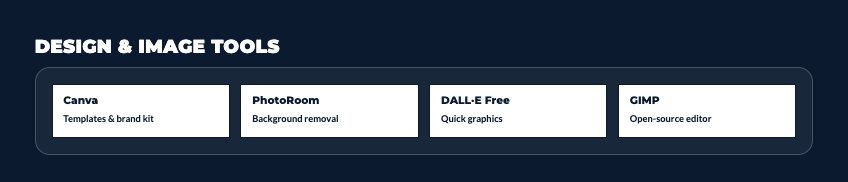
Canva Free
Canva Free is probably the most valuable free tool available. Period.
What’s included:
- 250,000+ free templates
- Magic Write AI for copy generation
- Background remover (limited uses)
- Basic photo editing tools
- Brand kit (1 brand)
- 5GB cloud storage
What you’re missing in Pro:
- Unlimited background removal
- Magic Resize for multi-platform content
- Brand kit for multiple brands
- Premium templates and stock images
Reality: Most solopreneurs can run their entire visual content operation on Canva Free for the first year. I’ve seen people build six-figure businesses without upgrading.
When to upgrade: When you’re hitting background removal limits weekly or need magic resize constantly.
Adobe Express Free
Adobe Express gives you professional Adobe tools without the complexity or cost of full Creative Cloud.
What’s free:
- 2GB storage
- Thousands of templates
- Basic photo editing
- AI-powered remove background (limited)
- Social media and print templates
When to use this over Canva: When you want slightly more control over design elements or need Adobe’s specific aesthetic.
Remove.bg Free
Remove.bg does one thing extremely well – removes backgrounds from images using AI.
Free tier:
- 50 preview-quality images monthly
- Limited to small file sizes
- Low resolution outputs
Strategy: Use this for quick social media graphics where high resolution doesn’t matter. Use Canva’s background remover or Photopea for higher quality needs.
Photopea Free
Photopea is basically Photoshop in your browser. Completely free.
What it does:
- Professional photo editing
- Layer-based editing like Photoshop
- Supports PSD, AI, XCF, Sketch files
- Advanced selection and masking tools
Tradeoff: Steeper learning curve than Canva. Worth it if you need professional editing capability.
Craiyon (formerly DALL-E mini)
Craiyon generates AI images completely free with no limits.
Reality check: The quality is significantly lower than Midjourney or DALL-E 3. But for concept visualization, placeholder images, or just experimenting with ideas, it’s sufficient.
Use it for brainstorming visual concepts, not final production graphics.
I’ve documented the exact system I use to make AI feel structured and human…not chaotic.
You can explore it here → See What’s Inside The AI Blueprint for Solopreneurs
Free AI Video Creation and Editing Tools
Video content performs well but traditionally required expensive software. Not anymore.
CapCut Free
CapCut is the best free video editor, hands down. It’s what most TikTok and Instagram Reels creators use.
What’s included (free):
- Full video editing on mobile and desktop
- AI auto-captions with high accuracy
- Trending effects and transitions
- AI-powered background removal for video
- Text-to-speech
- Beat detection for music sync
- No watermark on exports
What’s missing in free:
- Some premium effects and templates
- Cloud storage for projects
- 4K export in desktop version
Reality: The free version handles 95% of social media video needs. Professional quality outputs with zero cost.
DaVinci Resolve Free
DaVinci Resolve is professional-grade video editing software used in Hollywood productions. The free version is ridiculously powerful.
What’s free:
- Professional timeline editing
- Color correction and grading
- Audio post-production
- Visual effects
- Multi-cam editing
Tradeoff: Steep learning curve. Overkill for social media shorts. Perfect for longer-form content, YouTube videos, or if you’re serious about video quality.
Descript Free Tier
Descript offers limited free access to their text-based video editing.
Free includes:
- 1 video project and 1 audio project per month
- Basic editing capabilities
- Transcription with edits
Strategic use: Use your monthly free project for your most important video. Use CapCut for everything else.
Clipchamp Free (Microsoft)
Clipchamp is Microsoft’s browser-based video editor. Simple, free, decent for basic needs.
Best for:
- Quick social media clips
- Simple edits and trims
- Adding text and transitions
- Screen recording
Not as feature-rich as CapCut, but more accessible for complete beginners.

Free AI Tools for Social Media Management
Managing social media manually is exhausting. These free tools help without costing anything.
Buffer Free
Buffer Free lets you schedule up to 10 posts across three social channels.
What’s included:
- Basic scheduling
- Simple analytics
- Landing page builder
Limitations:
- Only 10 scheduled posts at a time (not per month – total queue)
- Three connected social accounts max
- Basic features only
Strategy: Use Buffer for your three most important platforms. Post manually on others or rotate which accounts are connected based on posting priorities.
Later Free (Instagram focused)
Later gives you more scheduling capacity than Buffer but is more Instagram-centric.
Free tier:
- 10 posts per social profile
- 1 social set (one account per platform)
- Visual Instagram planner
- Basic analytics
Best for: Instagram-heavy solopreneurs who want the visual planning interface.
Meta Business Suite (Free)
Meta Business Suite handles Facebook and Instagram natively – completely free with no limits.
What it does:
- Schedule unlimited posts
- Manage comments and messages
- View analytics and insights
- Create and schedule Stories
- Manage ads if you run them
Why it matters: This is Facebook and Instagram’s official tool. No third-party limits. If you’re primarily on these platforms, you might not need Buffer or Later at all.
LinkedIn Native Scheduling
LinkedIn has built-in scheduling for personal profiles and company pages. Free. No limits.
Just create your post and select “Schedule” instead of posting immediately. That’s it.
TweetDeck/X Pro (Free tier)
TweetDeck (now X Pro) offers enhanced Twitter/X management completely free.
Features:
- Multiple column views
- Scheduled posting
- Advanced search and monitoring
- Team management
Better than managing Twitter from the main app.
Free AI Productivity and Automation Tools
When you’re talking about free AI tools for solopreneurs, automation tools might deliver the biggest ROI – they save hours weekly without any cost.
Zapier Free
Zapier connects your apps with automated workflows. Free tier gives you five single-step Zaps.
Strategic use:
- Auto-save Gmail attachments to Google Drive
- New Facebook leads → Google Sheet
- Instagram posts → automatically tweet them
- Form submissions → email notifications
- Calendar events → task creation
Five Zaps sound limiting, but most solopreneurs only need 3-5 core automations.
Google Workspace Free Tools
Gmail, Docs, Sheets, Drive all have AI features built in now, completely free.
Gmail Smart Compose – AI suggests complete sentences as you type Google Docs voice typing – Hands-free content creation Google Sheets formulas – AI helps you write complex formulas Google Drive search – AI-powered search across all your documents
You’re probably already using these tools. Start leveraging the AI features.
Notion Free
Notion is the all-in-one workspace that replaced multiple tools for many solopreneurs.
Free includes:
- Unlimited pages and blocks
- Basic databases
- 10 guests
- 7-day page history
What’s missing:
- Advanced AI features (Notion AI requires paid plan)
- Unlimited file uploads
- Advanced permissions
Reality: The free version handles project management, notes, content planning, and documentation without issue.
Calendly Free
Calendly eliminates scheduling back-and-forth.
Free version:
- One event type
- One calendar connection
- Basic customization
Limitation: Only one meeting type. If you need different meeting lengths or types, you’ll hit the limit quickly.
Workaround: Use Calendly free for your most common meeting type. Schedule everything else manually or use Google Calendar appointment slots (also free).
Free AI Research and Analysis Tools
Research used to mean hours of manual searching. AI changed that completely.
Perplexity AI Free
Perplexity is an AI search engine that actually cites its sources. It’s better than Google for research questions.
What it does:
- Searches the internet with AI understanding
- Provides sourced answers with citations
- Follows up on your questions conversationally
- Suggests related questions
Free limitations:
- Limited searches daily
- No access to advanced models
- Can’t upload files for analysis
Best use: Replace Google for research questions and fact-checking. The citations alone make it invaluable.
ChatPDF Free
ChatPDF lets you upload PDFs and ask questions about the content.
Free tier:
- 2 PDFs per day
- 120 pages per PDF
- 50 questions per PDF
Use cases:
- Analyzing contracts
- Extracting insights from reports
- Summarizing long documents
- Finding specific information quickly
Google Trends Free
Google Trends shows what people are actually searching for. Completely free, constantly updated.
How to use it:
- Identify trending topics in your niche
- Validate content ideas before creating
- See seasonal patterns in interest
- Compare different keyword options
Underutilized by most solopreneurs but incredibly valuable for content strategy.
Free AI Tools for Customer Service and Communication
Customer service can eat hours daily. These free tools help you scale without hiring.
Tidio Free
Tidio provides basic AI chatbot functionality for your website.
Free includes:
- Live chat widget
- Basic chatbot flows
- 50 conversations monthly
- Email support
Strategy: Use it for FAQs and basic qualification. Route complex questions to you.
ManyChat Free
ManyChat creates chatbots for Facebook Messenger and Instagram DMs.
Free tier:
- 1,000 contacts
- Basic flows and responses
- Limited integrations
Best for: Solopreneurs using Instagram or Facebook for lead generation who need basic automation.
HubSpot Free CRM
HubSpot CRM is legitimately powerful and completely free.
What’s included:
- Unlimited contacts and companies
- Deal pipeline management
- Email tracking
- Meeting scheduling
- Live chat
- Basic automation
- Forms and landing pages
Reality: Most solopreneurs can run their entire customer management on HubSpot Free indefinitely.
Otter.ai Free
Otter.ai transcribes meetings and generates AI summaries.
Free tier:
- 300 monthly transcription minutes
- Real-time transcription
- Basic speaker identification
- Summary generation
Use it for:
- Client calls
- Team meetings
- Content creation from conversations
- Interview transcriptions
300 minutes is roughly 5-6 hours of meetings monthly. Sufficient for most solopreneurs.
Maximizing Free AI Tools: Strategies That Work
Having free tools isn’t enough. You need a system to make them work together.
Building Your Strategic Stack
Here’s a complete free AI stack that handles everything:
Content Creation:
- Writing: ChatGPT Free
- Design: Canva Free
- Video: CapCut Free
Social Media:
- Scheduling: Meta Business Suite + LinkedIn native
- Instagram: Later Free
- Twitter: TweetDeck
Productivity:
- Workspace: Notion Free
- Automation: Zapier Free (5 Zaps)
- Email: Gmail with Smart Compose
- Meetings: Calendly Free
Customer Management:
- CRM: HubSpot Free
- Chat: Tidio Free
- Transcription: Otter.ai Free
Research & Analysis:
- Search: Perplexity AI Free
- Trends: Google Trends
- Documents: ChatPDF Free
Total monthly cost: $0
This stack handles content creation, social media management, customer service, automation, and productivity. Most solopreneurs won’t outgrow this for 6-12 months minimum.
Account Management Strategy
Many free tools limit usage per account. Strategic workaround: use multiple email addresses.
Example:
- Primary Gmail: Business operations, HubSpot, official tools
- Secondary Gmail: Canva, design tools, social media
- Alternate email: Testing tools, experiments
This isn’t cheating – you’re just organizing access strategically. Most tools allow this.
Monthly Limit Planning
Track when your usage limits reset. Then time heavy usage accordingly.
Example:
- Otter.ai resets on the 1st → Schedule important meetings early in month
- Remove.bg gives 50 images monthly → Batch all background removal in one session
- Descript gives 1 project monthly → Use it for your most important video
Planning around limits turns them from restrictions into workflow optimization.
Knowing When to Upgrade
Upgrade to paid tools when free versions cost you money in lost time or opportunity.
Upgrade signals:
- You’re hitting limits weekly and it’s blocking revenue-generating work
- You’re spending hours on workarounds that cost more than the tool
- You’re losing clients or opportunities because of tool limitations
- The tool has become critical and you need reliability guarantees
But “I could use premium features” isn’t a reason to upgrade. “Free limitations are costing me $X monthly in time/opportunity” is.
Limitations and Workarounds for Free AI Tools
Free tools have tradeoffs. Let’s address them honestly.
Usage Caps and Quotas
Most free AI tools limit monthly usage. You gotta work within those constraints or rotate between alternatives.
Strategies:
- Batch work to use limits efficiently
- Rotate between similar free tools (ChatGPT → Claude → Gemini)
- Time usage around refresh cycles
- Use manual methods for low-value tasks, AI for high-value tasks
Feature Restrictions
Premium features are often locked behind paid plans. The question: do you actually need them?
Example: Canva Pro’s Magic Resize is clutch for multi-platform posting. But you can manually resize in Canva Free – it just takes 5 extra minutes per post.
Is 5 minutes worth $13/month? Depends on how many posts you’re creating.
Data Privacy Considerations
Free tools may use your inputs to improve their models. Be smart about what you share.
Don’t put in free tools:
- Client confidential information
- Financial data
- Personal information
- Proprietary business strategies
- Anything you’d want to remain private
Fine for free tools:
- Public social media content
- General educational content
- Non-sensitive customer service responses
- Your own published content
Creative Workarounds
Sometimes using multiple free tools achieves what one paid tool does.
Example: Paid tools like Repurpose.io auto-convert video across platforms. Free alternative:
- Edit video in CapCut
- Export in different aspect ratios manually
- Upload to each platform
- Add platform-specific captions
Takes 20 extra minutes but costs $0 instead of $15/month. Early on, that tradeoff makes sense.
If you’ve been trying to stay consistent while managing everything yourself, this will help.
I put together The AI Blueprint for Solopreneurs – a calm, structured guide that shows you how to use AI to simplify your systems and save time without losing your voice.
👇 Enter your email below to get your free copy.
It’ll be in your inbox within minutes – practical, focused, and built to help you work smarter.
Your Game Plan: Building Your Free AI System This Month
Alright, let’s make this actionable.
You don’t need hundreds of dollars in tools to leverage AI effectively. You need the right free tools used strategically.
Week 1: Foundation
- Set up ChatGPT Free for writing
- Set up Canva Free for design
- Set up CapCut Free if you do video
- Create accounts using organized email addresses
Week 2: Social Media
- Set up Meta Business Suite for FB/IG
- Enable LinkedIn native scheduling
- Add Buffer Free or Later Free for additional platform
- Schedule your first week of content
Week 3: Productivity
- Move notes/planning to Notion Free
- Set up 3-5 critical Zapier automations
- Add Calendly Free for meeting scheduling
- Enable Gmail Smart Compose
Week 4: Customer Management
- Set up HubSpot Free CRM
- Add website chat with Tidio Free
- Connect Otter.ai for meeting transcription
- Test your complete free stack
Your Complete Free Stack Costs: $0/month
Time Investment: 6-8 hours setup
Value Generated: Equivalent to $200-400/month in paid tools
The Sustainable Approach
Start with free tools. Master them. Track what’s working and what’s limiting you.
Upgrade strategically when:
- You’ve maximized the free version
- The limitation costs you money
- You can afford it without stress
- The ROI is clear
Don’t upgrade because you “should” or because someone said you need it. Upgrade when the math makes sense for YOUR business.

Remember This
The biggest advantage isn’t the tools – it’s how you use them.
A solopreneur using free tools strategically will outperform someone with expensive tools used poorly. Every single time.
Your job isn’t to have the best tools. It’s to use the tools you have effectively to grow your business.
Start with free. Master the fundamentals. Let your revenue fund upgrades when they actually make sense.
Here’s My Question For You:
What’s the one free tool you’re going to set up and master this week?
Not five tools. Not a complete transformation. Just one tool that solves one specific problem in your business right now.
Maybe it’s ChatGPT for writing content faster. Maybe it’s Canva for finally creating professional graphics. Maybe it’s HubSpot for organizing your customer chaos.
Pick one. Master it over the next 7 days. See how it changes your workflow.
Then come back and add the next tool.
Build your stack intentionally, one strategic tool at a time.
Your future self – the one running an efficient operation without burning cash on unnecessary subscriptions – is gonna thank you for starting smart.
Now go build something sustainable.