AI Content Calendar Planner: Stop Scrambling for Content Ideas and Start Planning Like a Pro

Imagine waking up on Monday morning with no idea what to post on social media.
You scroll through your phone looking for inspiration. Check what competitors posted. Browse trending topics. Maybe screenshot something interesting. By the time you’ve cobbled together a post, an hour has passed and you still need to do this for the other platforms.
Tomorrow, you’ll do it all over again. And the next day. And the day after that.
This is what reactive content creation looks like – constantly scrambling, never getting ahead, burning mental energy on the same decisions daily.
Now picture a different scenario: You open your content calendar on Monday morning and see the entire week mapped out. Every post idea, every platform, every day. You know exactly what to create because you planned it all in a focused 2-hour session last week using an AI content calendar planner.
No scrambling. No decision fatigue. No wasted time searching for ideas. Just execution.
That’s the shift AI made possible – strategic content planning that used to take a full day now takes 1-2 hours, with better variety, stronger alignment to business goals, and significantly less stress.
In this guide, we’re breaking down how to use AI tools to plan comprehensive content calendars fast, the workflows that keep you consistently posting quality content, and how to avoid the common planning mistakes that lead to abandoned calendars and reactive posting.
If you’re tired of the daily “what should I post?” panic and ready to get ahead of your content, this is your roadmap.
Before you map out your content systems, get clarity on where your business structure actually needs support.
I created The Clarity Compass to help you identify the gap between where you are and the structure your business needs next.
👇 Enter your email below to get it sent to you.
You’ll receive it in your inbox shortly – a simple, grounded guide to help you move forward with confidence.
Why AI Content Calendar Planning Changes Everything
Content calendars aren’t new. What’s new is AI making them actually sustainable for solopreneurs instead of abandoned after two weeks.
The Consistency Challenge
Social media algorithms reward consistency above almost everything else. Post regularly? You get rewarded with reach. Post sporadically? You basically disappear.
The problem: Consistency requires:
- Never-ending content ideas
- Daily creation time
- Sustained creative energy
- Strategic thinking about variety
- Platform-specific adaptation
For a solopreneur managing everything else in their business, maintaining consistency manually is brutal.
What typically happens: Strong consistency for 2-3 weeks. Then a busy period hits. Posting becomes sporadic. Momentum dies. Starting over feels harder than beginning. Most give up or settle for mediocre consistency.
Strategic Thinking vs. Reactive Posting
Reactive posting: “What should I post today?” Strategic planning: “What content moves my audience toward buying?”
Reactive content characteristics:
- No connection between posts
- Random topics based on mood or trends
- Inconsistent messaging
- No clear path to business goals
- Exhausting to maintain
Strategic content characteristics:
- Each post serves a purpose
- Content builds on itself
- Consistent themes and messaging
- Clear connection to offers
- Sustainable because it’s planned
AI helps you shift from reactive to strategic by making planning fast enough to actually do consistently.
Time Compression Effect
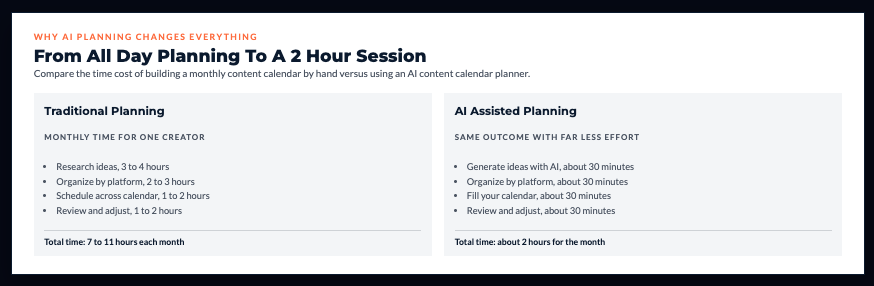
Traditional content calendar planning:
- Research content ideas: 3-4 hours
- Organize by platform: 2-3 hours
- Schedule across calendar: 1-2 hours
- Review and adjust: 1-2 hours Total: 7-11 hours for one month
AI-assisted content calendar planning:
- Generate content ideas with AI: 30 minutes
- Organize by platform: 30 minutes
- Fill calendar: 30 minutes
- Review and adjust: 30 minutes Total: 2 hours for one month
You’re not sacrificing quality for speed. You’re removing the blank-page paralysis and decision-making overhead that consumed most of the time.
Content Variety and Balance
Left to daily decisions, most people default to whatever’s easiest or most comfortable.
In my experience working with solopreneurs: Without planning, they post the same 2-3 content types repeatedly. Educational tips become 80% of content. Engagement posts disappear. Promotional content feels awkward so they avoid it.
A good calendar ensures variety:
- Educational content (build authority)
- Engagement content (build community)
- Promotional content (drive revenue)
- Personal content (build connection)
- Curated content (add value efficiently)
AI helps you distribute these intentionally instead of accidentally posting the same type of content all month.
Reduced Decision Fatigue
Every decision consumes mental energy. “What should I post today?” is a decision you shouldn’t make 365 times yearly.
Decision fatigue reality: By the time you’ve decided what to post daily for a week, you’ve burned creative energy that could’ve gone into creating better content, serving clients, or developing products.
Planning once reduces 30 decisions to 1 planning session. That’s significant cognitive load reduction.
Best AI Content Calendar Planning Tools
Let’s get specific about which tools actually make calendar planning manageable.
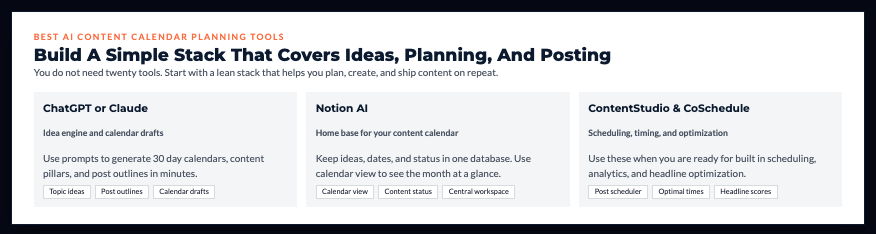
ChatGPT/Claude for Calendar Creation (Free – $20/month)
ChatGPT and Claude are your starting point. They generate comprehensive content calendars from simple prompts.
Prompt that works:
“Create a 30-day content calendar for [your niche]. Target audience: [audience]. Platforms: Instagram, LinkedIn, Twitter. Post frequency: Instagram daily, LinkedIn 3x weekly, Twitter daily.
Content pillars: [pillar 1], [pillar 2], [pillar 3]
Include:
- Specific post topic for each day
- Content type (educational, engagement, promotional, personal)
- Platform-specific format (Reel, carousel, text, etc.)
- Brief description of what the post should cover
Format as table with columns: Date, Platform, Content Type, Topic, Format, Description”
What you get: Complete month of content ideas in 5 minutes.
Notion AI with Calendar Templates ($10/month)
Notion with AI features is powerful for solopreneurs who want planning and organization in one place.
Setup:
- Create content calendar database
- Add properties: Date, Platform, Content Type, Status, Topic
- Use calendar view to see monthly overview
- Use Notion AI to generate ideas directly in database
Advantage: Everything stays in your central workspace. No tool-switching.
ContentStudio AI Planner ($25/month)
ContentStudio is purpose-built for content planning and scheduling.
What it does:
- AI generates topic suggestions
- Discovers trending content in your niche
- Suggests optimal posting times
- Includes scheduling and analytics
- Works across multiple platforms
Best for: Solopreneurs who want all-in-one content planning and posting without building their own system.
CoSchedule Headline Studio ($10/month for basics)
CoSchedule focuses on marketing calendar functionality with AI-optimized content elements.
Features:
- Headline analyzer (AI scores headline effectiveness)
- Marketing calendar with drag-and-drop
- Social media scheduling integration
- Team collaboration features
Use case: If headlines are a weak point or you want marketing-focused calendar tools.
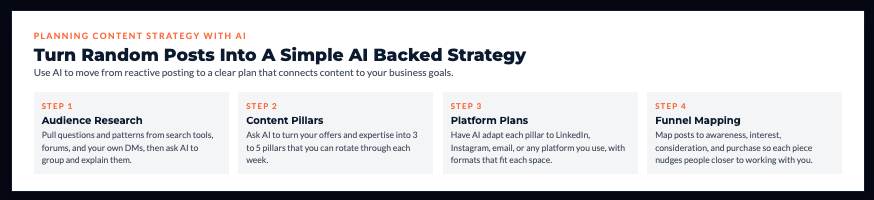
Planning Content Strategy with AI
Tools don’t matter without strategy. Here’s how to build a calendar that actually serves your business.
Audience Research Integration
Before planning content, understand what your audience actually wants.
AI research workflow:
- Ask ChatGPT: “What questions does [target audience] typically have about [topic]?”
- Check AnswerThePublic for real search queries
- Browse Reddit/forums to see actual conversations
- Use SparkToro to understand audience interests
- Feed insights back to AI: “Based on this audience research, what content topics would resonate most?”
You’re planning based on data, not assumptions.
Content Pillar Identification
Content pillars are the 3-5 core themes your content revolves around. They provide structure and prevent random topic selection.
AI prompt for pillar development:
“I help [target audience] achieve [outcome]. My expertise areas are [list 5-7 topics]. Based on this, what should my 3-5 content pillars be? Each pillar should:
- Relate to my expertise
- Interest my target audience
- Support my business goals
- Provide enough variety for regular content”
Example output for business coach:
- Pillar 1: Client acquisition strategies
- Pillar 2: Service delivery and client success
- Pillar 3: Business operations and systems
- Pillar 4: Mindset and entrepreneurial growth
Every piece of content fits into one of these pillars.
Platform-Specific Planning
What works on LinkedIn doesn’t work on TikTok. Your calendar needs platform-specific strategies.
AI planning for each platform:
“Create platform-specific content approaches for:
- LinkedIn (professional audience, B2B focus)
- Instagram (visual-first, lifestyle blend)
- Twitter (quick thoughts, engagement-focused)
Include optimal post types, tone adjustments, and content angles for each.”
You get a framework for adapting your core content pillars to each platform’s culture.
If this section is revealing gaps in your structure, the Clarity Compass will help you see exactly where to focus next.
You can grab it here → Get The Clarity Compass
Content Funnel Mapping
Your content should move people through a journey: awareness → interest → consideration → purchase.
Funnel-aware planning:
- Awareness content (60%): Educational, helpful, no selling
- Interest content (20%): Show your approach, share case studies
- Consideration content (15%): Explain offers, address objections
- Purchase content (5%): Direct calls-to-action, limited offers
Using an AI content calendar planner helps you intentionally distribute content across funnel stages instead of accidentally overloading on one type.
AI helps you see the distribution: “Analyze this content calendar. What percentage of content falls into each funnel stage? How should I adjust?”
Generating Content Ideas with AI
Calendar planning is only as good as your content ideas. Here’s how to generate months of quality topics fast.
Topic Brainstorming Sessions
AI brainstorming prompt:
“Generate 50 content ideas for [niche] targeting [audience]. Include:
- Mix of formats (how-to, lists, myths, case studies, personal stories)
- Range of depths (quick tips to comprehensive guides)
- Variety of content pillars: [list pillars]
- Balance of evergreen and timely topics
Format: Topic title, content type, brief angle/hook”
Time investment: 10 minutes to generate, 20 minutes to review and refine.
You now have 6-7 weeks of content topics to schedule.
Trend Identification
AI tools help you spot emerging topics before they peak.
Workflow:
- Use Google Trends to identify rising searches
- Check Exploding Topics for growing trends
- Paste data into ChatGPT: “Analyze these trends. Which ones fit my [niche]? What content should I create around them?”
- Schedule trend-based content for next 30-60 days
You’re riding trends while they’re building, not after they’ve peaked.
Question-Based Content
Your audience’s questions are your content ideas.
Sources:
- AnswerThePublic (shows questions people search)
- Reddit threads in your niche
- Comments on your existing content
- DMs and emails from audience
- Forum discussions
AI analysis: “Here are 20 questions my audience frequently asks [paste questions]. Turn each into a content topic with a hook and key points to cover.”
Content Series Planning
Series keep people coming back and build momentum.
AI series development:
“Create a 5-part content series about [topic] for [audience]. Each part should:
- Build on the previous
- Stand alone if someone misses earlier parts
- Include action steps
- Lead naturally to my offer: [your offer]
Include series title, individual episode titles, and brief descriptions.”
You get a month of connected content that builds anticipation.
Organizing Multi-Platform Content Calendars
Managing content across multiple platforms requires organization. Here’s how to structure it.
Cross-Platform Strategy
One core idea can become content for every platform.
Example content cascade:
- Core idea: “3 productivity mistakes killing your business”
- LinkedIn: 300-word post with professional framing
- Instagram: Carousel with one mistake per slide
- Twitter: Thread breaking down each mistake
- Email: Newsletter expanding on all three
- YouTube Short: 60-second video on biggest mistake
AI help: “Take this content idea [describe]. Adapt it for LinkedIn, Instagram, Twitter, email, and YouTube Shorts. Adjust tone and format for each platform.”
Posting Frequency Optimization
How often should you post on each platform?
AI recommendation prompt:
“I can dedicate 10 hours weekly to content creation and engagement. Recommend posting frequency for:
- Email newsletter
Consider platform algorithms, audience expectations, and sustainable consistency.”
You get realistic recommendations based on your capacity, not aspirational advice.
Content Format Variety
Within each platform, vary formats to maintain interest.
Instagram variety:
- Static posts
- Carousels
- Reels
- Stories
- Lives
LinkedIn variety:
- Text posts
- Document uploads
- Articles
- Videos
- Polls
Plan format variety into your calendar: “This week: 2 carousels, 3 Reels, 2 Stories highlights.”
AI Tools for Visual Content Calendar Planning
Some people think visually. These tools provide visual calendar interfaces.
Notion Calendar View ($10/month)
Notion databases can display as calendars, giving you month-at-a-glance visibility.
Setup benefits:
- See entire month of planned content
- Color-code by platform or content type
- Drag-and-drop to reschedule
- Click any date to see details
- Filter by status, platform, or pillar
Airtable with AI (Free tier, paid from $20/month)
Airtable is like a powerful spreadsheet-database hybrid with calendar views.
For content planning:
- Create content database with all details
- Calendar view shows scheduled dates
- Linked records connect related content
- Automation triggers reminders
- Integrates with scheduling tools
Worth the complexity if: You’re managing significant content volume or multiple brands.
Trello with Automation (Free tier, $5/month for premium)
Trello uses kanban boards – cards move across columns representing stages.
Content calendar setup:
- Column 1: Ideas
- Column 2: In Progress
- Column 3: Ready to Schedule
- Column 4: Scheduled
- Column 5: Published
Automation: Cards automatically move and notify you when deadlines approach.
Best for: People who think in workflows and stages rather than calendar views.
Batch Content Creation and Calendar Integration
Planning is one thing. Creation is another. Here’s how to connect them effectively.
Batch Planning Sessions
Set recurring calendar time for planning.
Monthly planning session (2 hours):
- Review last month’s performance
- Identify top-performing content
- Use AI to generate next month’s topics
- Fill calendar with planned content
- Schedule creation time for each piece
Weekly planning session (30 minutes):
- Review upcoming week
- Adjust based on current events
- Add any timely content
- Confirm creation timeline
Content Creation Sprints
Don’t create content daily. Batch creation in focused sessions.
Example sprint schedule:
- Monday AM: Write 5 LinkedIn posts
- Tuesday AM: Record 7 Instagram Reels
- Wednesday AM: Design 10 graphics
- Thursday AM: Schedule everything
You’re in creation mode once weekly, not scattered throughout every day.
Template Systems
Build templates for your common content types.
What to template:
- Carousel post structures
- LinkedIn post frameworks
- Email newsletter layouts
- Video scripts
- Caption formulas
Use AI to create templates: “Create a template structure for Instagram educational carousels. Include slide progression, text placement, and design notes.”
Templates plug into your calendar. Instead of “Create Instagram post,” your calendar says “Use Template 3: Problem-Solution-Action carousel.”

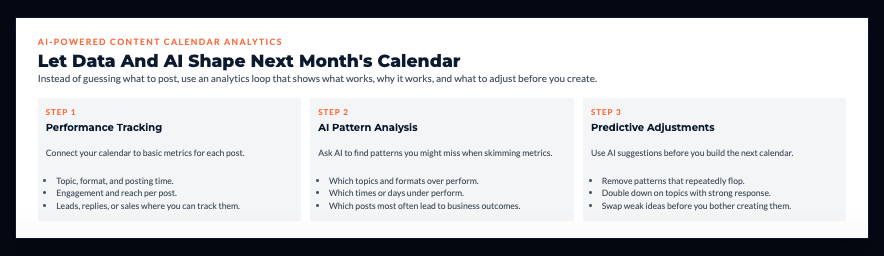
AI-Powered Content Calendar Analytics
Your calendar should improve based on what’s actually working.
Performance Tracking Integration
Connect your calendar to results.
What to track:
- Which topics got highest engagement
- Which formats performed best
- Which posting times drove results
- Which content led to business outcomes (leads, sales)
AI analysis: “Here’s my content calendar [paste] and performance data [paste metrics]. What patterns do you see? What should I do more of? What should I eliminate?”
Topic Resonance Scoring
Not all topics perform equally.
In my experience working with solopreneurs: They’re often surprised by what resonates. The “obvious” winner underperforms. The random experiment takes off.
Use AI to analyze: “Compare engagement across these content topics. Rank them by performance and suggest why each succeeded or failed.”
You plan more of what works, less of what doesn’t.
Predictive Performance
Some AI tools forecast which planned content will perform well before you publish.
Use case: You planned 20 posts for next month. AI analyzes them and flags: “These 3 topics typically underperform for your audience. Consider replacing them.”
You adjust before wasting time creating content that won’t resonate.
Troubleshooting Common Content Calendar Challenges
Even with great planning, challenges emerge. Here’s how to handle them.
Over-Planning Paralysis
The problem: Creating such elaborate calendars that you never execute because it feels overwhelming.
What I’ve seen happen: Solopreneurs spend 10 hours planning a perfect calendar, then burn out before creating any content. The calendar becomes procrastination dressed as productivity.
The fix: Start simple. Plan one week at a time until you build the habit. One week of executed imperfect content beats one month of perfect plans you never implement.
Inflexibility Issues
The problem: Calendar is so rigid that timely opportunities get missed.
The fix: Reserve 20-30% of your calendar for reactive content. Plan the strategic foundation, leave room for spontaneity.
Example: If you post daily on Instagram, plan 5 posts weekly. Leave 2 days for trending topics, timely news, or spontaneous content.
Unrealistic Volume
The problem: Planning content volume you can’t actually create and maintain.
The fix: Use AI to reality-check your plan.
Prompt: “I’m planning to post: Instagram daily, LinkedIn 5x weekly, Twitter 2x daily, email weekly, YouTube weekly. I have 10 hours weekly for content. Is this realistic? What should I adjust?”
AI will tell you that’s 50+ hours of work, not 10. Adjust accordingly.
Content Repetition
The problem: Calendar becomes predictable. Same topics recycled. Audience tunes out.
The fix: Regular calendar audits.
AI audit: “Review this quarter’s content calendar. Identify repetitive topics or patterns. Suggest fresh angles and topics I haven’t covered.”
Quality Versus Quantity
The problem: Maintaining high standards while posting consistently.
The fix: Reduce volume if necessary to maintain quality.
Better to post 3x weekly with excellent content than daily with mediocre content. Consistency matters, but quality matters more.
Use AI to create better content faster so you can maintain both.
Your Game Plan: Build Your First AI-Powered Content Calendar This Week
Let’s make this concrete with a focused action plan.

Monday: Foundation (1 hour)
- Define your 3-5 content pillars
- Identify target audience and key pain points
- Choose 2-3 platforms to focus on
- Set realistic posting frequency
Tuesday: Idea Generation (1.5 hours)
- Use ChatGPT to generate 30-60 content ideas
- Organize by content pillar and type
- Mark which ideas are evergreen vs. timely
- Prioritize based on audience needs
Wednesday: Calendar Building (1.5 hours)
- Choose calendar tool (Notion, Google Sheets, Airtable)
- Create calendar structure with dates and platforms
- Fill in 2 weeks of planned content
- Add notes on format and key points
Thursday: Creation Sprint (2-3 hours)
- Batch-create first week of content
- Use AI to draft copy and generate ideas
- Design graphics or record videos
- Save drafts in organized system
Friday: Scheduling and Review (1 hour)
- Schedule Week 1 content in platforms or tools
- Review Week 2 plan, make adjustments
- Set reminders for creation of Week 2 content
- Celebrate having 7-14 days planned ahead
Total time investment: 7-9 hours Result: 2 weeks of strategic content planned and first week ready to publish
The Calendar That Actually Works
What’s the minimum viable content calendar that keeps you consistent without overwhelming you?
It’s not posting daily across 5 platforms. It’s posting consistently on 2-3 platforms at a frequency you can realistically maintain with quality content.
Starter calendar example:
- Instagram: 4 posts weekly (3 educational, 1 promotional)
- LinkedIn: 2 posts weekly (1 educational, 1 personal/story)
- Email: 1 newsletter weekly
Total: 7 pieces of content weekly. Doable. Sustainable. Enough to build momentum.
Start here. Master it. Then expand if desired.
Remember This
The solopreneurs with the most consistent content presence aren’t necessarily creating better content than you.
They’re using systems that make consistency sustainable instead of trying to create daily through sheer willpower.
AI tools don’t make you a better content creator. They remove the friction that prevented you from being consistent.
Planning isn’t procrastination. It’s the foundation that makes execution possible.
Stop winging it daily. Start planning strategically. Use AI to make planning fast enough to actually do it.
If you want your content rhythm to feel calm and consistent, start by clarifying what your business actually needs next.
I created The Clarity Compass to help you identify the gap between where you are and the structure your business needs next.
👇 Enter your email below to get it sent to you.
You’ll receive it in your inbox shortly – a simple, grounded guide to help you move forward with confidence.
Here’s My Question For You:
What’s the one platform where you’re going to commit to consistent posting for the next 30 days, and what’s your realistic posting frequency?
Not “everywhere” and not “daily.”
One platform. A frequency you can actually maintain with quality.
Use the tools and workflow in this guide to plan that content this week. Get ahead. Experience what it feels like to not scramble for ideas daily.
Then decide if you want to expand to more platforms or increase frequency.
Build the foundation first. Scale later.
Your future self – the one posting consistently without panic or scrambling – is gonna thank you for starting today.
Now go build your content calendar.