AI Social Media Scheduling: The Smart Solopreneur’s Playbook for Staying Visible

Let me paint you a picture that probably feels familiar.
It’s 9:47 PM on a Tuesday. You just finished client work, answered emails, updated your books, and now you’re staring at your phone knowing you “should” post something on Instagram. But you’re exhausted. Your brain is fried. And honestly? You posted yesterday, so maybe you can skip today.
Except you can’t skip. Because the algorithm punishes inconsistency. And your competitors are posting daily. And if you’re not visible, you’re basically invisible.
This is the trap most solopreneurs find themselves in – knowing social media matters but hating the constant pressure to show up.
Here’s what shifted for me: AI social media scheduling isn’t just about posting at predetermined times anymore. We’re talking about intelligent systems that learn your audience, predict optimal engagement windows, and maintain your presence while you’re actually running your business.
This isn’t your grandfather’s social media calendar. This is adaptive, learning technology that gets smarter the more you use it.
In this guide, I’m gonna walk you through exactly how modern AI scheduling works, which tools deliver real value, and how to set up a system that keeps you visible without burning you out.
If you’ve been trying to stay consistent while managing everything yourself, this will help.
I put together The AI Blueprint for Solopreneurs – a calm, structured guide that shows you how to use AI to simplify your systems and save time without losing your voice.
👇 Enter your email below to get your free copy.
It’ll be in your inbox within minutes – practical, focused, and built to help you work smarter.
Understanding AI Social Media Scheduling (And Why It’s Different)
Traditional scheduling is manual. You pick Tuesday at 10 AM, queue up a post, and it publishes then. Every week, same time, regardless of whether your audience is actually online or engaged at that moment.
It’s better than posting manually because at least you’re consistent. But it’s not smart.
AI scheduling analyzes your data continuously. It tracks when your specific audience engages most, which content types perform best at different times, how engagement patterns shift seasonally, and what’s working in your niche. Then it makes recommendations – or automatically adjusts – based on that intelligence.
Maybe Tuesday at 10 AM used to work great, but your audience has shifted to engaging more on Wednesday mornings. AI catches that and adjusts. Manual scheduling doesn’t.
How AI Actually Learns Your Audience
Machine learning algorithms track every post you publish – timing, content type, topic, format, hashtags. Then they correlate that with engagement data – likes, comments, shares, saves, clicks, profile visits.
Over time, patterns emerge. Posts about X topic get 40% more engagement than posts about Y. Carousel posts outperform single images by 25%. Your audience engages 60% more between 8-9 AM than between 5-6 PM.
The AI builds a model of what works for YOUR specific audience. Not generic “best times to post” advice – actual data from your account showing what drives results.
First month? The recommendations might be hit or miss because there’s limited data. Three months in? The system knows your audience better than you do. That’s when things get interesting.
The Real Cost of Manual Posting
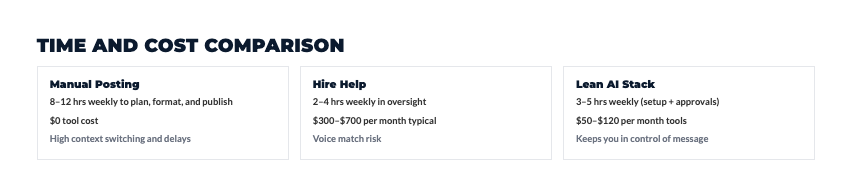
Let’s run the actual numbers because most solopreneurs underestimate this cost.
Manual posting workflow per post:
- Find/create content: 15-20 minutes
- Write caption: 10-15 minutes
- Choose hashtags: 5-10 minutes
- Format for platform: 5 minutes
- Decide when to post: 5 minutes
- Actually post it: 2 minutes
Total: 42-57 minutes per post.
If you’re posting once daily across three platforms, that’s 2-3 hours daily. Every. Single. Day.
At a $100/hour target rate, that’s $200-300 in opportunity cost daily, or $6,000-9,000 monthly.
AI scheduling cuts that to 3-4 hours weekly for the same output. You’re reclaiming 10-15 hours weekly. That’s $4,000-6,000 monthly in recovered productive time.
For tools costing $10-30 monthly? That ROI is crazy.
Top AI Social Media Scheduling Tools Worth Your Money
Let’s cut through the noise. These are the tools actually delivering value in 2025.
Buffer with AI Assistant ($6-12/month)
Buffer is stupid simple to use. Even if you’re not tech-savvy, you’ll figure it out in 10 minutes.
The AI Assistant does three things really well:
- Smart Queue – Dump content in, and Buffer distributes it across optimal times automatically
- Optimal Timing Suggestions – Shows predicted engagement and suggests better timing
- Content Rephrasing – Adapts one caption for different platforms automatically
Start at $6/month for essentials, $12/month for full AI features. Best for solopreneurs managing 3-5 accounts who want simplicity.
Later’s Predictive Analytics ($18/month)
Later started as Instagram-focused but now handles all major platforms. The visual planning interface is the best in the business – you see exactly how your feed looks before posting.
The AI predictive analytics forecast which content will perform best when. After 2-3 months, the recommendations get scary accurate.
The mobile app is excellent, which matters when you’re approving content on the go. Best for Instagram-heavy solopreneurs in visual niches.
Metricool’s Intelligent Scheduler ($18/month)
Metricool combines scheduling with deep analytics. The AI doesn’t just schedule – it analyzes performance and recommends content adjustments before you publish.
Low predicted engagement? Metricool suggests rewriting the caption or adjusting timing before you commit.
The cross-platform analytics show which platforms drive actual business results (traffic, leads, sales) versus just engagement. Best for analytical solopreneurs who optimize based on data.
SocialBee’s Category System ($29/month)
SocialBee uses content categories – educational, promotional, engagement – and the AI automatically rotates content from different buckets to maintain variety.
The evergreen content rotation is powerful. Old posts that performed well get automatically reshared when AI predicts they’ll perform well again. Captions get slightly varied so it doesn’t look like straight reposting.
Best for solopreneurs with evergreen content libraries they want to maximize.
Publer’s Multi-Platform Adaptation ($12/month)
Publer excels at content variation. Write one core message, and the AI creates platform-specific versions automatically.
LinkedIn gets professional tone and longer format. Instagram gets emojis and line breaks. Twitter gets condensed to 280 characters with strategic hashtags.
Probably the best bang-for-buck option for solopreneurs managing multiple platforms efficiently.

Setting Up Your AI Scheduling System (The Right Way)
Tools are useless without proper setup. Here’s how to build a system that actually works.
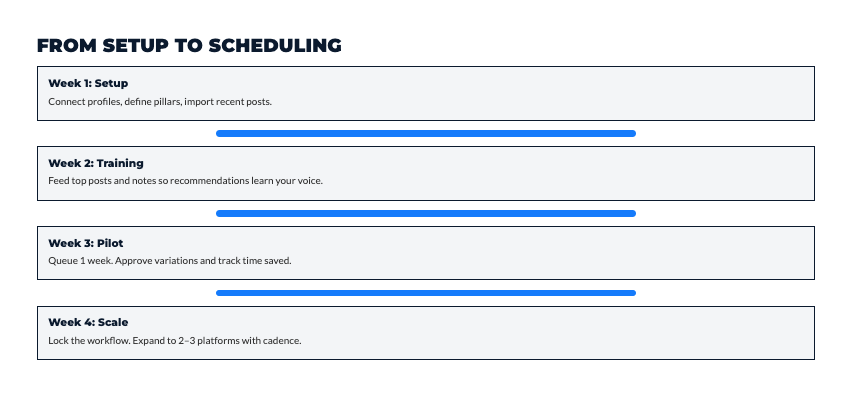
Week 1: Foundation Setup
Connect your accounts (30-45 minutes)
- Create your scheduling tool account
- Authenticate each social platform
- Grant necessary permissions
- Verify connections with test posts
Pro tip: Instagram Business accounts work better than personal accounts for scheduling. Facebook Pages require admin access. LinkedIn Company Pages need separate authorization.
Define posting frequency Start conservative:
- Instagram: 4-7 posts weekly + daily Stories
- LinkedIn: 3-5 posts weekly
- Twitter: 3-5 posts daily
- Facebook: 3-5 posts weekly
It’s easier to increase frequency than maintain an unsustainable pace.
Week 2: Training the AI
This is where understanding how to leverage AI social media scheduling really starts paying off – teaching the system your brand helps it maintain your voice automatically.
Set brand voice guidelines:
- Tone (professional, casual, humorous, inspirational)
- Vocabulary level (technical vs. accessible)
- Persona (expert, peer, mentor)
- Topics to emphasize or avoid
- Formatting preferences (emojis, hashtag placement, line breaks)
Provide 5-10 example posts that perfectly capture your voice. Tell the AI to match that style. Update these as your brand evolves.
Building Your Content Library
AI schedulers work best when they have content to optimize distribution for.
Initial batch creation:
- Create 20-30 posts across different categories
- Upload without specific scheduling
- Let AI suggest optimal distribution across 2-4 weeks
- Review, adjust, approve
- Repeat before your library runs low
Aim to stay 2-4 weeks ahead of your schedule. That buffer handles unexpected busy periods without your social presence dying.
I’ve documented the exact system I use to make AI feel structured and human…not chaotic.
You can explore it here → See What’s Inside The AI Blueprint for Solopreneurs
AI-Powered Timing and Analytics That Actually Matter
This is where AI scheduling separates from basic calendar tools.
How AI Determines Optimal Posting Times
AI tracks multiple data points:
- Historical engagement – when your posts got the most interaction
- Follower activity patterns – when your audience is actively scrolling
- Platform-specific trends – general engagement patterns for your niche
- Content type performance – video vs. carousels vs. static images
- Day of week patterns – weekday vs. weekend performance
The AI weights these factors and recommends posting windows with highest probability of engagement.
Platform-Specific Timing Strategies
Optimal times vary dramatically by platform:
Instagram: Early morning (6-8 AM) and evening (7-9 PM) when people commute or relax. Lunch break (12-1 PM) also strong.
LinkedIn: Business hours dominate. 8 AM, 12 PM, and 5 PM peak times.
Twitter: Consistent throughout day. Slight spikes at 9 AM, 12 PM, 6 PM.
Facebook: Evenings (7-9 PM) and weekends when people have leisure time.
TikTok: Late evening (7-11 PM) when younger audiences scroll freely.
AI tools understand these patterns and adjust recommendations automatically. You’re not manually managing five different strategies.

Metrics That Actually Drive Business
Stop obsessing over vanity metrics. Track what matters:
Engagement rate – Percentage of audience that interacts (not just total engagement) Click-through rate – How often content drives traffic to your site Conversion rate – How often social traffic becomes leads or customers Best performing content – What formats and topics resonate most
AI analytics surface these automatically. You see what’s working without manually building reports.
Creating Content at Scale Without Losing Quality
The best AI schedulers help you create efficiently, not just schedule.
AI Caption Generation Built-In
Most modern tools include writing assistance directly in the scheduling interface.
Buffer’s AI Assistant rewrites captions for different tones (professional, casual, humorous) with one click.
Later’s Caption Writer is tuned for Instagram – knows that first line matters most, that questions drive comments.
The workflow: AI generates draft → you customize with your voice → schedule with optimized timing. Time per post drops from 20-30 minutes to 5-10 minutes.
Multi-Platform Content Adaptation
Creating one post and publishing everywhere is lazy and leaves results on the table.
Smart cross-posting adapts content contextually:
- LinkedIn: Professional, 200-300 words, thought leadership framing
- Instagram: Casual, line breaks, emojis, storytelling approach
- Twitter: Punchy, 250-280 characters, strategic hashtags
- Facebook: Middle-ground tone, personal storytelling
Publer and SocialBee excel at this. Same message, different executions.
Batch Creation Workflows
Most successful solopreneurs work in batches – creating multiple posts in one focused session rather than daily.
Typical workflow:
- Block 2-3 hours for content creation
- Generate 20-30 posts using AI assistance
- Upload to scheduler in bulk
- Let AI suggest optimal distribution across 2-4 weeks
- Review and approve
- Repeat before content runs out
You’re in creation mode weekly or biweekly instead of daily. That focused time is way more productive.
Maintaining Authenticity While Automating
Here’s the tension: automation makes social media manageable, but over-automation makes you seem robotic.
What to Schedule vs. What to Post Live
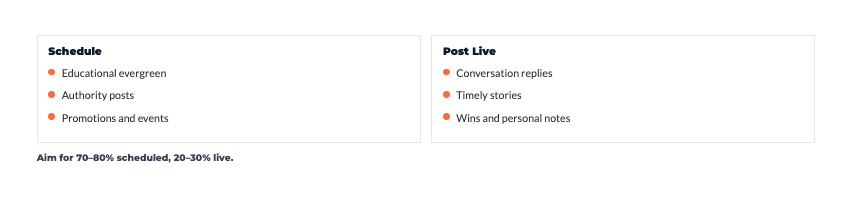
Schedule this:
- Educational content (tips, how-tos, insights)
- Promotional content (offers, products, services)
- Evergreen content (foundational concepts)
- Curated content (industry news)
Post in real-time:
- Breaking news commentary
- Personal updates and behind-the-scenes
- Responses to trending topics
- Time-sensitive announcements
- Spontaneous thoughts
Most successful solopreneurs land around 70-80% scheduled, 20-30% real-time. That balance maintains consistency while preserving authenticity.
Daily Engagement Strategy
Scheduling content doesn’t mean scheduling engagement. These require human response:
15-20 minutes morning and evening:
- Respond to comments personally
- Address DMs authentically
- Engage with other accounts in your niche
- Jump into relevant conversations
Scheduled posts maintain visibility. Real-time engagement builds relationships. You need both.
Quality Control Checklist
Before approving scheduled content:
- Does this sound like something I’d actually say?
- Would someone who knows me recognize this as mine?
- Is there a more authentic way to express this?
- Does this add value or just fill space?
- Would I want to read this?
If you can’t answer yes to all five, keep editing. AI gives you the skeleton – you add the soul.
Troubleshooting Common Challenges
Even the best tools have issues. Here’s how to solve them.
Time Zone Confusion
Problem: You’re scheduling in one timezone but targeting audiences in another.
Solution:
- Set “home timezone” in settings and don’t change it
- Use “audience timezone” features that post based on where followers are
- Test posts after connecting accounts to verify settings
Platform Policy Compliance
Each network has automation rules. Violate them, risk account restrictions.
Instagram: Use only approved partners (Buffer, Later, Hootsuite) LinkedIn: Scheduling posts is fine. Automated engagement (auto-liking/commenting) is not Twitter: Scheduling allowed. Aggressive automation that manipulates engagement is restricted
Check current policies before using tools. Rules change frequently.
Over-Scheduling Risks
More content doesn’t equal better results. Too much causes audience fatigue.
Warning signs:
- Engagement rate declining despite consistent posting
- Follower growth slowing
- Comments becoming less frequent
Solution: Start conservative. Track engagement rate, not just total engagement. Quality beats quantity always.
Budget Optimization
Most solopreneurs overpay for features they don’t use.
Strategy:
- Start with free versions (Buffer, Later have free tiers)
- Identify features you actually need vs. want
- Upgrade only when free versions limit workflow
- Audit subscriptions quarterly
- Cancel tools you’re not actively using
Most solopreneurs need basic scheduling, simple analytics, 3-5 connected accounts. That’s $10-20/month, not $100+.
If you’ve been trying to stay consistent while managing everything yourself, this will help.
I put together The AI Blueprint for Solopreneurs – a calm, structured guide that shows you how to use AI to simplify your systems and save time without losing your voice.
👇 Enter your email below to get your free copy.
It’ll be in your inbox within minutes – practical, focused, and built to help you work smarter.
Your Game Plan: Building a Scheduling System That Actually Sticks
Alright, let me bring this home with what actually matters.
AI social media scheduling isn’t about posting more. It’s about maintaining consistent visibility without sacrificing your sanity or your business.
The solopreneurs winning with social media aren’t posting 10 times daily across every platform. They’re the ones who built sustainable systems that keep them visible while they’re actually running their businesses.
Your 30-Day Implementation Plan:
Week 1: Foundation
- Pick ONE scheduling tool based on your platform and budget
- Connect your 2-3 most important accounts
- Set up basic brand voice guidelines
- Create 10-15 posts to start your library
Week 2: Optimization
- Let AI analyze your posting history
- Review optimal timing recommendations
- Schedule your posts across next 2 weeks
- Start noticing what AI suggests vs. what you’d choose manually
Week 3: Refinement
- Review performance of AI-scheduled content
- Adjust content categories if needed
- Create another batch of 10-15 posts
- Start building evergreen content library
Week 4: Evaluation
- Calculate time saved vs. manual posting
- Review engagement rates and business metrics
- Decide if this tool works or try a different one
- Plan next month’s strategy based on results
That’s it. Don’t try to master every feature immediately. Don’t connect every account day one. Don’t schedule three months of content in your first week.
Start small. One platform. One tool. Two weeks of content. See how it feels. See what results you get. Then expand strategically.

The Balance You’re Looking For:
- 70-80% scheduled content (educational, promotional, evergreen)
- 20-30% real-time posts (spontaneous, timely, personal)
- 15-20 minutes daily for engagement (comments, DMs, relationships)
- 2-3 hours weekly for content creation and scheduling
That’s sustainable. That maintains visibility without consuming your life.
Remember These Truths:
AI scheduling saves time. It doesn’t replace your strategic thinking or authentic voice.
Consistency matters more than perfection. Better to post good content regularly than perfect content sporadically.
Engagement can’t be fully automated. Comments, DMs, and relationship-building require your personal attention.
Every tool has a learning curve. Give it 30 days before deciding if it works.
Your audience wants to connect with YOU. AI helps you show up consistently, but you’re still the one building relationships.
Here’s My Question For You:
What’s the one thing keeping you from scheduling content consistently right now?
Is it the overwhelm of choosing a tool? Uncertainty about what content to create? Fear that automation makes you seem inauthentic? Just not knowing where to start?
Identify that one barrier. Then tackle just that barrier this week. Not all barriers. Just one.
Maybe that means trying Buffer’s free plan for 7 days. Maybe it means creating 10 posts this weekend. Maybe it means giving yourself permission to schedule without guilt.
One barrier. One week. Then reassess.
The Bottom Line:
You don’t need perfect. You need sustainable.
You don’t need to be on every platform. You need consistency on platforms that matter to your business.
You don’t need the most expensive tools. You need tools you’ll actually use regularly.
You don’t need to automate everything. You need to automate the mechanical stuff so you can be present for the human stuff.
Build a system that serves your business without consuming your life. That’s the whole point of AI scheduling.
Start this week. One tool, one platform, two weeks of content. See what happens.
Your future self – the one maintaining consistent social presence without feeling chained to their phone – is gonna thank you for starting today.
Now go build something sustainable.