AI Voice Generator for Solopreneurs: Create Audio Content Without Recording Yourself

Picture this common scenario.
A solopreneur knows they should be creating audio content. Podcasts are huge. Audiobooks are growing. Video content needs voiceovers. But every time they sit down to record, something gets in the way.
Maybe they hate how their voice sounds on recordings. Maybe they don’t have proper equipment and the audio quality is terrible. Maybe they stumble over words and waste hours recording and re-recording the same section. Maybe they just feel awkward talking to a microphone.
So they skip audio content entirely, even though they know it’s leaving money on the table.
Here’s what changed: AI voice generators that sound natural enough that most people can’t tell the difference from a real person. You write your script, pick a voice, and get professional-quality audio in minutes. No recording equipment. No multiple takes. No editing out every “um” and “uh.”
This isn’t robot voices from 2010. We’re talking about AI that captures emotion, adjusts pacing, and sounds genuinely human. And it’s accessible to solopreneurs at prices that actually make sense.
In this guide, we’re breaking down why audio content matters, which AI voice generator for solopreneurs delivers the best results, and how to create everything from podcasts to audiobooks without ever pressing record.
Before you explore the tools, get the clarity you need to choose the right audio strategy for your business.
I created The Clarity Compass to help you identify the gap between where you are and the structure your business needs next.
👇 Enter your email below to get it sent to you.
You’ll receive it in your inbox shortly – a simple, grounded guide to help you move forward with confidence.
Why AI Voice Generators Matter for Solopreneurs
Audio content isn’t optional anymore if you want to reach people where they consume content. People listen while commuting, working out, doing chores, walking the dog. That’s attention you can’t capture with text or video alone.
The Audio Content Opportunity
Audio consumption is exploding across every platform. Podcasts hit 464 million listeners globally in 2024. YouTube added podcast support. LinkedIn now prioritizes audio posts. TikTok and Instagram push audio content harder than static posts.
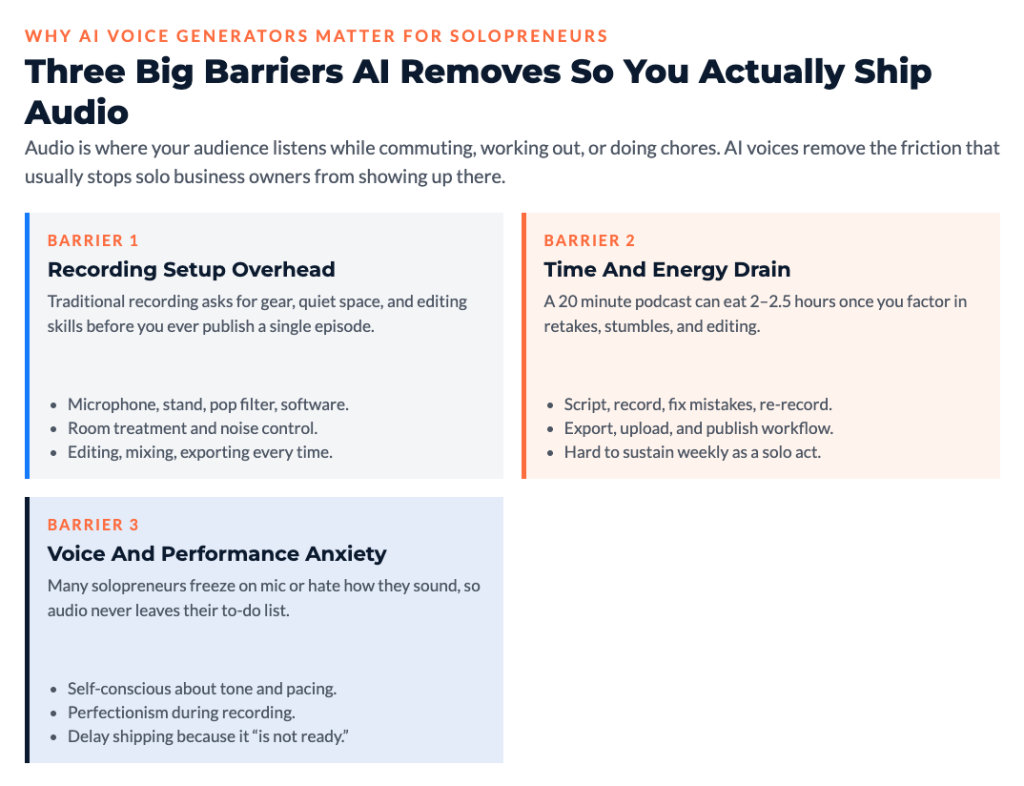
But here’s the challenge: most solopreneurs don’t create audio because recording feels like a huge barrier.
Recording Barrier Elimination
Traditional audio creation requires:
- Decent microphone ($100-300)
- Recording software and learning curve
- Quiet recording space
- Audio editing skills
- Multiple takes to get it right
- Comfort speaking on mic
That’s a lot of friction. AI voice generators remove all of it. You need text and a $10-50/month subscription. That’s it.
Time Efficiency Advantage
Recording a 20-minute podcast episode manually might take:
- 30 minutes writing script or outline
- 45-60 minutes recording (including mistakes and retakes)
- 30-45 minutes editing
- Total: 2-2.5 hours
With AI voices:
- 30 minutes writing script
- 5 minutes generating audio
- 10-15 minutes review and adjustments
- Total: 45-50 minutes
You just got 60-75 minutes back. Every episode. That adds up fast.
If this is sparking ideas, the Clarity Compass will help you see exactly where audio fits in your business.
You can grab it here → Get The Clarity Compass
Cost Savings Reality
Professional voice actors charge $100-300 per finished hour of audio. An audiobook that’s 6 hours long costs $600-1,800 just for narration. A weekly podcast for a year (52 episodes averaging 20 minutes each) would cost $1,700-5,200 in voice actor fees.
AI voice tools cost $10-100/month with unlimited generation. You break even after producing about 2-3 hours of content monthly.
Editing Flexibility
Here’s where AI voices get really powerful. Made a mistake in your script? Don’t re-record. Just edit the text and regenerate that section.
Need to update content with new information? Change a few paragraphs and regenerate. With traditional recording, updating means re-recording entire sections and trying to match the original audio quality and energy level.
Voice Anxiety Solution
In my experience working with solopreneurs, voice anxiety is real and kills audio content plans. People hate how they sound recorded. They get self-conscious. They freeze up on mic.
AI voices eliminate that completely. You’re writing, which most people are comfortable with. No performance anxiety. No cringing at your own voice. Just professional audio from text.
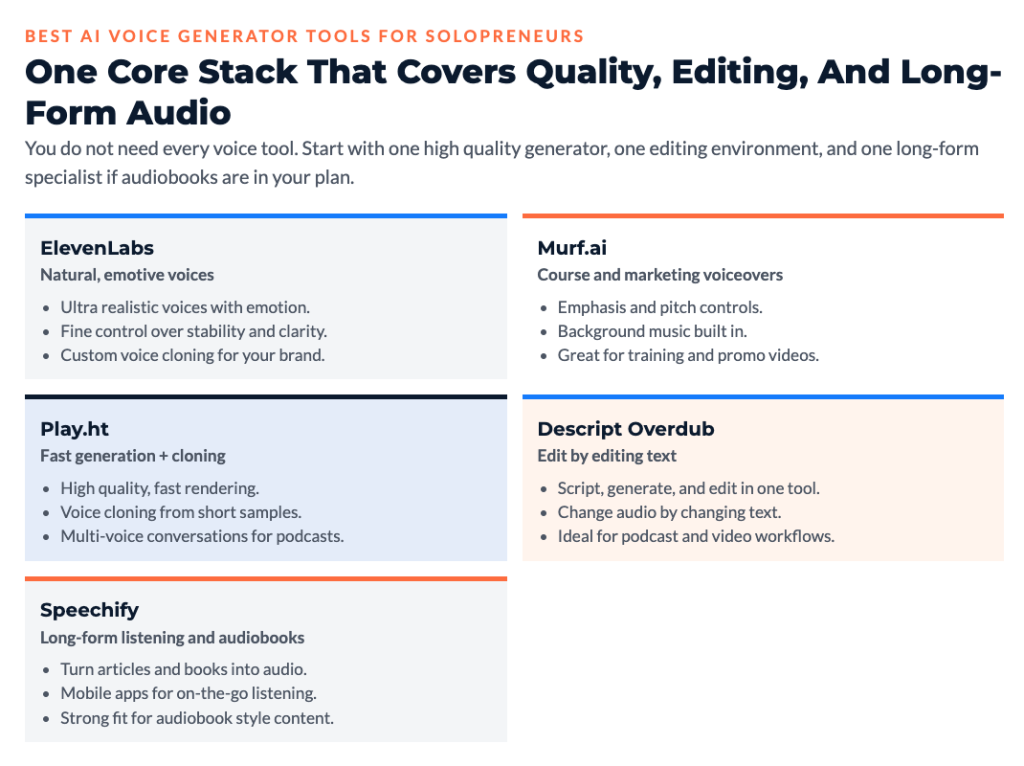
Best AI Voice Generator Tools for Solopreneurs
Let’s talk specific tools. These are the ones that actually sound natural enough to use for professional content.
ElevenLabs ($5-$330/month)
ElevenLabs is currently the industry leader for natural-sounding AI voices. The quality gap between their voices and competitors is noticeable.
What you get:
- Voices that sound genuinely human with emotional range
- Custom voice cloning (create an AI version of your voice)
- Multiple languages and accents
- Fine control over stability and clarity
- Real-time generation
Pricing:
- Free tier: 10,000 characters monthly (about 10 minutes of audio)
- Starter: $5/month for 30,000 characters (30 minutes)
- Creator: $22/month for 100,000 characters (100 minutes)
- Pro: $99/month for 500,000 characters (500 minutes)
Best for: Solopreneurs serious about audio content who want the highest quality AI voices available.
Murf.ai ($19-$75/month)
Murf offers professional voiceovers with good control over emphasis and pacing.
Key features:
- 120+ voices across 20 languages
- Emphasis and pitch control
- Background music library
- Collaboration features
- Video voiceover integration
Pricing:
- Free tier: 10 minutes of voice generation
- Basic: $19/month for 2 hours
- Pro: $26/month for 4 hours
- Enterprise: $75/month for 8 hours
Best for: Solopreneurs creating marketing videos, courses, or presentations who need solid quality at reasonable prices.
Play.ht ($31-$99/month)
Play.ht delivers high-quality voices with fast generation and voice cloning capabilities.
What stands out:
- Real-time voice generation
- Custom voice cloning from 30 seconds of audio
- Ultra-realistic voices
- API access for automation
- Multi-voice conversations
Best for: Podcasters who want to create multi-voice conversations or need custom voice cloning.
Descript Overdub ($12-$30/month)
Descript integrates AI voice generation with their text-based audio and video editor. You edit by editing text, which is perfect for audio content creation.
Why it’s different:
- Voice generation built into full editing platform
- Create your own voice clone
- Edit audio by editing transcript
- Video editing included
- Screen recording built in
Best for: Solopreneurs who need both voice generation and editing in one tool. Especially valuable for podcast and video creators.
Speechify ($29/month or $99/year)
Speechify focuses on converting written content to audio, particularly for accessibility and consumption.
Primary use:
- Converting articles and documents to audio
- Audiobook creation
- Accessibility features
- Mobile app for listening on the go
Best for: Converting existing written content to audio formats rather than creating original audio content.
Creating Podcast Content with AI Voices
Podcasts are one of the best uses for AI voices because the format is naturally more forgiving and the bar for “perfect” audio is lower than something like an audiobook.
Podcast Episode Generation
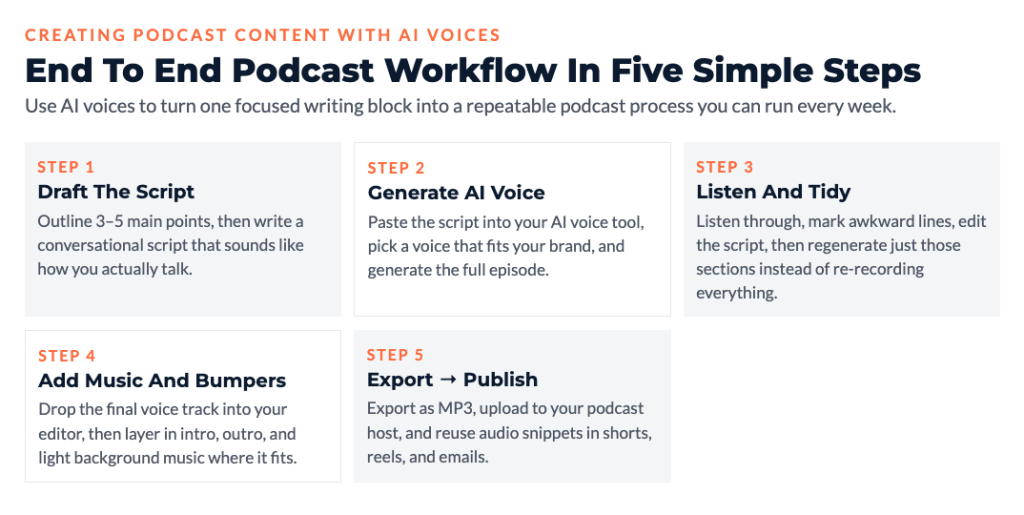
The basic workflow is simple:
- Write your episode script (or outline with key points)
- Choose your AI voice
- Generate the audio
- Add intro/outro music
- Export and publish
What typically happens with solopreneurs new to podcasting: they overthink it. They want perfect scripts before starting. But here’s the reality – you can write conversationally, generate audio, listen to it, adjust the script where it sounds awkward, and regenerate. The iteration is fast.
Interview Format Creation
You can create interview-style podcasts with multiple AI voices. Pick two different voices (one as “host,” one as “guest”), write the dialogue, and generate.
Important note: Be transparent about this. Don’t present AI-generated interviews as real conversations. But for educational content, explainer formats, or storytelling, multiple voices work great.
Intro and Outro Production
AI voices are perfect for consistent podcast intros and outros. Record once, use forever. Every episode has the same professional opening instead of you recording it slightly different each time.
Pro tip: Keep these short. 10-15 seconds of intro is plenty. Get to content fast.
Ad Read Generation
If you’ve got sponsors or promote your own products, AI voices can generate those reads consistently.
Some platforms require disclosure that voices are AI-generated for advertising content. Check platform policies before using AI for promotional reads.
AI Voiceovers for Video Content
Video content needs voiceovers, and AI voices handle this better than most solopreneurs recording themselves.
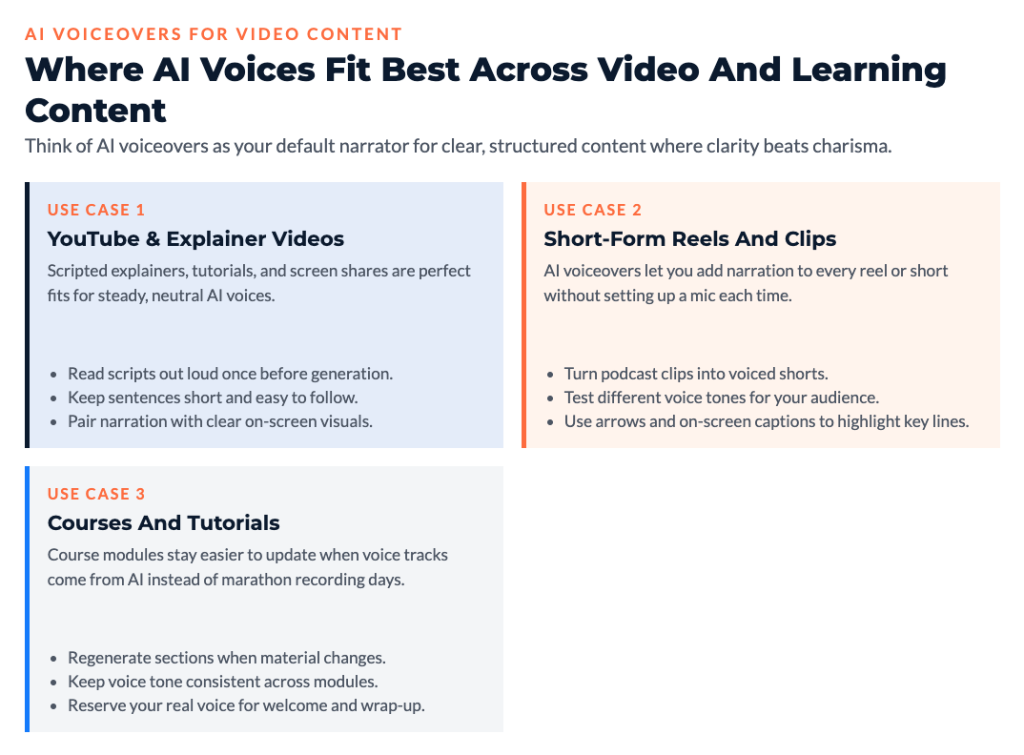
YouTube Video Narration
Educational YouTube content, tutorials, explainers – these all work well with AI narration.
The key is writing scripts that sound natural when spoken. Read your script out loud before generating. If it sounds awkward when you read it, it’ll sound awkward when AI reads it.
Social Media Video Voices
Short-form video (Reels, TikToks, YouTube Shorts) often performs better with voiceover than text-on-screen. AI voices let you add narration to every video without recording.
Strategic note: Test different voice styles. Some audiences respond better to energetic voices, others prefer calm and clear. A/B test and let data decide.
Explainer Video Production
Product demos, software tutorials, concept explanations – AI voices work great for these because the focus is on clarity, not personality.
Pick a voice that sounds professional and trustworthy. Avoid anything too dramatic or stylized. Clear and neutral wins for educational content.
Tutorial and Course Content
Creating online courses with AI voices scales better than recording yourself. You can update content easily by editing text and regenerating, rather than re-recording entire lessons.
For course creators: This is a game changer. Updates don’t require re-filming or matching old audio quality. Just edit the script and regenerate the section.
Creating Audiobooks and Long-Form Audio
Audiobooks used to require hiring professional narrators. AI voices made this accessible to anyone with written content.
Book Narration
If you’ve written a book, turning it into an audiobook is now realistic. Tools like Speechify and ElevenLabs handle long-form content well.
Process:
- Format your book text with proper breaks and punctuation
- Split into chapters for easier management
- Generate each chapter with consistent voice
- Add chapter markers
- Export final audio files
A 50,000-word book becomes about 5.5 hours of audio. At traditional voice actor rates ($100-300/hour), that’s $550-1,650. With AI voices, it’s your monthly subscription cost regardless of length.
Blog Post Audio Versions
Adding audio versions of blog posts serves people who prefer listening. It also increases time on site and gives people another way to consume your content.
Simple workflow:
- Copy blog post text
- Paste into AI voice tool
- Generate audio
- Embed on blog post or link to audio version
Some solopreneurs create entire audio feeds of their blog content, essentially turning their blog into a podcast automatically.
Lead Magnet Audio Versions
Your PDF guides and lead magnets can become audio downloads. This differentiates your offer and serves people who prefer audio learning.
Practical example: A 3,000-word guide becomes a 15-20 minute audio file. Offer both PDF and audio versions. Some people will appreciate the option and it costs you nothing extra to provide.

Voice Cloning and Custom AI Voices
Voice cloning lets you create an AI version of your actual voice. This is where the technology gets really interesting for personal branding.
Personal Voice Cloning
ElevenLabs and Play.ht both offer voice cloning. You record yourself reading a script for 5-10 minutes, upload it, and the AI creates a voice model that sounds like you.
Use cases:
- Scale content creation using “your” voice
- Update old content without re-recording
- Create content when you’re sick or traveling
- Maintain voice consistency across all audio
Ethical consideration: Always disclose when you’re using an AI version of your voice, especially in content where authenticity matters to your audience.
Brand Voice Consistency
Instead of cloning your voice, you can pick an AI voice and use it consistently across all content. This becomes your brand’s audio signature.
Strategic benefit: People recognize the voice and associate it with your brand. Consistency builds familiarity and trust.
Voice Cloning Process
The typical process for creating a custom voice:
- Record 5-10 minutes of clear speech
- Upload to platform
- AI trains on your voice patterns
- Test and refine if needed
- Use your cloned voice for content
Quality matters here. Record in a quiet space with decent audio. The better your source audio, the better your cloned voice sounds.
Optimizing AI Voice Output Quality
AI voices sound good by default, but you can make them sound great with proper script formatting and settings.
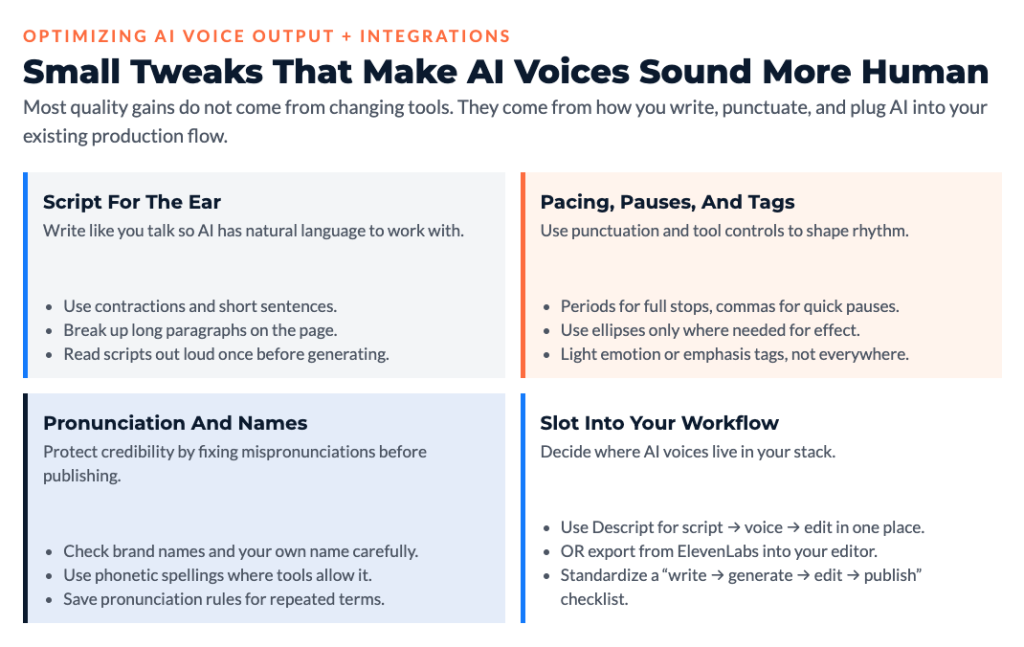
Script Formatting for AI
Write like people actually talk, not like formal writing:
- Use contractions (it’s, don’t, you’ll)
- Keep sentences short and clear
- Break up long paragraphs
- Use conversational language
- Avoid complex sentence structures
Bad: “It is important to note that one should not, under any circumstances, attempt to…” Good: “Don’t try to do this. Here’s why…”
Punctuation for Pacing
Punctuation controls how AI voices deliver content:
- Periods create full stops (longer pauses)
- Commas create brief pauses
- Question marks add upward inflection
- Exclamation points add emphasis
- Ellipses (…) create dramatic pauses
Use these strategically to control pacing and create natural rhythm.
Phonetic Spelling Techniques
AI voices sometimes mispronounce names, technical terms, or acronyms. Fix this with phonetic spelling:
- “SQL” might be read as “sequel” or “S-Q-L” depending on your preference
- “Nike” could be “NYE-kee” or “NICK-ee”
- Names might need phonetic guidance
Most tools let you add pronunciation guides or spell things phonetically in your script.
Emotion and Emphasis Tags
Some tools (particularly ElevenLabs and Murf) let you control:
- Emphasis on specific words (make them louder or more pronounced)
- Emotional tone (excited, calm, serious)
- Speaking pace for sections
- Pitch variations
Use these features but don’t overdo it. Natural sounding voice wins over overly dramatic voice.
Background Music Integration
AI voice plus background music elevates production quality significantly. Most podcast and video platforms make this easy:
- Keep music 10-15db lower than voice
- Use music that matches content tone
- Fade music in during voice pauses
- Don’t let music distract from words
Free music sources: YouTube Audio Library, Pixabay, Free Music Archive (check licenses).
Integrating AI Voices into Production Workflows
AI voices need to fit into your actual content production process to be useful.
Descript Integration
Descript is the smoothest workflow because voice generation, editing, and publishing all happen in one tool:
- Write or import script
- Generate AI voice
- Edit by editing the text
- Add music and effects
- Export final audio/video
This cuts out the “moving files between tools” friction that slows everything down.
Podcast Editing Tools
If you’re using Audacity (free), GarageBand (Mac), or Adobe Audition, the workflow is:
- Generate AI voice in your voice tool
- Export as MP3 or WAV
- Import into editing software
- Add music, adjust levels, export final version
Not as smooth as Descript but works fine if you’re already comfortable with these tools.
Video Production Workflows
For video editing in Premiere, Final Cut, or DaVinci Resolve:
- Generate voiceover with AI voice tool
- Export audio file
- Import to video editor timeline
- Sync with video clips
- Edit and export
The separation between voice generation and video editing isn’t ideal, but the time savings of AI voices versus recording yourself still wins.
Multilingual Content Creation with AI Voices
One unexpected advantage of AI voices: instant multilingual capability. You can’t suddenly speak Spanish or Mandarin, but AI voices can.
Language Expansion Strategy
Imagine this scenario: You’ve got successful content in English. You know there’s demand in Spanish-speaking markets but hiring translators and voice actors is expensive.
With AI voices:
- Translate your script (use AI translation or human translator)
- Generate audio in target language
- Publish to new audience
Cost is the same monthly subscription regardless of how many languages you create content in.
Translation Workflow
Simple approach:
- Write or translate script in target language
- Pick appropriate AI voice for that language
- Generate audio
- Publish alongside original language version
Quality check: Have a native speaker review at least your first few pieces to catch translation issues or unnatural phrasing.
Market Testing
Before investing heavily in a new language market, AI voices let you test cheaply:
- Create 3-5 pieces of content in target language
- Publish and measure engagement
- If it works, expand. If not, you’ve lost minimal time and money.
This removes huge risk from international expansion.
Cost Analysis: AI Voices vs. Traditional Recording
Let’s run real numbers on why AI voices make financial sense for solopreneurs.
Equipment Cost Comparison
Traditional recording setup:
- Decent microphone: $150-300
- Pop filter and stand: $30-50
- Headphones: $50-150
- Recording software: $0-300
- Acoustic treatment: $100-500
- Total: $330-1,300 upfront
AI voice setup:
- Computer you already have: $0
- AI voice subscription: $20-50/month
- Total: $240-600 annually, $0 upfront
Time Value Calculation
If your target hourly rate is $100 (what you need to earn to hit income goals), and AI voices save you 60-90 minutes per piece of content:
- 4 pieces monthly = 4-6 hours saved = $400-600 monthly value
- Annual value: $4,800-7,200
Even at $50/hour target rate, you’re looking at $2,400-3,600 annual value from time savings alone.
Scaling Economics
Creating one audio piece costs the same as creating 100 with AI subscription models. Your per-piece cost drops toward zero as volume increases.
With traditional recording, every piece takes the same time regardless of how many you create.

Maintaining Authenticity with AI Voices
Here’s the important part that nobody wants to talk about: using AI voices raises authenticity questions.
Transparency Best Practices
Be upfront about using AI voices when it matters:
- Educational content: Usually fine without disclosure
- Personal brand content: Consider disclosing
- Testimonials or endorsements: Absolutely disclose
- Selling voice-related services: Don’t use AI voices
General rule: If knowing the voice is AI-generated would change how someone perceives the content’s value or authenticity, disclose it.
Hybrid Approaches
What works well in my experience working with solopreneurs: mix AI and real recording strategically:
- Use your real voice for personal stories and direct-to-audience messages
- Use AI voices for educational content, tutorials, and evergreen material
- Use AI for scaling content you’ve validated works with your real voice
This balances efficiency with authenticity.
Audience Trust Considerations
Some audiences care deeply about AI usage, others don’t care at all. Know your audience.
Testing approach: Try AI voices with a small segment of content and measure engagement. If it drops significantly, people care. If engagement maintains or grows, they care more about content quality than voice source.
Common AI Voice Generator Mistakes to Avoid
These mistakes happen constantly with solopreneurs starting to use AI voices.
Robotic Script Writing
Writing like you’re submitting a formal report creates robotic-sounding audio even with great AI voices.
Fix: Write like you talk. Use contractions. Keep sentences short. Read scripts out loud before generating to catch stiff phrasing.
Over-Automation Trap
Using AI voices for everything when some content genuinely benefits from your real voice.
When to use your real voice:
- Personal updates and behind-the-scenes
- Emotional or vulnerable content
- Stories only you can tell
- Direct sales pitches for high-ticket offers
Poor Voice Matching
Picking voices that don’t fit your brand or content type creates disconnect.
Professional services: Authoritative, calm, trustworthy voice Creative content: Expressive, energetic, engaging voice Educational content: Clear, patient, easy-to-understand voice
Match the voice to the content purpose.
Ignoring Pronunciation Issues
AI mispronouncing your name, your business name, or key terms damages credibility.
Always preview and fix: Listen to full audio before publishing. Fix any pronunciation issues with phonetic spelling or pronunciation tools.
Length Without Engagement
Creating 45-minute AI voice content that nobody finishes because it’s boring or too long.
Better approach: Start shorter. Prove people will listen to 10-minute episodes before creating 45-minute ones. AI makes it easy to create content, but that doesn’t mean you should create more than people want.
Your Action Plan: Start Creating Audio Content This Week
Alright, you’ve got the full picture now. Time to actually use this stuff.
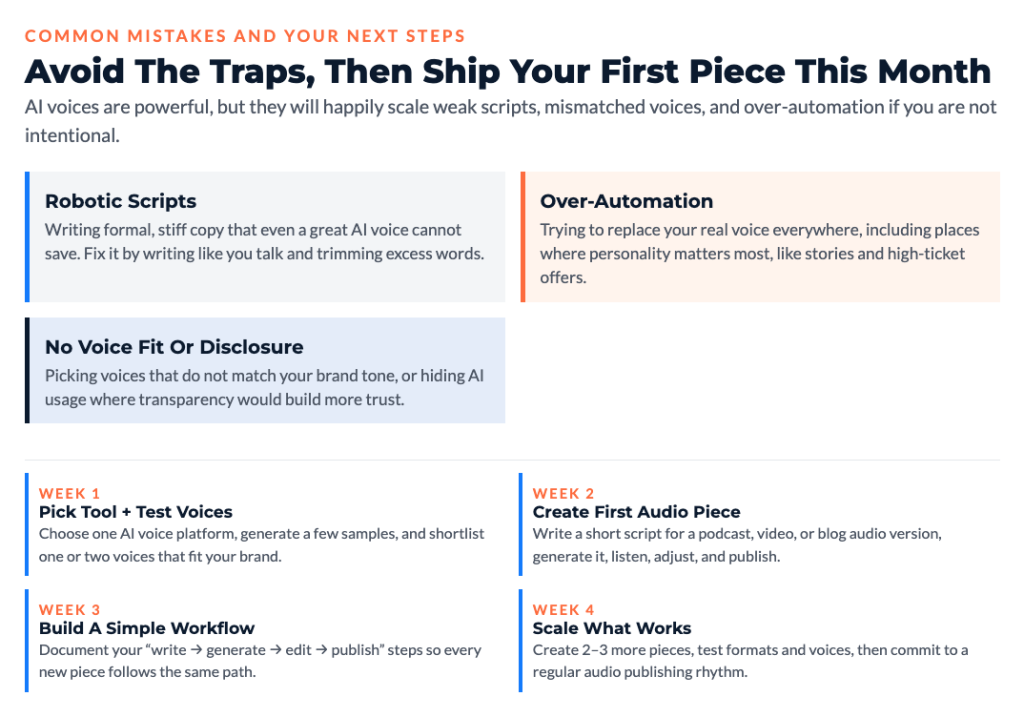
Week 1: Tool Selection and Testing
- Pick one AI voice tool based on budget and needs
- Free tier options: ElevenLabs, Murf (for testing)
- Paid recommendation: ElevenLabs $22/month or Descript $12/month
- Create test audio with different voices
- Find voice that fits your brand
- Total time: 2-3 hours
Week 2: First Content Creation
- Write script for one piece of content (podcast episode, video voiceover, or audiobook chapter)
- Keep it short: 5-10 minutes maximum
- Generate audio and listen completely
- Note what sounds awkward or unnatural
- Revise script and regenerate
- Total time: 3-4 hours
Week 3: Production Workflow Setup
- Set up editing workflow (if needed)
- Add intro/outro music
- Create publishing process
- Publish first piece of AI voice content
- Measure initial engagement
- Total time: 2-3 hours
Week 4: Scaling and Optimization
- Create 2-3 more pieces using refined process
- Compare engagement to expectations
- Adjust voice selection or script style if needed
- Plan regular production schedule
- Total time: 4-6 hours
Total investment: 11-16 hours to launch audio content strategy that runs indefinitely
The Content That Matters Most
What’s the one piece of audio content you’ve been putting off creating?
Maybe it’s:
- An audiobook version of your existing written content
- A podcast you’ve thought about starting
- Voiceovers for YouTube videos
- Audio versions of blog posts
- Course narration
Pick one. Use AI voice tools to create it this month. Not next quarter. This month.
Don’t wait until you can afford perfect recording equipment. Don’t wait until you feel confident recording yourself. Don’t wait until you’ve taken a voice training course.
Use AI voices to start now. You can always transition to recording yourself later if you want to. But getting audio content out there beats having nothing because you’re waiting for perfect conditions.
Remember This
AI voice generators aren’t about replacing your authentic voice in everything. They’re about removing barriers that stop you from creating audio content at all.
The biggest mistake isn’t using AI voices. It’s skipping audio content entirely because recording feels too hard or uncomfortable.
Your audience wants to consume content in multiple formats. Some prefer reading. Some prefer watching. Some prefer listening. Serving only one format means losing the others.
AI voices let you serve the listeners without the recording barrier. Use them strategically, be transparent when it matters, and focus on creating valuable content regardless of whether the voice is yours or AI-generated.
As you decide how audio fits into your content strategy, use the Clarity Compass to choose the right next step.
I created The Clarity Compass to help you identify the gap between where you are and the structure your business needs next.
👇 Enter your email below to get it sent to you.
You’ll receive it in your inbox shortly – a simple, grounded guide to help you move forward with confidence.
Here’s My Question For You:
What’s the first piece of audio content you’re gonna create with AI voice this week?
Not five pieces. Just one.
Pick your tool. Write your script. Generate the audio. Listen to it. Adjust what needs adjusting. Then publish it.
That’s how you go from “I should create audio content someday” to “I create audio content regularly.”
Your future self (the one reaching audiences through audio who would never have found you through text alone) is gonna thank you for starting today.
Now go create something people can listen to.