AI Transcription Tools for Solopreneurs: Turn Every Conversation Into Content

Here’s a scenario that plays out constantly with solopreneurs.
They record a client call with great insights. They host a podcast interview with valuable advice. They capture a voice memo with a brilliant idea. Then all that valuable content just sits there in audio form because manually transcribing it would take hours.
The audio stays trapped. The insights don’t get shared. The content doesn’t get repurposed. All because the barrier to getting it into text form feels too high.
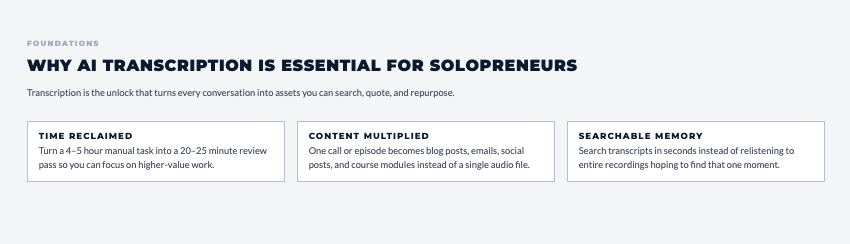
That’s where AI transcription changed everything. What used to take 4-5 hours of manual typing now takes 5 minutes and costs a few dollars or less. You can transcribe meetings, podcasts, videos, voice memos, anything with spoken words, and turn it into searchable, quotable, shareable text.
This isn’t just about saving time. It’s about unlocking the value sitting in all your audio content. Every client call becomes a case study. Every podcast episode becomes a blog post. Every voice memo becomes documented content you can actually use.
In this guide, we’re breaking down why transcription matters for solopreneurs, which AI transcription tools for solopreneurs actually deliver accurate results, and how to turn every conversation into multiple content assets.
Before you pick a tool, get the blueprint that shows how to use AI with more clarity and less overwhelm.
I put together The AI Blueprint for Solopreneurs – a calm, structured guide that shows you how to use AI to simplify your systems and save time without losing your voice.
👇 Enter your email below to get your free copy.
It’ll be in your inbox within minutes – practical, focused, and built to help you work smarter.
Why AI Transcription Is Essential for Solopreneurs
Audio content is valuable, but it’s hard to work with. You can’t search it. You can’t skim it. You can’t quote it. You can’t repurpose it easily. Text changes all of that.
The Audio-to-Text Bottleneck
Here’s what typically happens: A solopreneur records something valuable (a client call, podcast episode, video tutorial, brainstorming session). They know there’s good content in there. But to use it, they’d need to:
- Listen back to find the good parts (30-60 minutes)
- Manually type what they hear (3-4 hours for a 30-minute recording)
- Edit and format the text (30-60 minutes)
- Total: 4-5.5 hours of work
Most solopreneurs skip it entirely because that time investment doesn’t make sense. So valuable content stays trapped in audio format.
Time Reclamation Math
AI transcription tools process a 30-minute recording in about 5 minutes. That’s not a small improvement. That’s 95% time savings.
Real numbers:
- 30-minute recording manually transcribed: 4-5 hours
- Same recording with AI transcription: 5 minutes processing + 15-20 minutes reviewing/editing = 25 minutes total
- Time saved: 3.5-4.5 hours per recording
If you’re targeting a $100/hour rate, that’s $350-450 in time value per recording. Do this weekly and you’re looking at $18,000-23,000 annually in reclaimed time.
Content Repurposing Multiplier
Once you’ve got transcribed text, one piece of audio becomes multiple assets:
- Blog post from podcast episode
- Social media quotes from client calls
- Email newsletter from webinar
- Course content from teaching sessions
- Case studies from customer conversations
- Quote graphics from interviews
The transcription is the unlock. Without it, you’re stuck with just the audio. With it, you’ve got raw material for a dozen different content pieces.
If this is opening up possibilities, the AI Blueprint will help you use AI in a clearer and more structured way.
You can explore it here → See What’s Inside The AI Blueprint for Solopreneurs
Searchability and Reference
Audio recordings are black boxes. You know something valuable is in there, but finding it means listening to the entire thing again.
Transcripts make everything searchable. Need that quote from a client call three months ago? Search your transcripts. Want to reference specific advice from a past interview? Search and find it in seconds.
Documentation and Compliance
For certain businesses, recording and transcribing client conversations creates documentation that protects you legally. If there’s ever a question about what was said or agreed upon, you’ve got a record.
Important note: Always get permission before recording and transcribing calls. Laws vary by location, and some require two-party consent.
SEO and Discoverability
Search engines can’t index audio files. They can index text.
Adding transcripts to podcast episodes, videos, and audio content makes that content discoverable through search. People searching for topics you’ve covered can actually find your content instead of it being invisible to Google.
Best AI Transcription Tools for Solopreneurs
Let’s talk specific tools. These are the ones that balance accuracy, cost, and ease of use for solopreneurs.
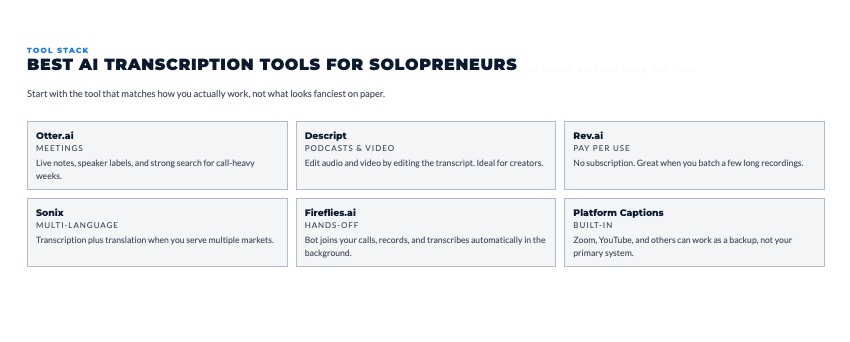
Otter.ai (Free to $30/month)
Otter is probably the most popular transcription tool for meetings and conversations. Real-time transcription, speaker identification, and collaboration features.
What you get:
- Live transcription during meetings
- Speaker identification (labels who said what)
- Keyword highlighting and search
- Shareable transcripts
- Integration with Zoom, Google Meet, Teams
Pricing:
- Free: 300 minutes monthly (about 5 hours)
- Pro: $17/month for 1,200 minutes (20 hours)
- Business: $30/month per user for 6,000 minutes (100 hours)
Best for: Solopreneurs who do lots of video calls and want automatic meeting transcription.
Descript ($12 to $30/month)
Descript combines transcription with audio and video editing. You edit by editing the transcript, which is powerful for content creators.
Key features:
- Transcription plus full editing platform
- Remove filler words automatically
- Overdub (AI voice generation)
- Screen recording with transcription
- Multi-track editing
Pricing:
- Free: 1 hour of transcription monthly
- Creator: $12/month for 10 hours
- Pro: $24/month for 30 hours
Best for: Podcasters and video creators who need transcription plus editing in one tool.
Rev.ai ($0.02-0.05 per minute)
Rev.ai offers both AI transcription and human transcription. Pay only for what you use instead of monthly subscriptions.
What’s different:
- Pay-per-use pricing (no monthly fee)
- Option to upgrade to human transcription for 99%+ accuracy
- API access for developers
- Fast turnaround (minutes for AI, hours for human)
Pricing:
- AI transcription: $0.02 per minute ($1.20 per hour)
- Human transcription: $1.50 per minute ($90 per hour)
Best for: Solopreneurs with irregular transcription needs who don’t want monthly subscriptions.
Sonix ($10 to $50/month)
Sonix handles automated transcription with translation capabilities in 40+ languages.
Features:
- Accurate transcription
- Translate transcripts into multiple languages
- Automated subtitles for video
- Searchable media library
- Collaboration tools
Pricing:
- Standard: $10/month for 5 hours
- Premium: $22/month for 20 hours
- Enterprise: $50/month for 100 hours
Best for: Solopreneurs creating content in multiple languages or needing translation services.
Fireflies.ai (Free to $29/month)
Fireflies is an AI meeting assistant that joins video calls, records, and transcribes automatically.
What it does:
- Automatically joins scheduled meetings
- Records and transcribes in real-time
- Creates meeting summaries
- Extracts action items
- Integrates with CRM and project tools
Pricing:
- Free: 800 minutes monthly of storage
- Pro: $10/month per user for unlimited transcription
- Business: $19/month per user for advanced features
Best for: Solopreneurs who want completely hands-off meeting transcription.
Transcribing Client Meetings and Calls
Client conversations contain insights, commitments, and details you need to reference later. Transcription makes this practical.
Automatic Meeting Transcription
Most video platforms (Zoom, Teams, Google Meet) now have built-in transcription. But dedicated tools like Otter and Fireflies work better for solopreneurs because they:
- Provide better accuracy
- Offer speaker identification
- Create searchable archives
- Extract action items automatically
- Integrate with other business tools
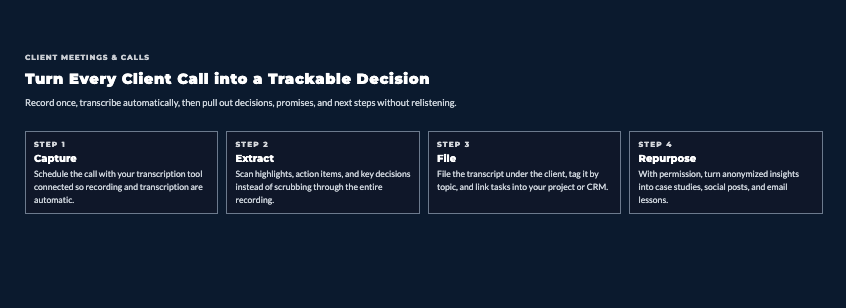
Typical workflow:
- Schedule meeting
- Transcription tool auto-joins or you record locally
- Meeting happens
- Transcript appears in your account within minutes
- Review, extract key points, file for reference
Action Item Extraction
AI tools can identify commitments and tasks from transcripts automatically. Instead of listening back to find what you agreed to do, the AI pulls out action items:
- “I’ll send you the proposal by Friday”
- “You’ll review the draft and get back to me”
- “We need to schedule a follow-up call”
Tools like Otter and Fireflies specifically highlight these items so you can quickly convert them to tasks.
Speaker Identification
Multi-person conversations need clear speaker labels. When understanding which AI transcription tools for solopreneurs provide accurate speaker identification matters because you need to know who said what in client calls, interviews, and collaborative meetings.
Most modern tools handle this automatically, but quality varies. Otter and Descript excel at speaker identification, especially after you’ve used them for a few meetings and the AI learns voices.
Legal and Compliance Documentation
For businesses where verbal agreements matter or where you need records of client conversations, transcription creates documentation.
Critical reminder: Always disclose that you’re recording and get permission. Requirements vary by location (some states require two-party consent, others only require one party to know). Don’t skip this step.
Podcast and Interview Transcription
Podcasts are content gold mines. Every episode can become multiple pieces of written content if you’ve got a transcript.
Full Episode Transcription
The basic workflow is simple:
- Record and edit your podcast episode
- Upload audio file to transcription tool (or use platform with built-in transcription like Riverside.fm)
- Wait 5-10 minutes for transcript
- Review and clean up errors
- Use transcript as foundation for other content
Cost reality: A 45-minute podcast episode costs about $0.90 with Rev.ai ($0.02/minute) or is included in your monthly subscription with Otter or Descript.
Show Notes Generation
Transcripts make creating show notes fast. Instead of listening back and manually noting timestamps and topics:
- Scan the transcript for main topics discussed
- Pull out key quotes or insights
- Note timestamps for interesting segments
- Create episode summary and bullet points
What used to take 30-45 minutes takes 10-15 with a transcript.
Quote Extraction for Social Media
Every podcast episode has 10-20 quotable moments. Transcripts let you find them quickly instead of listening to the entire episode again.
Smart workflow:
- Review transcript and highlight compelling quotes
- Create text-based social posts
- Design quote graphics
- Schedule throughout the week
One episode becomes a week of social content.
Blog Post Creation
A 30-minute podcast episode transcribes to roughly 4,500-6,000 words. That’s a solid blog post worth of content.
Transformation process:
- Get transcript
- Remove filler words and conversational tangents
- Organize into logical sections with headers
- Add introductory and concluding paragraphs
- Edit for readability (spoken word differs from written)
- Publish
This works particularly well for solo episodes or interviews where you’re teaching something.
Video Content Transcription and Captioning
Video needs captions for accessibility, SEO, and engagement. AI transcription makes this practical at scale.
YouTube Video Transcripts
Adding transcripts to YouTube videos helps with:
- SEO (Google indexes the text)
- Accessibility (viewers who are deaf or hard of hearing)
- User experience (people can search within transcripts)
- Engagement (some people prefer reading to watching)
YouTube has auto-captions, but the accuracy is inconsistent. Better workflow: use dedicated transcription tool, clean up the transcript, and upload as custom captions.
Subtitle and Caption Generation
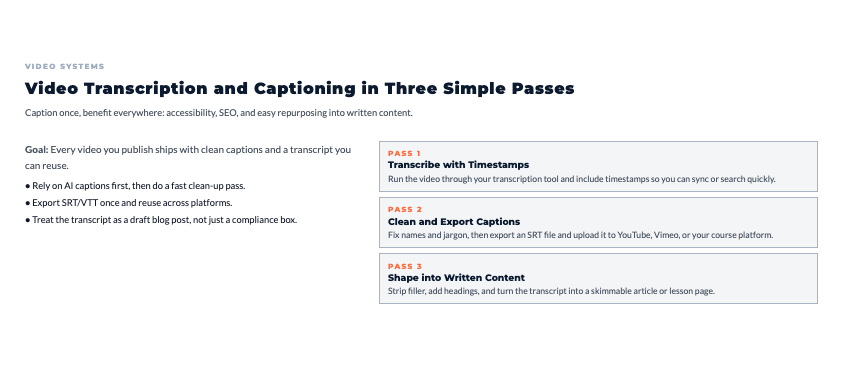
Most transcription tools can export in subtitle formats (SRT, VTT) that video platforms accept. This is faster and more accurate than manually typing captions.
Process:
- Transcribe video with timestamps
- Export as SRT file
- Upload to YouTube, Vimeo, or your video hosting platform
- Captions appear automatically synced to audio
Video-to-Blog Conversion
Educational videos, tutorials, product demos, these all work as blog content. The transcript gives you the foundation.
What typically happens: Someone creates a great video tutorial but never turns it into written form. People who prefer reading never access that content. With transcripts, you serve both audiences.
Voice Memo and Idea Capture Transcription
Voice memos are where ideas go to die because they’re hard to work with later. Transcription changes that.
Voice Note Organization
Most smartphones have voice memo apps. The problem: You record a dozen ideas over a week, then never listen back because it’s tedious.
Better workflow:
- Record voice memos as usual
- Batch-upload to transcription tool weekly
- Review transcripts and extract actionable ideas
- File or delete the originals
Now those ideas are searchable text instead of forgotten audio files.
Content Idea Capture
Here’s a common pattern with content creators: Ideas strike while driving, walking, working out, anywhere you can’t easily type. Voice memos solve the capture problem, but transcription solves the “now what?” problem.
Speak your ideas fully when they hit. Expand on them verbally. The transcript gives you a rough draft to polish later instead of just a reminder that you had an idea.
Email and Message Drafting
Some transcription apps work in real-time on your phone. You can dictate longer messages or emails, get instant transcription, review and edit, then send.
This is faster than typing on phone keyboards and results in more natural, conversational tone than slowly typing formal text.
Transcription Accuracy and Quality Optimization
AI transcription is good, but you can make it better with proper recording practices.
Audio Quality Best Practices
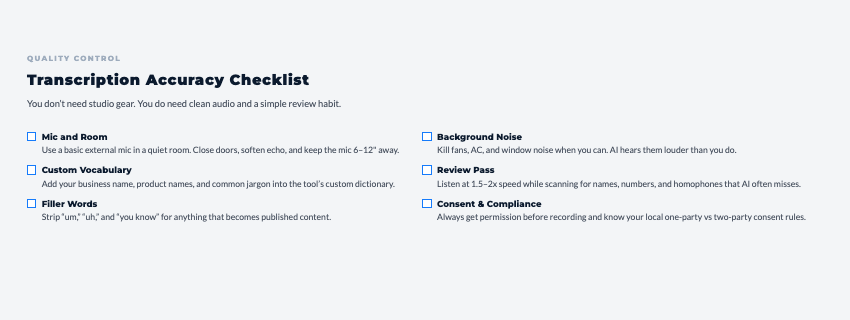
Better audio equals better transcription. Simple improvements make big accuracy differences:
- Use a decent microphone (built-in laptop mics are marginal)
- Record in quiet spaces (close doors, turn off fans)
- Speak clearly and at moderate pace
- Avoid talking over each other in group conversations
- Position mic 6-12 inches from mouth
Reality check: You don’t need professional studio quality. But you do need clear audio where words are distinguishable.
Background Noise Management
AI struggles with background noise. What sounds like minor noise to you (air conditioning, traffic, typing) creates transcription errors.
Quick fixes:
- Record away from windows (street noise)
- Turn off fans and AC temporarily
- Use headset microphones for video calls
- Close doors to block hallway noise
- Add soft materials to rooms (curtains, rugs) to reduce echo
Technical Term Training
AI transcription tools learn over time, but they start with general vocabulary. Industry-specific terms, product names, and proper nouns often get transcribed incorrectly at first.
Most tools let you add custom vocabulary. Spend 10 minutes adding key terms you use frequently and accuracy improves immediately.
Common additions:
- Your business name
- Product/service names
- Common client names
- Industry acronyms
- Technical terminology
Editing and Refining AI Transcripts
AI transcription is typically 80-95% accurate depending on audio quality. That 5-20% needs human review.
Quick Editing Workflow
Don’t edit transcripts like traditional proofreading (slow, word-by-word). Use efficient approaches:
- Listen at 1.5-2x speed while reading transcript
- Fix obvious errors as you go
- Mark unclear sections for later review
- Don’t obsess over perfect accuracy unless it matters for legal/publishing reasons
Time expectation: Reviewing and cleaning a 30-minute transcript takes 15-20 minutes.
Common Error Patterns
AI makes predictable mistakes:
- Homophones (there/their/they’re, to/too/two)
- Names (especially uncommon ones)
- Technical terms
- Acronyms
- Quiet speech or crosstalk
- Accented speech
Once you recognize patterns in your transcripts, you can quickly scan for and fix them.
Filler Word Removal
Spoken language includes lots of “um,” “uh,” “like,” “you know.” These are normal in conversation but awkward in written form.
Descript has automatic filler word removal. Other tools require manual deletion. For content that becomes published writing (blog posts, books, courses), removing these improves readability.
For meeting notes or reference transcripts, leaving them in is usually fine since you’re capturing what was actually said.
Repurposing Transcribed Content
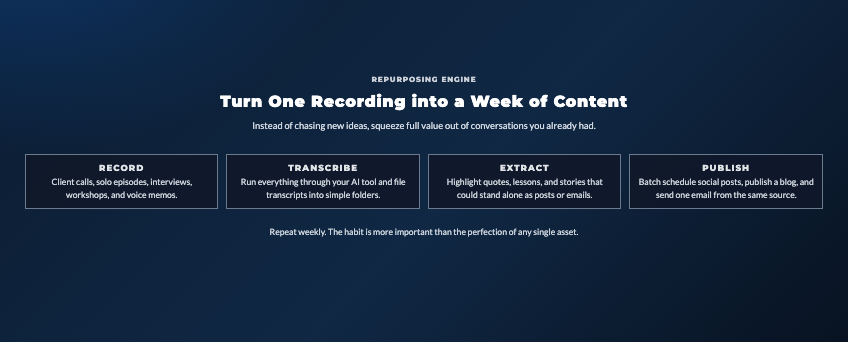
This is where transcription ROI really shows up. One piece of audio becomes multiple content assets.
Podcast to Blog Workflow
Standard approach:
- Transcribe episode
- Remove conversational filler and redundancies
- Organize into logical sections with headers
- Add intro paragraph and conclusion
- Edit for written style (shorter sentences, clearer structure)
- Add images, links, formatting
- Publish with embedded audio player
One podcast episode becomes both audio and written content, serving different audience preferences.
Social Media Content Extraction
Every substantial conversation contains 15-30 quotable snippets perfect for social media.
Efficient extraction:
- Scan transcript for compelling statements
- Pull 5-10 best quotes
- Create quote graphics or text posts
- Schedule across platforms throughout the week
This systematic approach to content extraction beats trying to remember great moments from audio.
Email Newsletter Content
Transcripts are excellent source material for newsletters. You can:
- Summarize key insights from recent podcast episodes
- Share quotes from client conversations (with permission)
- Create “lessons learned” content from your own recorded brainstorming
- Repurpose webinar or presentation content
The transcript gives you raw material to shape into newsletter-appropriate content quickly.
Course Material Development
For course creators, transcribing your teaching sessions gives you course scripts to work from.
Record yourself teaching a concept (even if it’s rough and conversational). Transcribe it. Now you’ve got a first draft of the lesson content to refine into polished course material.
This is faster than trying to write lessons from scratch because you’re editing existing content rather than facing blank page paralysis.
Multilingual Transcription and Translation
AI transcription handles multiple languages, opening up global content opportunities.
Multi-Language Transcription
Tools like Sonix and Descript support transcription in dozens of languages. If you create content in Spanish, French, Mandarin, or other languages, the same AI accuracy applies.
Strategic use: You don’t need different tools for different languages. One subscription handles all your transcription needs regardless of language.
Translation Workflow
Some tools (particularly Sonix) can transcribe in one language and translate to another simultaneously.
Typical scenario: You record a podcast in English. The tool transcribes in English and creates Spanish and French translations. Now you’ve got content in three languages from one recording.
Quality note: AI translation is good but not perfect. For published content, have native speakers review translations before publishing.
Market Expansion Strategy
Transcription plus translation lets solopreneurs test new markets affordably.
Want to see if there’s demand for your content in Spanish-speaking markets? Transcribe existing content, translate it, publish and measure engagement. If it works, double down. If not, you’ve spent minimal resources testing.
Cost Analysis: AI Transcription vs. Alternatives
Let’s run real numbers on why AI transcription makes financial sense.
Time Value Comparison
Manual transcription (doing it yourself):
- 30-minute audio = 4-5 hours of typing
- At $100/hour opportunity cost = $400-500 in lost time
- Total cost: $400-500 per recording
AI transcription:
- 30-minute audio = 5 minutes processing + 15 minutes review
- At $100/hour opportunity cost = $33
- Subscription cost = $0.90-2.00 (included in monthly plan)
- Total cost: $34-35 per recording
Savings per recording: $365-465
Do this weekly and you’re looking at $18,000-24,000 annual savings in time value.
Human Transcription Services
Professional human transcription costs $1.00-2.50 per audio minute depending on turnaround time.
30-minute recording:
- Human transcription: $30-75
- AI transcription: $0.90-2.00 or included in subscription
- Accuracy difference: Humans ~99%, AI ~85-95%
When human transcription makes sense:
- Legal depositions or court proceedings
- Medical dictation
- Highly technical content with lots of jargon
- Content where 100% accuracy is legally required
When AI transcription works fine:
- Podcasts and video content
- Meeting notes and client calls
- Voice memos and brainstorming
- Content that gets edited anyway
Free Tier Evaluation
Several tools offer generous free tiers:
- Otter: 300 minutes monthly (5 hours)
- Descript: 1 hour monthly
- Fireflies: 800 minutes storage
For solopreneurs transcribing 2-3 hours monthly, free tiers are sufficient. Only upgrade when you consistently hit limits.
Your Action Plan: Start Transcribing Everything This Week
Alright, let’s make this actionable.
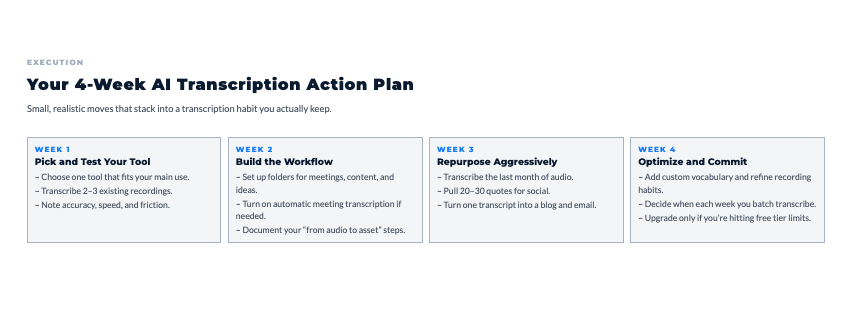
Week 1: Tool Selection and Testing
- Pick one transcription tool based on your primary need
- Meeting-heavy: Otter or Fireflies
- Content creation: Descript
- Irregular use: Rev.ai (pay-per-use)
- Sign up for free tier
- Transcribe 2-3 test recordings
- Note accuracy and usability
- Total time: 1-2 hours
Week 2: Workflow Integration
- Set up automatic meeting transcription if applicable
- Create folder system for organizing transcripts
- Transcribe one piece of content you want to repurpose
- Edit the transcript and create one derivative asset
- Document your process for repeating later
- Total time: 2-3 hours
Week 3: Content Repurposing
- Transcribe all audio/video content from past month
- Extract quotes for social media (aim for 20-30)
- Convert one transcript to blog post
- Create email newsletter using transcript content
- Schedule social posts for the week
- Total time: 3-4 hours
Week 4: System Optimization
- Review what worked well and what didn’t
- Adjust recording practices for better transcription accuracy
- Add custom vocabulary to your tool
- Plan regular transcription schedule going forward
- Evaluate if you need to upgrade from free tier
- Total time: 1-2 hours
Total investment: 7-11 hours to build a transcription system that runs indefinitely
The Content That’s Waiting
What’s the one piece of audio content sitting on your computer or phone right now that you’ve been meaning to do something with?
Maybe it’s:
- A client testimonial call
- A podcast episode you never repurposed
- Voice memos with ideas you never documented
- A webinar or presentation recording
- Interview recordings with valuable insights
Pick one. Transcribe it this week. Then turn it into at least three pieces of content: a blog post, social media posts, and email newsletter content.
That’s how you go from “I should do something with this audio” to “I systematically turn every conversation into content.”
Remember This
Transcription isn’t the goal. Usable content is the goal. Transcription is just the unlock that makes everything else possible.
Every client call you transcribe becomes a case study. Every podcast episode becomes a blog post. Every voice memo becomes a documented idea you can actually execute on.
The solopreneurs maximizing their content aren’t creating more from scratch. They’re extracting more value from what they’re already creating by transcribing it and repurposing it.
Start with what you’ve already got. Transcribe it. Use it. Build the habit of turning audio into text automatically, and watch how much more value you get from every conversation.
As you scale your content systems, use the AI Blueprint to build a simple, repeatable workflow powered by AI.
I put together The AI Blueprint for Solopreneurs – a calm, structured guide that shows you how to use AI to simplify your systems and save time without losing your voice.
👇 Enter your email below to get your free copy.
It’ll be in your inbox within minutes – practical, focused, and built to help you work smarter.
Here’s My Question For You:
What’s the first thing you’re gonna transcribe this week?
Not ten things. Just one.
Pick your tool. Upload or record your audio. Get the transcript. Then create one piece of content from it.
That’s how you build a transcription habit that multiplies the value of every conversation you have.
Your future self (the one getting way more mileage from every piece of audio content) is gonna thank you for starting today.
Now go turn those conversations into content.